Is it possible to point only a subset of feeds at AI Bridge? E.g. if an installation has several hundred feeds, is it possible to have AI Bridge only consume a dozen or two of those feeds? If so, how does one go about accomplishing this?
Thanks in advance!
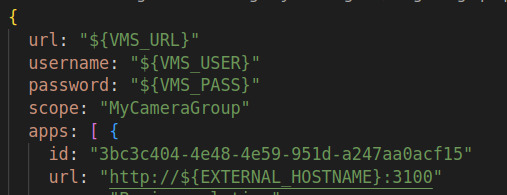
Yes, this is possible. When you do a registration with AI Bridge, you can provide a “scope” value. A scope is basically just the name of a camera group in XProtect defining those cameras that should be exposed to AI Bridge.
Typically you would do the registration using the “register.graphql” file as shown below. Here we are using MyCameraGroup as the scope.
Here is the more detailed description from the reference manual.
Name of camera and microphone group in new VMS to register defining the scope of which devices to provide access to. A non-existent group is considered equivalent to an empty group. Groups with the same name will be merged together and thus interpreted as one. If no group is specified (the empty string), then all enabled cameras and microphones are included in the scope.
A sub group can be specified with a path using the forward slash character (/). If a group name contains the forward slash character itself, it can be enclosed by a pair of quote characters (either ’ or "). As an example, “my/parent”/mygroup identifies the group named mygroup as a child group of the group named my/parent.
Note that the scope cannot be updated for an already registered VMS. To change this, a full unregistration must be applied first.
In AI Bridge v1.5, we have identified an inefficiency in how we get the configuration data from XProtect. If you have many cameras, this can take a long time. As a workaround, the scope can be used. We will of course address the inefficiency in an upcoming release.
That’s great, thank you.
To be clear: When it says, “full unregistration”, that means from the XProtect side? I.e. I have to delete the process server and re-add it? That would also mean I’d have to re-add any alarm definitions.
Or can I simply stop and start the AI Bridge itself with the updated “scope” definition?
Stopping the AI Bridge and starting it again will be fine and you don’t have to do anything on the XProtect side.