Dear All,
Our client want to have pop up window alarm for any new alarm incoming in smart client. How could we capture the alarm message when occur? Thank a lot!
KennethT
Dear All,
Our client want to have pop up window alarm for any new alarm incoming in smart client. How could we capture the alarm message when occur? Thank a lot!
KennethT
The Smart Client Overlay on Event plugin sample does this. It subscribes to MessageId.Server.NewAlarmIndication. The incoming alarm is in that sample used to write an overlay on screen but you can use the same mechanism for something else.
Dear Andersen,
I have merge and combine SCOverlayOnEvent & DynamicView samples to do the above feature. and the following code which used as PopUpBackgroundPlugin.cs
public override void Init()
{

  MessageCommunicationManager.Start(EnvironmentManager.Instance.MasterSite.ServerId);

  \_messageCommunication = MessageCommunicationManager.Get(EnvironmentManager.Instance.MasterSite.ServerId);

  \_obj1 = \_messageCommunication.RegisterCommunicationFilter(EventReceiver,

    new CommunicationIdFilter(MessageId.Server.NewEventIndication));

}

 public override void Close()

{

  if (\_messageCommunication != null)

  {

    \_messageCommunication.UnRegisterCommunicationFilter(\_obj1);

    \_messageCommunication = null;

  }

}

 private Object EventReceiver(VideoOS.Platform.Messaging.Message message, FQID destination, FQID source)

{

  AnalyticsEvent evAnalyt = message.Data as AnalyticsEvent;

  if (evAnalyt != null)

  {

    ++\_viewCounter;

    // Make a new Temporary view group

    ConfigItem tempGroupItem = (ConfigItem)ClientControl.Instance.CreateTemporaryGroupItem("Temporary" + \_viewCounter);

    // Make a group

    ConfigItem groupItem = tempGroupItem.AddChild("AlarmViewGroup" + \_viewCounter, Kind.View, FolderType.UserDefined);

    string viewName = "AlarmView" + \_viewCounter;

    groupItem.AddChild(viewName, Kind.View, [FolderType.No](https://FolderType.No));

    Dictionary<String, String> cameraViewItemProperties = new Dictionary<string, string>();

    cameraViewItemProperties.Add("CameraId", evAnalyt.EventHeader.Source.FQID.ObjectId.ToString());

    // Create floating window

    MultiWindowCommandData data = new MultiWindowCommandData();

    List<Item> screens = Configuration.Instance.GetItemsByKind(Kind.Screen);

    if (screens != null && screens.Count > 0)

    {

      data.Screen = screens\[0\].FQID;

      List<Item> windows = Configuration.Instance.GetItemsByKind(Kind.Window);

      if (windows != null && windows.Count > 0)

      {

        data.Window = windows\[0\].FQID;

        foreach (Item view in groupItem.GetChildren())

        {

          if (view.Name.Equals(viewName))

          {

            data.View = view.FQID;

            data.X = 200;

            data.Y = 200;

            data.Height = 500;

            data.Width = 500;

            data.MultiWindowCommand = "OpenFloatingWindow";

            data.PlaybackSupportedInFloatingWindow = true;

            EnvironmentManager.Instance.SendMessage(new VideoOS.Platform.Messaging.Message(MessageId.SmartClient.MultiWindowCommand, data), null, null);

            return null;

          }

        }

      }

    }

  }
}
When we run the smart client and receive Analytics Events from Server, it will trigger EventReceiver but no popup window has been display. It seem can’t find any view in groupItem.GetChildren(). Is that any thing has been wrong in the coding? Please advance, thx.
KennethT
I suspect it fails because it needs to run on the UI thread.
There is a handy function: virtual void VideoOS.Platform.ClientControl.CallOnUiThread (Action actionToBeInvoked ) [inline, virtual]
This is a guess, let me know if it solves the issue..
Dear Andersen,
As I am the newer on Milestone SDK , could you provide a sample for how to use this function? Thx a lot!
KennethT
Just put this around the content of your EventReceiver -
ClientControl.Instance.CallOnUiThread(() =>
{
       //content here
});
Dear Andersen,
It work and thank a lot!
Kenneth Tang
i-Total Service Ltd
Better Quality, Better life
Tel :9035 2859 / 2388 8311
Please consider the environment before printing this email.
* Disclaimer *
This message and any attachments are confidential and are intended only for the use of the addressee. If you are not the intended recipient, you should not disseminate, distribute or copy this communication. If you have received this communication in error, lease notify us immediately by return email and delete the original message. We use virus scanning software but exclude all liability for viruses or similar in any attachment. Thank you.
Dear Andersen,
How could we know if user has been close the popup window ? we want to adjust _viewCounter value after user close the popup. Please advance, thx.
KennethT
This is not as easy as it sounds.
Listening for messages you might be able to detect when a windows is closed. Explore this option by using the Message Tester tool plugin sample.
You could count the windows open at any given time. Explore this option by using the Config Dump tool plugin sample.
Dear Andersen,
We used the following coding to received message in plugin module.
private Object EventReceiver(VideoOS.Platform.Messaging.Message message, FQID destination, FQID source)

{

  AnalyticsEvent evAnalyt = message.Data as AnalyticsEvent;

  if (evAnalyt != null)

  {

    [log.Info](https://log.Info)("New AnalyticsEvent - " + evAnalyt.EventHeader.Message + " " + evAnalyt.EventHeader.CustomTag);

    switch (evAnalyt.EventHeader.Message)

    {

      case "Live Client Feed Requested":

      case "Live Client Feed Terminated":

        break;

      default:

        ClientControl.Instance.CallOnUiThread(() =>

      {

        ++\_viewCounter;

      // Make a new Temporary view group

      ConfigItem tempGroupItem = (ConfigItem)ClientControl.Instance.CreateTemporaryGroupItem("Temporary" + \_viewCounter);

      // Make a group

      ConfigItem groupItem = tempGroupItem.AddChild("AlarmViewGroup" + \_viewCounter, Kind.View, FolderType.UserDefined);

        var viewName = evAnalyt.EventHeader.Source.Name.ToString();

      //[log.Info](https://log.Info)(evAnalyt.EventHeader.Priority.ToString());

      //string viewName = "AlarmView" + \_viewCounter;

      // Build a layout with wide ViewItems at the top and buttom, and 5 small ones in the middle

      Rectangle\[\] rect = new Rectangle\[1\];

        rect\[0\] = new Rectangle(000, 000, 999, 399);

        ViewAndLayoutItem viewAndLayoutItem = (ViewAndLayoutItem)groupItem.AddChild(viewName, Kind.View, [FolderType.No](https://FolderType.No));

        viewAndLayoutItem.Layout = rect;

      // Insert cameras

      int index = 0;

        if (evAnalyt.EventHeader != null && evAnalyt.EventHeader.Source != null)

        {

          Dictionary<String, String> cameraViewItemProperties = new Dictionary<string, string>();

          cameraViewItemProperties.Add("CameraId", evAnalyt.EventHeader.Source.FQID.ObjectId.ToString());

          viewAndLayoutItem.InsertBuiltinViewItem(0, ViewAndLayoutItem.CameraBuiltinId, cameraViewItemProperties);

          index++;

        }

        viewAndLayoutItem.Save();

        tempGroupItem.PropertiesModified();

      // Create floating window

      MultiWindowCommandData data = new MultiWindowCommandData();

        List<Item> screens = Configuration.Instance.GetItemsByKind(Kind.Screen);

        if (screens != null && screens.Count > 0)

        {

          data.Screen = screens\[0\].FQID;

          List<Item> windows = Configuration.Instance.GetItemsByKind(Kind.Window);

          if (windows != null && windows.Count > 0 && windows.Count <= PopupMax)

          {

            data.Window = windows\[0\].FQID;

            foreach (Item view in groupItem.GetChildren())

            {

              if (view.Name.Equals(viewName))

              {

                data.View = view.FQID;

                data.X = 200;

                data.Y = 200;

                data.Height = 500;

                data.Width = 500;

                data.MultiWindowCommand = "OpenFloatingWindow";

                data.PlaybackSupportedInFloatingWindow = true;

                EnvironmentManager.Instance.SendMessage(new VideoOS.Platform.Messaging.Message(MessageId.SmartClient.MultiWindowCommand, data), null, null);

              }

            }

          }

        }

      });

        break;

    }

  }

  BaseEvent evData = message.Data as BaseEvent;

  if (evData != null)

  {

    //[log.Info](https://log.Info)("New BaseEvent - " + [evData.EventHeader.Name](https://evData.EventHeader.Name) + " " + [evData.EventHeader.Source.Name](https://evData.EventHeader.Source.Name));

    //// Make a new Temporary view group

    //ConfigItem tempGroupItem = (ConfigItem)ClientControl.Instance.CreateTemporaryGroupItem("Temporary" + \_viewCounter);

    //// Make a group

    //ConfigItem groupItem = tempGroupItem.AddChild([evData.EventHeader.Source.Name](https://evData.EventHeader.Source.Name), Kind.View, FolderType.UserDefined);

  }

  return null;

}
We could only capture the source information from evAnalyt.EventHeader.Source
Please advance that how to capture the destination information from the message or message header?
Thank a lot!
KennethT
In the AnalyticsEvent there is no destination field. I actually do not understand the question. What kind of information would destination be? Please elaborate on what information you need to find.
Dear Andersen,
Sorry for make you misunderstand.
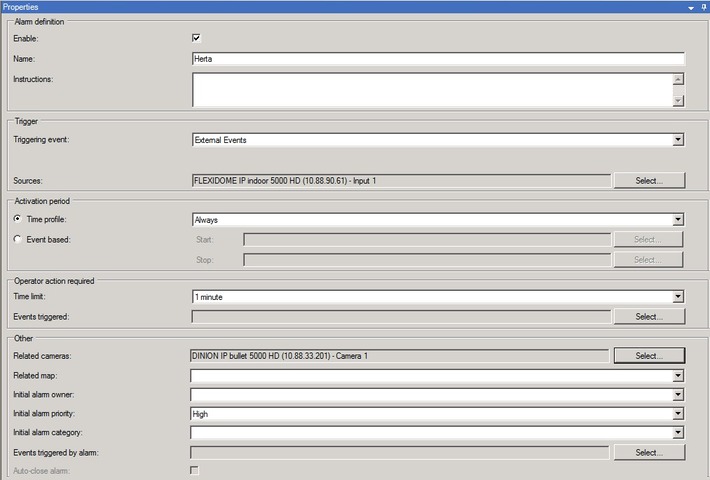
We had setup a external event and config it with related camera, how could we capture the related camera information when receiving the alarm message?
Thank a lot!
KennethT
In my understanding you cannot associate an external event like a user-defined event with a camera, there is no way in XProtect to configure an event to have a related camera. I am guessing here is my misunderstanding. Please explain how you see or setup the event to have a related camera.
Do you use analytics event or user-defined event (or something else)?
Dear Andersen,
We had use user-defined-event to define an alarm message as attached. Please advance how we could get the related camera info after received the alarm message, thx.
KennethT
I am guessing you subscribe to NewEventsIndication, if you instead subscribe to NewAlarmIndication you can cast the message.Data as Alarm and then you can use the ReferenceList property to get the related camera list as setup in the alarm definition.
Dear @Kenneth Tang
I have been working on a similar pop up window on new event/alarm, I went through your code and I am facing issues with the floating window. If possible, can you share the source code after you implemented the CallOnUiThread function?
Try this: https://www.milestonesys.com/marketplace/secursys-s.a.s/alarmwindows/
Frediano