We have an application which processes Alarms into groups based on common names and displays them together. The group, called an Alert, has a Created property which is pulled from the earliest AlarmHistory’s timestamp. In this case, the Created property turns out to be 13 minutes earlier than the timestamp on the AlarmHistory.
Here is how we pull the timestamp from the AlarmHistory (AlarmLinesWithHistory is filled with calls to IAlarmClient.GetAlarmHistory() and IAlarmClient.GetAlarmLines()):
AlarmHistory[] firstMemberHistory = alarm.AlarmLinesWithHistory.Last().AlarmHistory;
Created = firstMemberHistory.First().Time.ToLocalTime()
And the relevant data from the log says the Created property is 12:59:28 but the only AlarmHistory for the entire Alert has the timestamp 13:12:45 (same day). Is it possible the server mangled the timestamp somehow?
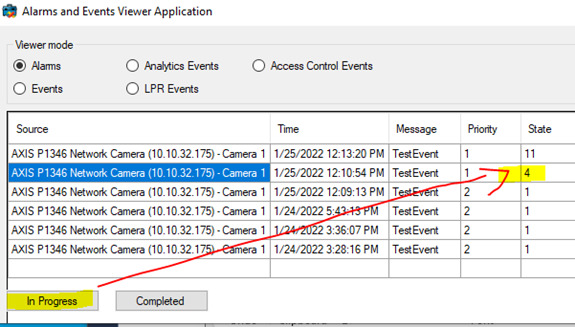
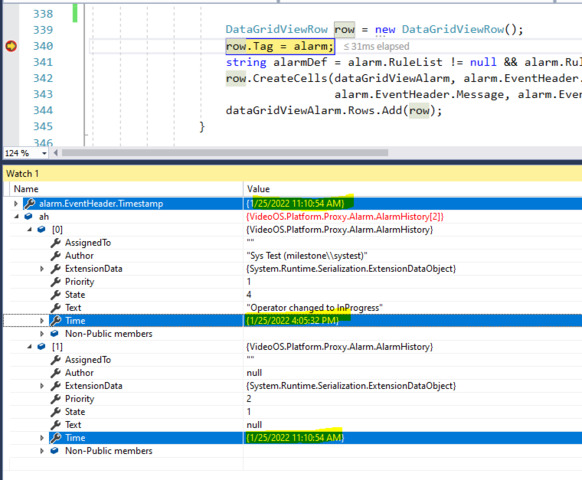
It is because AlarmHistory has an alarm history, this means it has multiple time. When changing the alarm status, alarm history increases its history including time. Let me explain what we did.
Add one line around 337 in LoadClientAlarm() in MainForm.cs, like this -
foreach (AlarmLine line in alarms)
{
    Alarm alarm = alarmClient.Get(line.Id);
    AlarmHistory[] ah = alarmClient.GetAlarmHistory(line.Id); // add this line to see Alarm History
    DataGridViewRow row = new DataGridViewRow();
    row.Tag = alarm;
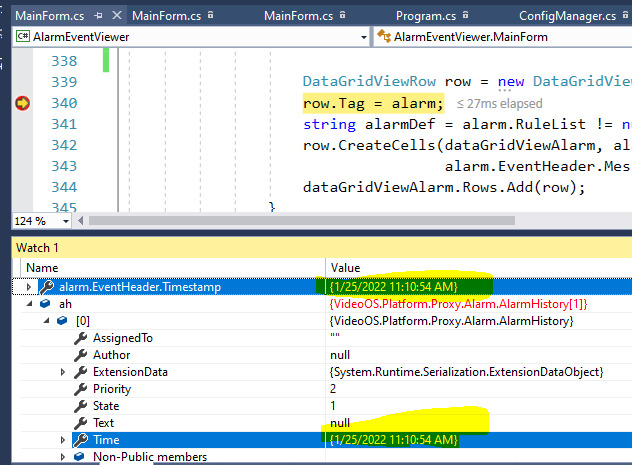
Put a break point on the line “row.Tag = alarm;” to see time and timestamp.
Run the sample.
See alarm.EventHeader.Timestamp and Alarm history time, it is the same time (if the alarm has only one status).
I’m familiar with the nature of AlarmHistory in that it is an array of events that have occured on the alarm; What’s strange is that there is only one AlarmHistory element for this particular alarm (at the time of logging), despite what was pulled into the Created property having a different time from that single AlarmHistory element. So I wonder if an individual AlarmHistory instance (not the array but a single AlarmHistory class instance) can have its Timestamp changed?