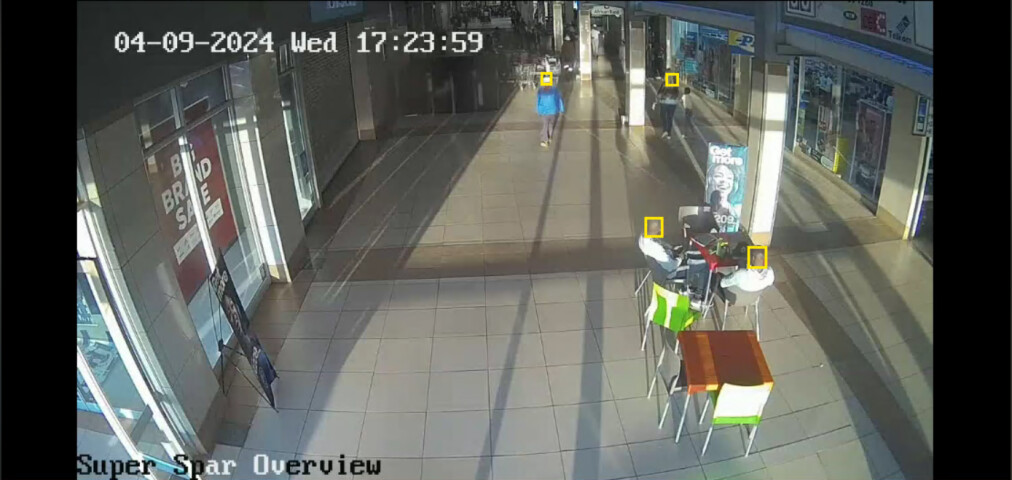
Context
Our system processes live video streams to assist operators in monitoring specific environments. To ensure compliance with privacy regulations and protect individuals’ identities, we aim to integrate a privacy mask directly into the camera feeds displayed in Milestone. The goal is to ensure that operators only see the processed feed with facial blurring applied in real-time.
Proposed Solution
We are exploring different approaches to implement privacy masking within the video streams, ensuring seamless integration into Milestone:
- Injecting a Privacy Mask (Blur) into the Camera Feed:
- Implement real-time face detection and apply a blur mask over detected faces before the feed is displayed in Milestone.
- The processed feed, with the privacy mask applied, should be the only version available to operators, ensuring compliance with privacy policies.
- The system should handle multiple concurrent streams without affecting usability.
- Technical Integration with Milestone:
- Evaluate whether privacy masking should be applied at the camera source level (before reaching Milestone) or via a middleware processing layer that sits between the camera and Milestone’s VMS.
- Ensure that the privacy mask persists regardless of camera switching by operators within the Milestone dashboard.
Operational Considerations
- Camera Switching: Operators frequently switch between different camera feeds within Milestone. The privacy masking must remain consistent across all active streams, ensuring no unprocessed feed is displayed.
- Performance and Latency: Applying real-time face blurring should be optimized to minimize latency while maintaining high-quality video playback. The solution should be tested under different workloads to validate its impact on system performance.
- Scalability: The approach should support multiple streams simultaneously without significantly increasing processing overhead.
- Compliance & Security: The implementation should align with data protection regulations, ensuring that raw, unmasked video feeds are not exposed where privacy enforcement is required.
Request for Recommendations
We are looking for guidance on the most effective approach to inject privacy masking into Milestone Live Video Cameras, considering:
- The best method to inject the privacy masking into the Milestone platform.
Any recommendations or insights on implementing this within the Milestone ecosystem would be highly valuable.