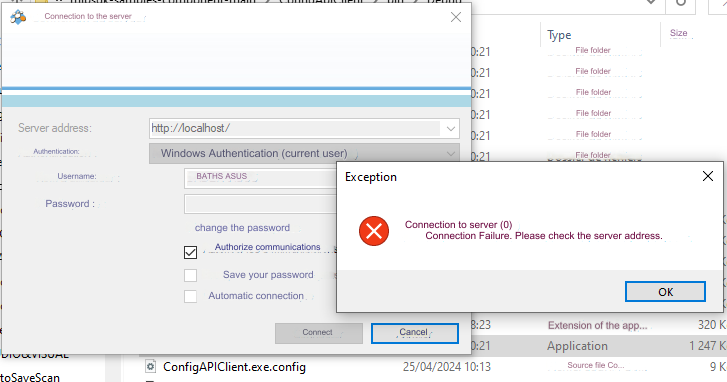
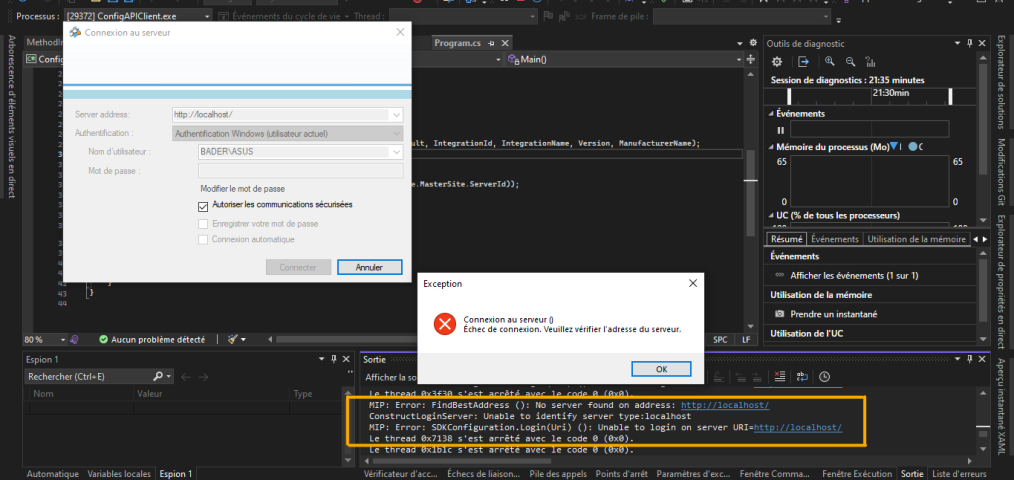
I am reaching out to you because I am currently experiencing an issue with connecting to the server using your system. Whenever I attempt to establish a connection using the Configuration API, I consistently receive an error message stating “Connection Failed. Please verify the server address.” I have carefully checked the server address as well as all the connection information used in my application, but I have been unable to resolve this issue on my own.
Configuration API Client (milestonesys.com)
mipsdk-samples-component/ConfigApiClient at main · milestonesys/mipsdk-samples-component · GitHub
I assume you have the XProtect VMS installed and running in the same machine “localhost”. Could you please verify if the Smart Client (SC) can login? If the SC cannot log in you have a general issue and might be better helped in the Support Community.
If SC can login, please observe if you get a notice during login that the site is not secure. If the server is not setup to use secure and encrypted communication with a certificate you will get this notice in SC. If the site is not secure you must make sure the “Allow only secure communication” is not ticked! I can see you have it ticked, please try to remove this tick mark and see if the login then works.
(What version is the XProtect VMS? Are you using the newest version of the MIP SDK from https://www.nuget.org/profiles/milestonesys ?)
-
If this is a general issue, please ask again in the support community, you should get better help from the partners using the support community.
https://supportcommunity.milestonesys.com
I am reaching out regarding a problem I’m encountering with the ConfigApiClient in my project’s custom build. While utilizing a build obtained directly from your site, the ConfigApiClient functions as expected. However, upon creating my own build from the source code, the ConfigApiClient fails to establish a connection.
I have thoroughly examined the build process, ensuring that all necessary files and configurations are included
It is important to make sure you do not have a mix of old and new files. As a first try to remove everything in the output and then build using the NuGet directly.
I am not sure what else it can be, when sample works it should be possible for your app also.
I am writing to provide an update on the persistent issue I am experiencing with server connection in my application, even after updating the MIP SDK version as per your previous recommendation.
Despite updating to the latest version of MIP SDK, I continue to encounter the following errors when attempting to connect to the server using the Configuration API(ConfigApiClient)
Please uncheck “Authorise les comm..” this is the key takeaway from my first comment so maybe you have tried and it doesn’t make a difference. (?)