In the past, We have developed a client application with .net framework and milestone-sdk and this application runs ok.
Now, we try to develop a micro-service to integrate with milestone and when we deploy application inside iis with same milestone dependencies, we obtain this error
Message: Could not load file or assembly ‘VideoOS.Toolkit.DLL’ or one of its dependencies. The specified module could not be found.
If we want to deploy milestone-sdk inside iis, Have we change the procedure to deploy?
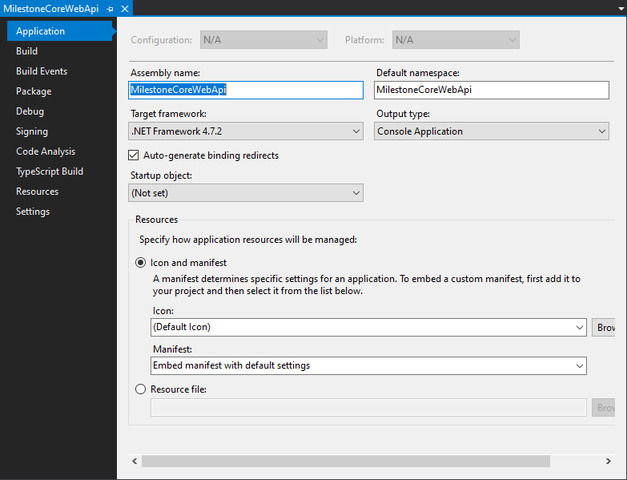
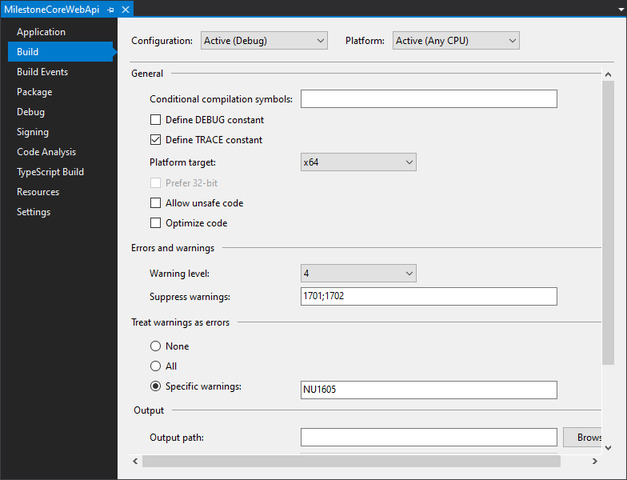
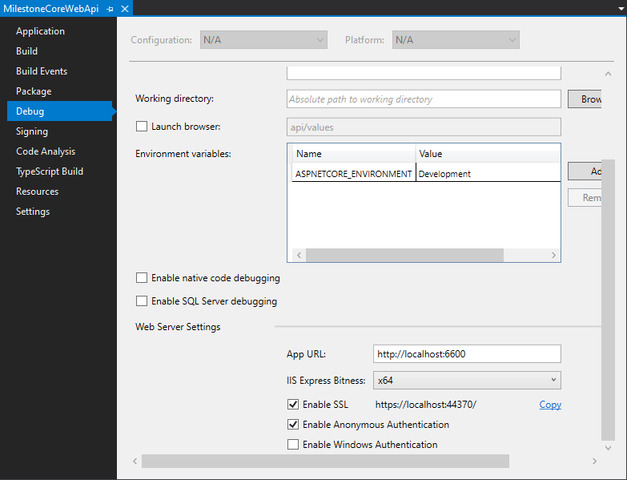
When I wrote an ASP.NET Core project (targetting .NET Framework 4.7) I ran into similar issues. Here are the project properties I needed to set to make sure it worked properly:
- Target .NET Framework (if you’re building an ASP.NET Core site, it’ll need to target framework instead of core)
- Platform target must be x64
- IIS Express Bitness should be x64
Here’s some screenshots:
I still have the same problem.
I develop with .net framework 4.7.1 and i have platform target x64.
On friday, i had different issues in local with IIS Express respect test environment with IIS Server 8.5, but my problem was IIS Express Bitness.
I put IIS Express Bitness x64 and I have the same problem in both environments
There was an error during processing of the managed application service auto-start for configuration path: ‘MACHINE/WEBROOT/APPHOST/milestone-service-test.gcelsa.com/’. The error message returned is: 'An initialization error occurred while trying to preload an application.
Exception: System.Configuration.ConfigurationErrorsException
Message: Could not load file or assembly ‘VideoOS.Toolkit.DLL’ or one of its dependencies. The specified module could not be found.
StackTrace: at System.Web.Configuration.CompilationSection.LoadAssemblyHelper(String assemblyName, Boolean starDirective)
at System.Web.Configuration.CompilationSection.LoadAllAssembliesFromAppDomainBinDirectory()
…
InnerException: System.IO.FileNotFoundException
I’m assuming the same/similar project runs okay as a command-line, Forms or WPF app?
If so, it might be that Environment.CurrentDirectory does not resolve to the folder where the MIP SDK components are located. When I built out the MilestonePSTools PowerShell module, I discovered that before making any calls to MIP SDK components relating to live/playback or anything related to media, I had to set Environment.CurrentDirectory to the path where the SDK components were sitting. This is because the unmanaged C++ based components are pulled in by joining Environment.CurrentDirectory with the name of the assembly to be loaded.
As a side note, this was especially confusing in PowerShell because the current directory displayed in PowerShell is not necessarily the value of Environment.CurrentDirectory.
If that’s not your issue here, you may need to use something like ProcessMonitor to trace the activity at the time of the exception to see which resources are attempting to be loaded from where.
Yes Josh, I developed a WPF application with the same dependencies.
My problem is IIS does not start application, because I obtain error of dll before.
I don’t know how to set Environment.CurrentDirectory inside IIS.