Hello,
I am trying to integrate a Search Agent in the Smart Client 2019 R3 using the MIP SDK which supports creating new search functionality.
I am following this guide:
https://doc.developer.milestonesys.com/html/gettingstarted/intro_searchagent.html
However, the Search windows doesnt’ appear in the Smart Cient. I have seen that it is very similar to integrate a new plugin using the .dll and .def in the MIPPlugins.
I have the Smart Client 2019 R3, Xprotect Corporate. Any suggestion?
Thanks,
Sergio
The Search tab/workspace is now included automatically. Make sure you use the advanced mode and not the simplified mode in the Smart Client, you can switch this in the upper right hand corner of the Smart Client.
Hello Bo Andersen,
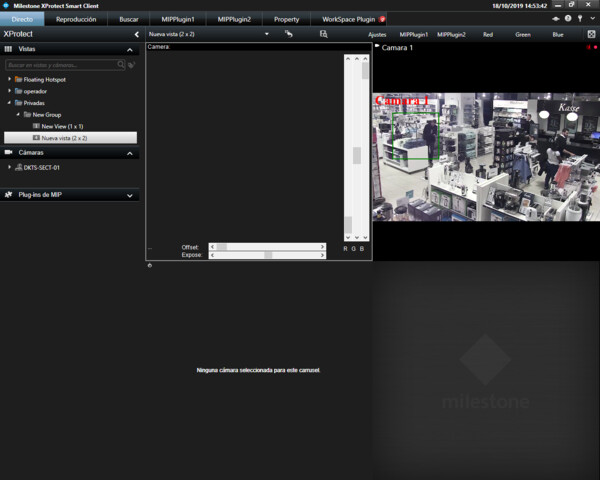
I’ll send you a screenshot from my Client’s view. The Search tab/workspace doesn’t appear.
Thanks for your response
What is Buscar? Might it mean search?
You can switch the user interface to English, or simply see what is in that tab..
I switched to Spanish in my Smart Client, “Buscar” is the workspace you seek.
Thank you for your response, I thought the workspace name was the specific name of the search agent.
As I commented before I am following this guide: https://doc.developer.milestonesys.com/html/gettingstarted/intro_searchagent.html
To integrate a new search agent I have copied the .dll and .def files of SCAnimalsSearchAgents in MIPPlugins. It should appear in the “Search for” option in the Smart Client but it doesn’t happen.
Do you have any suggestion?
Thank you
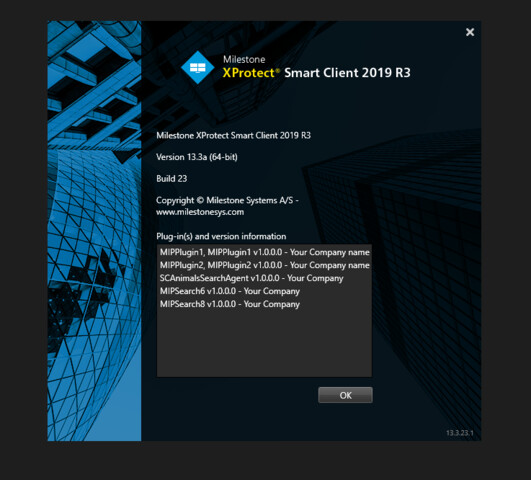
As a first troubleshooting step please verify that the plugin is loaded, use the About box..
See also - https://developer.milestonesys.com/s/article/debugging-techniques-for-Smart-Client-plugins
The plugin SCAnimalsSearchAgent is loaded (Screenshot1).
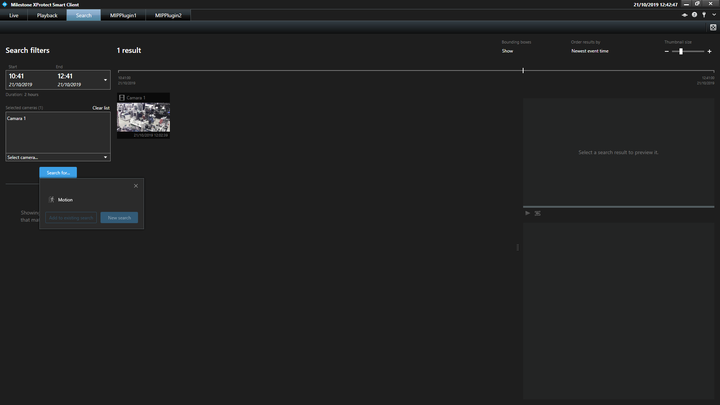
However, the “Animal” search agent doesn’t appear (Screenshot2).
I have debugged following the document you sent me using Visual Studio 2017 with the start action option (with the client.exe). The initialization code of the search agent is well executed and the Smart Client is opened.
What could be the problem?
Thanks in advance
You should not have it listed twice, please remove the duplicate, verify that you only have the plugin loaded once from one location.
You are also missing workspaces like Alarm Manager and System Monitor, this could be caused by using the Essential+ version, testing with a user with limited rights or the duplicate plugin possibly (the last one I never tested so I do not know what to expect). Please verify the product version and test with a user belonging to the administrators role.
Have I understood correctly that you have XProtect Corporate 2019R3?
If you in the Management Client look at the License Information page, is there anything reporting as not licensed?