A few questions on PTZ sessions and locking with multi-user:
- Does SDK or SOAP provide any way of getting the status of the PTZ lock and who is using it?
- Can the MultiUserEnvironment component sample be combined with the PTZandPresets example? We want to control ptz be impersonating the right user. We need to know if a PTZ session is locked or not.
- We need to know when a PTZ session is unlocked, can we query the state of the camera to know when it is released?
- Is it still impossible to reserve/release using the SDK? https://developer.milestonesys.com/s/question/0D53X00007UPtS8SAL/does-mip-sdk-or-protocol-support-function-to-reserverelease-ptz-session
- No.
- Yes, using MultiUserEnvironment you will make sure you act under the user’s credentials. But no, you have no way to know if the PTZ session is locked or not.
- No.
- Yes.
Unfortunately the thread that you link to is still correct. There is no functionality in MIP SDK or public protocols to interface with the PTZ locking / PTZ session mechanism.
Hi Bo,
I did some tests with MultiUserEnvironment. It seems there is no way to control PTZ with a user context, because that is a command and it does not use the Instance.Configuration method e.g. “userContext.Configuration.GetItemsBySearch”. Is there a way to call " EnvironmentManager.Instance.SendMessage(
new VideoOS.Platform.Messaging.Message(MessageId.Control.PTZMoveStartCommand, data), \_camera.FQID);" with a user context?
What I am getting at here, is if we can’t send messages with a user context, the MultiUserEnvironment cannot be used in this way, and it simply sends the message as the initial user that was logged on in the VideoOS.Platform.SDK.MultiUserEnvironment.InitializeUsingUserContext(…), and so there is no difference than with a normal logon?
Am I missing something?
My workaround idea is to build a simple exe that can logon to Milestone as a specific user, and can receive commands to control PTZ. I would call this exe as a new process from my application. In this way, I could have multiple users being impersonated at the same time to control PTZ.
Thanks
I was surprised by your observations and I then ran a series of test.
My observations are different, let me explain.
I started with MultiUserEnvironment sample. For each of the two user context areas I placed a button. The buttons made a simple PTZMoveCommand on the camera FQID (which the sample fetches with the correct user context).
I now prepared the XProtect server with two roles and corresponding users.
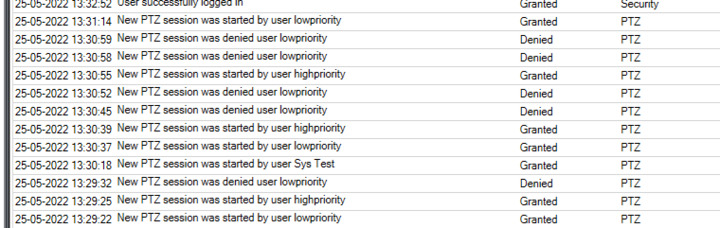
I made login with both user roles and had fun seeing that the one with higher PTZ priority could do PTZ where the one with lower priority had to wait for 10 seconds when the one with higher priority had done PTZ (non-default setting).
And what I expected I saw in the audit log:
Hi Bo, thanks for this.
How did you write the PTZMoveCommand to get triggered by the UserContext? I don’t understand how to call the SendMessage with a user context.
Thanks
Edit: I am doing this inside a service so if the user context attaches to a forms panel is there a way to make it work without any UI?
Thanks
What is the key to using the UserContext is that the FQID.ServerId carries the UserContect information. So it is important that you get this while using the correct UserContext. You must use something like the sample.
IEnumerable allCameras = userContext.Configuration.GetItemsBySearch(..)
Or simpler perhaps something like
Item item = userContext.Configuration.GetItem(..);
The difference lies in the FQID you use to do the PTZMoveCommand !