PtzCenter zoom scaling?

I have absolute screen coordinates on the ImageViewer. How should I use the zoom value to calculate the “relevant” coordinates?

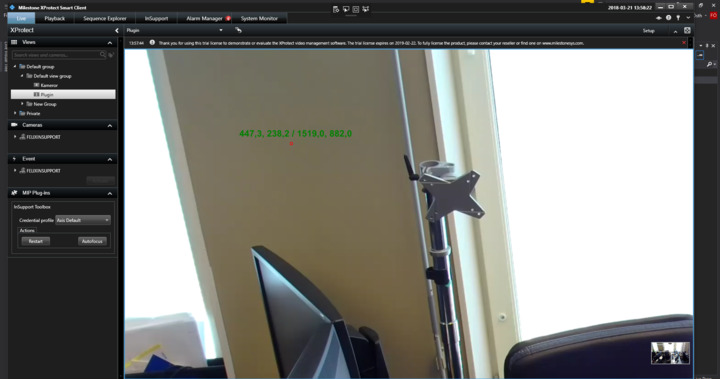
This is the view when I do

imageViewer.PtzCenter((int)imageViewer.RenderSize.Width, (int)imageViewer.RenderSize.Height, (int)camLoc.X, (int)camLoc.Y, zoom);
 

The zoom is about 60.

The string on the pic is formatted as posX, posY / width, height

The idea here is that the overlay on the image should be in the center of the video. It’s getting worse towards the edges.

My observations:

I tested with the VideoPreview sample and the “PTZ-Center” button in that sample, but added 5 text-boxes so that I could play with the values used. Camera was a fixed camera so testing was digital zoom.

If I made the the 5 values (100, 100, 50, 50, 60) I got dead center.

Other values seemed to work nicely too, with one special note though: If I enter something like (100, 100, 0, 50, 60) the center of the square that is zoomed to will have a center that is not the left hand side, but the left hand side of the square is left hand side of the image. This lead to, in my testing, entering (100, 100, 0, 50, 60) and (100, 100, 20, 50, 60) achieves the same result.

I do not think it is surprising behavior, you would still want the same area size of the square even when going close to the edge of the image.

(5 values ref.: PtzCenter (int refWidth, int refHeight, int centerX, int centerY, int zoom))

I have a hunch that either you find the close-to-edge behavior surprising or you might see something unexpected based on using values from mouse click or something similar, maybe you should try to focus on whether you have the right variable values when doing the PtzCenter.
My question might have been unclear. I hope this image demonstrate what I’m looking for better:

Let’s say I click the zoomed image(right). I get the X and Y coordinates on the ImageViewer. If I use those values to PtzCenter it will be centered accordingly to the X and Y values on the original view(left). I want to translate the X and Y values to X2 and Y2 using the zoom value.

I’m no math genious by and means so that’s why I’m asking here!

When making overlays, consider to use values between 0.0 and 1.0, then center is always at 0.5 x 0.5

My case is a bit more advanced. I’m controlling the digital zoom camera with screen coordinates, my goal isn’t to make overlays. The thing I find difficult is navigating around a zoomed in view with digital zoom.

Do you try to control the Smart Client’s ‘digital zoom’ feature, or the camera’s zoom feature?

ImageViewerWpfControl’s PtzCenter method.

I’ve already a working prototype but the accuracy is off around the edges because I don’t adjust the X and Y coordinates according to the Zoom value.

I doubt you can do this accurately - how much a camera is zoomed for a given value depands on each camera. Then PTZRectangle setting might be a better way to zoom and specify center.