Hi,
Using 2022 R1 SDK.
We are trying to get presets from the camera using PtzPresetFolder.GetDevicePresets(), the call succeeds, but no presets are shown in the milestone.
Thanks,
Vega
Hi,
Using 2022 R1 SDK.
We are trying to get presets from the camera using PtzPresetFolder.GetDevicePresets(), the call succeeds, but no presets are shown in the milestone.
Thanks,
Vega
The GetDevicePresets() method corresponds with the “Use presets from device” in the Management Client, Camera Properties on the Preset tab. Not all cameras support this and please test it in the Management Client, if it works there it should also work for the MIP SDK.
I have a feeling that this might not be what you want and I am guessing you simply want the PTZ Presets already defined and present when you look in the Management Client Camera properties and the PTZ Preset tab. If this is what you need you should use code such as –
foreach (var ptzPreset in camera.PtzPresetFolder.PtzPresets)
We are using ConfigAPI sample.
We call PtzPresetFolder.GetDevicePresets() and it succeeds, but in the management client, we see no PTZ retrieved from the camera.
From the Management client, if we click use camera ptz, it’s able to retrieve all presets from the camera**.**
I imagine that you have some code similar to my test code..
ServerTask serverTask = camera.PtzPresetFolder.GetDevicePresets();
while (serverTask.State != StateEnum.Error && serverTask.State != StateEnum.Success)
{
	System.Threading.Thread.Sleep(100);
	serverTask.UpdateState();
}
label1.Text = serverTask.State.ToString(); // Error?
camera.PtzPresetFolder.Save();
Right now I have a test device on which this fails, serverTask.State is “Error”.
If your code is different and works please let me see your code.
Do you do the save?
One theory that I cannot test with my current test failing, if you add a camera.Save(); will it make a difference?
We have the same code, but still, the management client does not show the ptz preset from the camera
ServerTask presetTask = Camera.PtzPresetFolder.GetDevicePresets();
while (presetTask.State != StateEnum.Error && presetTask.State != StateEnum.Success)
{
System.Threading.Thread.Sleep(1000);
timeout++;
presetTask.UpdateState();
if (timeout >= maxtimeouts)
break;
if (timeout >= maxtimeouts)
{
writelog("GetDevicePresets timeout - " + cam.sCamName);
continue;
}
if (presetTask.State == StateEnum.Error)
{
writelog("GetDevicePresets error - " + cam.sCamName);
}
else if (presetTask.State == StateEnum.Success)
{
writelog("GetDevicePresets Success - " + cam.sCamName);
Camera.PtzPresetFolder.Save();
}
}
Camera.Save();
Sorry, but I need to be sure. (I got Error in my testing, which of course would explain that nothing is updated..)
You get Success?
We get success.
We are using AXIS M5013 PTZ.
What is the product and version of the XProtect VMS?
You report to be using MIP SDK 2022R1, can you tell me why you are not using the newest version?
Using XProtect corporate 2023 R1
We have some customers using XProtect Corporate 2019 R2.
You have to call GetDevicePresets twice in order for PTZ presets to be saved. The reason is that the first call fetches the PTZ presets from the camera, while the next one (where you pass the sessionId) causes the retrieved presets to be saved.
private static void GetPtzPresets(Camera camera)
{
	// Fetch the PTZ presets from the camera
	int sessionDataId = RunGetPtzPresetTask(camera, 0);

	// Save PTZ presets fetched in the previous step
	RunGetPtzPresetTask(camera, sessionDataId);

	// At that point Management Server should be updated with PTZ presets from the camera
}

private static int RunGetPtzPresetTask(Camera camera, int sessionDataId)
{
	ServerTask serverTask = camera.PtzPresetFolder.GetDevicePresets(sessionDataId);
	while (serverTask.State != StateEnum.Error && serverTask.State != StateEnum.Success)
	{
		System.Threading.Thread.Sleep(100);
		serverTask.UpdateState();
	}
	if (serverTask.State == StateEnum.Error)
		throw new Exception(serverTask.ErrorText);

	var sessionDataIdString = serverTask.GetProperty("SessionDataId");
	return int.Parse(sessionDataIdString);
}
With SDK 2023 R2, the above feature is broken.
Sample ConfigAPI when called to get devicePTZ and succeeds but PTZ presets does not show in the management client
I can see that the Config API sample has a faulty behavior when it comes to passing the ID of the session from one dialog to another, but the functionality of retrieving PTZ presets works fine as long as the value is aligned.
Here is how to make sure it is set to correct value:
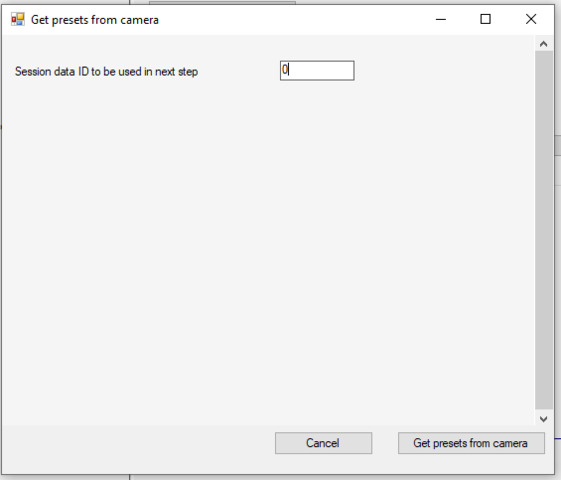
First, when you press Get presets from a camera, the following dialog appear:
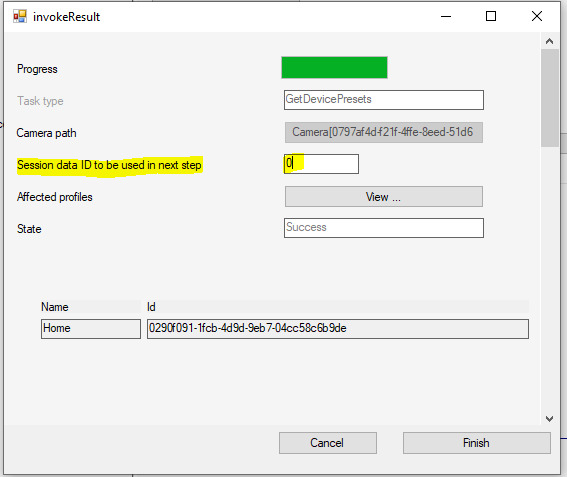
Make sure to copy ID from in the text field.After you press Get presets from a camera, invokeResults dialog appear:
Make sure, that the Session data ID to be used in the next step is set to the same ID as in the first dialog. It seems that those two values don’t get aligned automatically.Once you finish getting presets from the camera in ConfigAPI sample and navigate to the Management Client, you should be able to see the retrieved presets.
@Bo Ellegård Andersen (Milestone Systems)
Getting exception:
GetDevicePresetsServerTask serverTask = camera.PtzPresetFolder.GetDevicePresets();
serverTask.SetProperty(“SessionDataId”, “0”);
ServerTask serverTask2 = serverTask.Execute();
if (serverTask2.Path != null)
{
serverTask2.GetTask(serverTask2.Path);
}
while (serverTask2.State != StateEnum.Error && serverTask2.State != StateEnum.Success)
{
System.Threading.Thread.Sleep(100);
serverTask2.UpdateState();
}
if (serverTask2.State == StateEnum.Error)
throw new Exception(serverTask2.ErrorText);
if (serverTask2.State == StateEnum.Success)
{
String sessionid = serverTask2.GetProperty(“SessionDataId”);
GetDevicePresetsServerTask serverTask1 = camera.PtzPresetFolder.GetDevicePresets();
serverTask1.SetProperty(“SessionDataId”, sessionid);
ServerTask serverTask3 = serverTask1.Execute();
if (serverTask3.Path != null)
serverTask3.GetTask(serverTask3.Path);
while (serverTask3.State != StateEnum.Error && serverTask3.State != StateEnum.Success)
{
System.Threading.Thread.Sleep(100);

serverTask3.UpdateState();
}
if (serverTask3.State == StateEnum.Error)
throw new Exception(serverTask3.ErrorText);
if (serverTask3.State == StateEnum.Success)
{
}
}
I am not sure if I follow. Is there any exception you are getting when running the above piece of code?
Please find the short video attached
1)MC has 1 device preset
2)Ran Sample ConfigAPI , got two device preset
The reason it doesn’t work as expected in your video is that the session ID from the first step doesn’t match the ID in the invokeResult step. InvokeResult step is responsible to getting the retrieved PTZ saved and if the IDs don’t match, the results will not be saved.
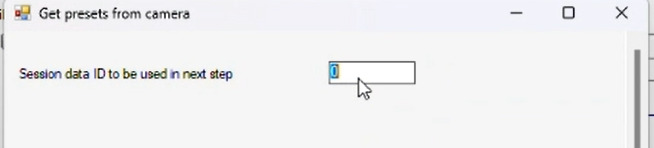
First step, the ID is set to 0:
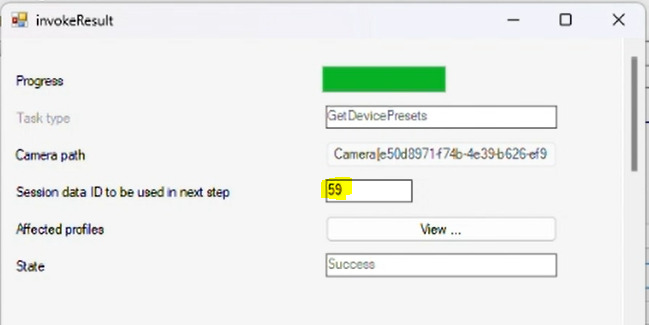
InvokeResult step, ID is set to 59:
That is not correct, the highlighted value should be set to the same ID as in the first step, in this case that would be 0.Still the same and also getting exception
exception - /tasks/9594 at VideoOS.Platform.Proxy.RestApi.RestApiClient.GetSpecificResource(String resourceType, String id, Boolean askResources)
at VideoOS.Platform.Proxy.RestApi.RestApiClientDecorator.CallWithRetry[TResult](Func`2 call)
at VideoOS.Platform.Proxy.RestApi.RestApiClientDecorator.GetItem(String path)
at VideoOS.Platform.Proxy.ConfigApi.ConfigurationApiItemWrapper.GetItem(String path)
at VideoOS.Platform.ConfigurationItems.ServerTask.UpdateState()
I have talked to a colleague about this error, and there is indeed an issue in 2023R2 release when using strongly typed classes (i.e. when using the code you provided) to get the presets. We are working on making a hotfix for it.
However, the functionality still works fine through Config API sample as the sample doesn’t use strongly typed classes and instead uses SOAP communication. I was though wrong that it requires changing the ID in the invokeResult step, as that is not needed. Instead, you have to run getting the presets twice - see the video attached.