I apologize if this is a dumb question, but am hoping someone can help me.
I am currently building a .NET 9.0 application that is able to manage modern XProtect systems using the newer REST API.
So far I have had no issues getting connected to the system and retrieving and modifying device configs, but I am not seeing an obvious way to query if a device is connected or having streaming issues. I would have imagined this information would be visible from “https://test-01.example.com/api/rest/v1/cameras/{id}” but this only seems to have configuration details.
I did see the SDK example for the status viewer at “https://github.com/milestonesys/mipsdk-samples-component/tree/main/StatusViewer” but this seems to be using the SDK for legacy .NET, which is not compatible with .NET Core. This also seems to be subscribing to real time events which seems a little overkill for my particular needs. My application really only needs to poll the server once every 5-10 minutes and is not intended to be connected to the server at all times.
Can this information be queried via the REST API, or do I need to use a lower level integration like the Messaging API?
There is a Rest API. you need to look at ‘events’ rather than ‘cameras’ as the latter is all about configuration as you correctly state.
https://doc.developer.milestonesys.com/mipvmsapi/api/events-rest/v1/#tag/EventSessions
There is also a websocket API.
https://doc.developer.milestonesys.com/mipvmsapi/api/events-ws/v1/
For an overview that best includes the newer APIs I would like recommend.
https://doc.developer.milestonesys.com/mipvmsapi/
Thank you for the clarification, that makes a bit more sense.
I have adapted my code to attempt to make use of /api/rest/v1/events and /api/rest/v1/eventSessions but am still having some issues.
I am assuming that the events I am looking for would be “CommunicationError”, “CommunicationStarted”, and “CommunicationStopped”.
However, I cant seem to make these show up when I query these APIs.
I can confirm that I see these events in the logs for the Mangement Client when I unplug my test camera.
I was able to make some user defined events and trigger those as a test, and those seem to have worked as expected and show up in the results from “/api/rest/v1/events”, but still nothing related to device communication.
I did also try a few things with the “/api/rest/v1/eventSessions”, and attempted to try and subscribe to any events generated by my test camera, or even trying to subscribe to all CommunicationError events both by ID and by name, however this also seemed to have generated no results.
I am not sure if I am doing something wrong?
Hey Robert,
For your use-case, I would second Bo’s opinion, that most probably is better to be used Event and State Websocket API.
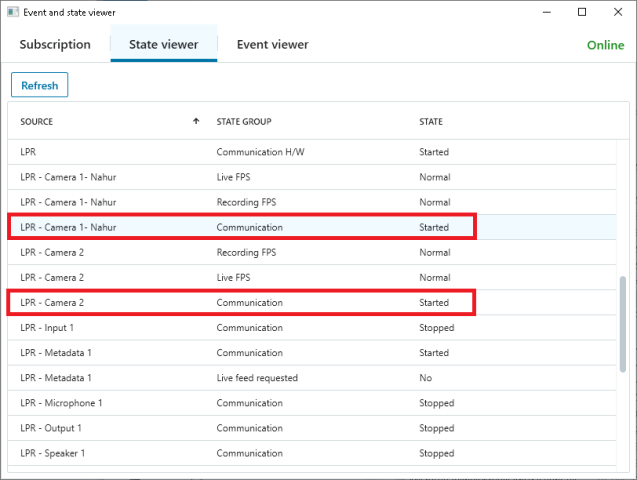
It provides you with possibility not only to subscribe for events (communication error for example) but also to get current state of the cameras. Thus, you could connect periodically to the system (for ex on 10 minutes as you mentioned) and get the actual state of the cameras (of interests).
You could see what could be achieved using this API looking at the Events and State Viewer sample.
Unfortunately, it uses MIP SDK for component integration. And as you mentioned, there is (still) not an official .NET 8 version of the MIP SDK.
But the protocol is well documented (I believe) and could be implemented relatively easy. Ofc a little bit harder than a single REST call.
There are two (Event and State WebSocket) protocol samples available as well:
Thanks Petar,
I ended up implementing the WebSockets protocol and was able to get the events and state without much issue. Was a lot more work to get this feature going than I was hoping for since the rest of my codebase revolves around REST, but the WebSockets version of the API had no issue returning the information that I needed.
However, I do find it very puzzling that this information is not provided by the REST API with “/api/rest/v1/events/{id}” or “/api/rest/v1/eventSessions/{id}/events”.
I don’t see anything in the docs that seems to indicate that there is a limitation of which events are returned and if certain types of events are excluded: https://doc.developer.milestonesys.com/mipvmsapi/api/events-rest/v1/#tag/Events/operation/Events_Get
This is especially puzzling since “/API/rest/v1/eventTypes” is more than happy to return an array of all event types supported by the system, including the “CommunicationStarted” and “CommunicationError” events that I am looking for.
At this point I am not sure if there is just something wrong with my development server, if I am doing something wrong with the REST API, or if there is some sort of potentially publicly undocumented limitation on the REST version of the Events API.
At least the WebSockets implementation seems to work well enough, so I will probably just go ahead and move forward with that.
I appreciate your and Bo’s help and insight!
Hi Robert,
I’m glad you managed to make it work with the WebSockets API.
I planned to explain what the reason for not getting these events via REST API could be in a follow up post but was interrupted and just forgot. Sorry about that.
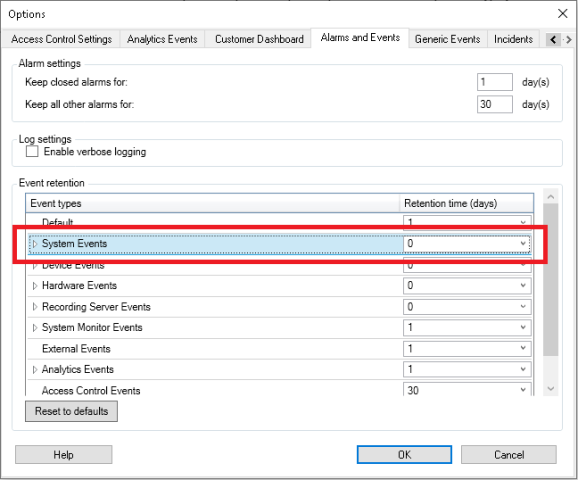
Events REST APIs (/events and /eventSessions) are designed with recorded events in mind. Aka they are returning the events that are written into the DB. By default, systems events (Communication XXX are part of them) are set to not be recorded in the DB. Thus, you could not fetch them through the events REST APIs.
If you want to achieve that, you need to change events retention policy via Management client (Tools → Options → Alarms and Events → Event retention):
Unfortunately, I don’t see them in the sub-list of the group, so you have to change the whole group settings. This however could be not exactly a desired action in a large-scale system. Manly because some performance concerns.
Events and States WebSocket API, on the other hand, works only with events in their “live” mode. Something like a custom message broker. You cannot get already recorded events through it. But only so called “states”. These are group of events, that share common state. For example, “CommunicationStarted”, “CommunicationStopped” and “CommunicationError”. Therefore, I’ve assumed this one would be more suitable for your needs.
In short, your system (most probably) is working as expected. Keep using the WebSocket API.
btw. If you want to understand what the group relation of the events is - you could look at the (already mentioned) /API/rest/v1/eventTypes. Or directly fetch the state groups via /API/rest/v1/stateGroups.
Thank for the extra information Petar!
That makes perfect sense.
You’re also probably right about the performance concerns too.
Most of the systems I am intending on running this custom integration on have over a thousand devices on them that I intend on monitoring, so we probably wouldn’t want to make any major changes to the config like that. So WebSockets is definitely the best way to go for my scenario then. I appreciate the help and explanation, hope you have a great day!