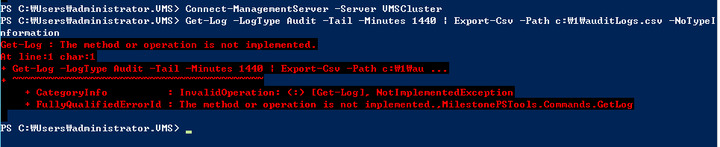
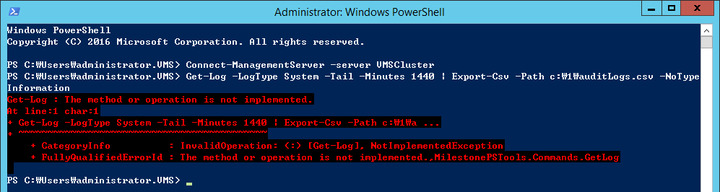
I’m thinking the issue is that the LogClient in 2020 R3 MIP SDK is unable to communicate with the Log Servers older than 2018 R3.
We implemented a new Log Server and made breaking changes requiring recompile to support the newer Log Server and I’m assuming the reverse is also true - the 2018 R3 and later SDK’s are unable to communicate with the old log server component.
Restructuring MilestonePSTools to enable the user to select the SDK version they want to use is probably the only way to make Get-Log work in this situation and that is a fairly large undertaking that I am not prepared to do.
If it’s not feasible to upgrade to at least 2018 R3, I’m afraid the only option may be to write this yourself either in C# or PowerShell using the 2018 R1 MIP SDK binaries. Here’s how the Get-Log cmdlet is written in C# for reference:
using System;
using System.Collections;
using System.Management.Automation;
using VideoOS.Platform.Log;

namespace MilestonePSTools.Commands
{
    /// <summary>
    /// <para type="synopsis">Gets log entries from the Log Server component of a Milestone XProtect VMS system.</para>
    /// <para type="description">This cmdlet brings the contents of the System, Audit, and Rules logs to PowerShell. These are the same log entries available through Management Client, and do not include application/component log files typically found under C:\ProgramData\Milestone\..</para>
    /// <example>
    ///     <code>C:\PS>Get-Log</code>
    ///     <para>Gets the log entries for the last 24 hours from the System log.</para>
    ///     <para/><para/><para/>
    /// </example>
    /// <example>
    ///     <code>C:\PS>Get-Log -LogType Audit -Tail -Minutes 10</code>
    ///     <para>Gets the audit log entries for the last 10 minutes.</para>
    ///     <para/><para/><para/>
    /// </example>
    /// <example>
    ///     <code>C:\PS>Get-Log -LogType Audit -BeginTime '2019-06-05 08:00:00' -EndTime '2019-06-05 11:00:00'</code>
    ///     <para>Gets the audit log entries for the time between 8am and 11am local time on the 5th of June.</para>
    ///     <para/><para/><para/>
    /// </example>
    /// <example>
    ///     <code>C:\PS>Get-Log -LogType Rules -BeginTime '2019-06-05 08:00:00Z' -EndTime '2019-06-05 11:00:00Z'</code>
    ///     <para>Gets the audit log entries for the time between 8am and 11am UTC time on the 5th of June. If run from a system with a UTC offset of -7, then the results would be from between 1am and 4am local time.</para>
    ///     <para/><para/><para/>
    /// </example>
    /// </summary>
    [Cmdlet(VerbsCommon.Get, "Log", DefaultParameterSetName = "TimestampFilter")]
    [OutputType(typeof(PSObject))]
    public class GetLog : ConfigApiCmdlet
    {
        /// <summary>
        /// <para type="description">Specifies the type of log entries to retrieve. Default is System. Not to be confused with the System log from Windows Event Logs.</para>
        /// <para type="description">System logs include events like motion started/stopped, connection errors and license errors.</para>
        /// <para type="description">Audit logs include user actions like logon, playback and exporting. Note: Not all user actions are automatically audited and extensive audit logging must be enabled manually from Management Client > Tools > Options > Server Logs.</para>
        /// <para type="description">Rules logs include any log entry generated within the set of actions defined in the Rules section in Management Client.</para>
        /// </summary>
        [Parameter(Position = 1, ParameterSetName = "TimestampFilter")]
        [Parameter(Position = 2, ParameterSetName = "Tail")]
        [ValidateSet(validValues: new[] {"System", "Audit", "Rules"}, IgnoreCase = true)]
        public string LogType { get; set; } = "System";

        /// <summary>
        /// <para type="description">Specifies point in time to begin the log entry search. Default is 24 hours before the current time.</para>
        /// </summary>
        [Parameter(Position = 3, ParameterSetName = "TimestampFilter")]
        public DateTime BeginTime { get; set; } = DateTime.UtcNow.AddHours(-24);

        /// <summary>
        /// <para type="description">Specifies the point in time to end the log entry search. Default is the current time.</para>
        /// </summary>
        [Parameter(Position = 4, ParameterSetName = "TimestampFilter")]
        public DateTime EndTime { get; set; } = DateTime.UtcNow;

        /// <summary>
        /// <para type="description">Get the last Minutes minutes worth of log entries.</para>
        /// </summary>
        [Parameter(Position = 5, ParameterSetName = "Tail")]
        public SwitchParameter Tail { get; set; }

        /// <summary>
        /// <para type="description">The number of minutes before now to retrieve the logs. Default is the last 60 minutes.</para>
        /// </summary>
        [Parameter(Position = 6, ParameterSetName = "Tail")]
        public long Minutes { get; set; } = 60;

        /// <summary>
        ///
        /// </summary>
        protected override void BeginProcessing()
        {
            base.BeginProcessing();
            VideoOS.Platform.SDK.Log.Environment.Initialize();
        }

        /// <summary>
        ///
        /// </summary>
        protected override void ProcessRecord()
        {
            BeginTime = BeginTime.ToUniversalTime();
            EndTime = EndTime.ToUniversalTime();
            try
            {
                var beginTime = Tail
                    ? DateTime.UtcNow - TimeSpan.FromMinutes(Minutes)
                    : BeginTime;
                var endTime = Tail
                    ? DateTime.UtcNow
                    : EndTime;
                var page = 1;
                bool readNextPage;
                do
                {
                    LogClient.Instance.ReadLog(Connection.CurrentSite.FQID.ServerId, page++, out var result, out var columns, LogType, beginTime, endTime);
                    foreach (ArrayList entry in result)
                    {
                        var record = new PSObject();
                        for (var i = 1; i < entry.Count; i++)
                        {
                            record.Properties.Add(
                                new PSVariableProperty(
                                    new PSVariable(columns[i - 1] as string, entry[i] as string)));
                        }
                        WriteObject(record);
                    }
                    readNextPage = result.Count == 1000;
                } while (readNextPage);
            }
            catch (Exception ex)
            {
                WriteExceptionError(ex);
            }
        }
    }
}