I am reaching out to seek guidance on an issue I have encountered while attempting XML message triggering using the API within the Milestone XProtect environment.
When sending XML-based events as analytics events, I receive an HTTP response indicating “200 OK”. However, alongside this response, I encounter a warning message stating: “Device not known”.
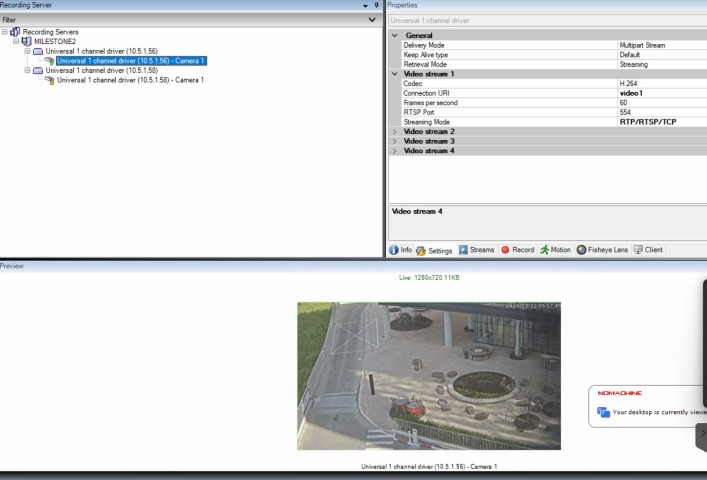
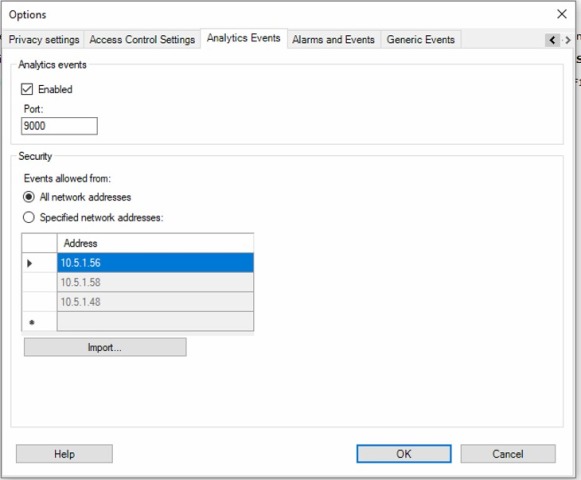
To provide further context and facilitate troubleshooting, I have attached screenshots of the XProtect application along with the relevant sections of my code.


import socket
import time
import sys
import threading
import os
import logging
import log_settings
import re
from datetime import datetime
import queue
import requests

FILE_LOGGER = logging.getLogger('ENCDEC_File')


PRINT_OUT =1
PRINT_OUT = os.environ.get('PRINT_OUT')
if not PRINT_OUT:
    PRINT_OUT = False    # Taking a default value
if PRINT_OUT  in ["1","TRUE","true","T","t","Y","YES","ENABLE","enable"]:
    PRINT_OUT = 1
else:
    PRINT_OUT = 0

class TCPClient:

    # this serves as an alarms transmitter, always connected to server and sends an alarm when necessary
    def __init__(self, server_ip, server_port, buffer_size=1024, rate=20, verbosity=1, max_connection_attempts=10):
        self.server_ip = server_ip
        self.server_port = int(server_port)
        self.messages_queue = queue.Queue(maxsize=30)


    def connect(self):
        self.connection_thread = threading.Thread(target=self.keep_connection_live_thread)
        self.connection_thread.daemon = True
        self.connection_thread.start()


    def stop_keep_live(self):
        self.keep_live_event.clear()


    def post_message(self,item):
        did_send = False
        try:
            headers = {'Content-Type':'text/xml'}
            response = requests.post(f'http://{self.server_ip}:{self.server_port}', data=str(item).encode('utf-8'), headers=headers)
            # print("###########",response,self.messages_queue.qsize())
            # print(response.text)
            return_code = response.status_code
            FILE_LOGGER.info(response)
            if return_code == 200:
                if "Warning: Event message not known" in response.text:
                    FILE_LOGGER.info("Issues in POST message:: Warning: Event message not known",exc_info=True)
                    did_send = False
                else:
                    did_send = True
            elif return_code == 400:
                did_send = False
            elif return_code == 403:
                did_send = False
            elif return_code == 500:
                did_send = False
        except Exception as e:
            FILE_LOGGER.info("Issues in POST message",exc_info=True)
        return did_send

    def keep_connection_live_thread(self):
        """
            This is thread keep checking the socket is open or not for each 5 sec. on the basis of the 'is_connected' event.
            'is_connected' event is also modified by the 'send()' api call.
            'stop_keep_live()' api call can finish this thread.
        """
        while True:
            try:
                item = self.messages_queue.get(timeout=5)
                did_send = self.post_message(item)
                if not did_send:
                    for trying in range(5):
                        did_send = self.post_message(item)
                        if did_send:
                            break
                    FILE_LOGGER.info(f"Tried 5 times to send, and it was failed ignoring the message{item}")
                    time.sleep(1)
            except Exception as e:
                # FILE_LOGGER.info("Exception while sending message",exc_info=True)
                time.sleep(0.5)


    def send(self, msg):
        try:
            self.messages_queue.put(msg)
        except Exception as e:
            FILE_LOGGER.info("Pushing messages to queue",exc_info=True)


    def generate_message(self,name="Analytics_test",message="Analytics_test",source="10.5.1.6,0"):
        current_datetime = datetime.utcnow()

        # Format the datetime object as a string in the desired format
        formatted_datetime = current_datetime.strftime('%Y-%m-%dT%H:%M:%S')

        print(formatted_datetime)
        xml = f"""<?xml version="1.0" encoding="utf-8"?>
            <AnalyticsEvent xmlns:i="http://www.w3.org/2001/XMLSchema-instance" xmlns="urn:milestone-systems">
            <EventHeader>
            <ID>00000000-0000-0000-0000-000000000000</ID>
            <Timestamp>{formatted_datetime}</Timestamp>
            <Name>{name}</Name>
            <Message>{message}</Message>
            <Source>
            <Name>{source}</Name>
            </Source>
            </EventHeader>
            </AnalyticsEvent>
            """
        return xml


# if __name__ == "__main__":
#     msg_client = TCPClient("127.0.0.1", 9090, verbosity=5)
#     msg_client.connect()
#     xml = msg_client.generate_message()
#     msg_client.send(xml)
#     while True:
#         time.sleep(10)
#         xml = msg_client.generate_message()
#         msg_client.send(xml)
Plsease find a sample xml that I am sending now.
'<?xml version="1.0" encoding="utf-8"?>\n
<AnalyticsEvent
	xmlns:i="http://www.w3.org/2001/XMLSchema-instance"
	xmlns="urn:milestone-systems">\n
	<EventHeader>\n
		<ID>00000000-0000-0000-0000-000000000000</ID>\n
		<Timestamp>2024-03-22T13:03:42</Timestamp>\n
		<Name>1056</Name>\n
		<Message>1056</Message>\n
		<Source>\n
			<Name>10.5.1.56,1</Name>\n
		</Source>\n
	</EventHeader>\n
</AnalyticsEvent>\n '
Interesting thing is it was working until 2 days ago.