Hi,
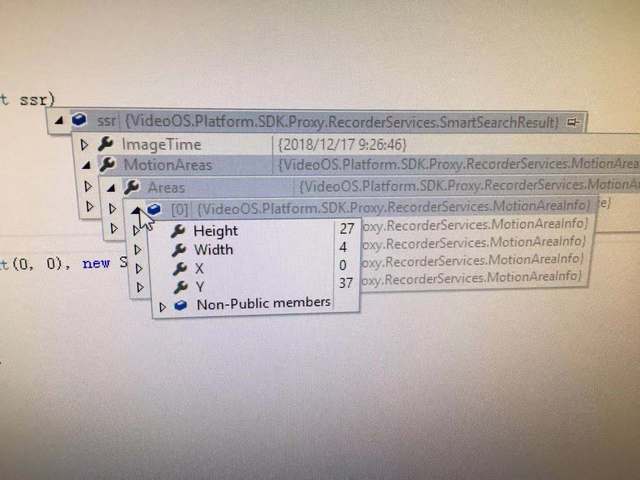
We’re trying to implement the smart search functionality. We referred to the smart search sample in the SDK. We’re confused about the returned results. For the SmartSearchResult, there is MotionAreaInfo. It seems to us that it contains all motion areas in the whole image instead of the masked area. Is it correct? For the member Mask in MotionMask, it’s all “0”. Shouldn’t it be the combination of “0” and “1” to specify the actual motion area within masked area.
Actually, we want to draw the real motion areas inside the masked area just like what smart client showed when doing smart search. Which data we can use to make it? We tried to use the MotionAreainfo and MotionMask. However the results were expected.
See pictures for code details.
MotionMask is unfortunately outdated and no longer filled with any real value (as you also observed). However, the MotionAreas should contain the information you are looking for and only within the area selected. This is what is used by the Smart Client.
Hi Peter,
Thanks for your quick reply. Some more questions.
- To call SmartSearchStart, do we still need to generate imagemask for selected area? In our implementation, we used 64*64 grids to generate imagemask for selected area(Say the whole area as A, the selected area as B). It seems the imagemask doesn’t affect anything either.
- For the returned MotionAreas, our understanding is that the area A is splited into 64*64 grids, the returned X,Y is the left-top grid location, the Height and Width means the numbers of grids. Then we can draw the Motion areas inside A. If that’s true, the MotionAreas array includes all motion areas in image A, not just in B from our testing results. If we want to draw motion area in image B, we need to filter again. Is our understanding correct?
Hi Karol,
- Please be aware that the imageMask parameter is an exclude mask, so search is done in the regions you do not specify in this mask. This is not clear from the documentation and it also confused me for a while.
- The MotionAreas only includes results from the non-selected area and will always be defined according to a 64x64 grid (which is also indicated in the result). And the X, Y is according to upper-left yes.
The recognize that the documentation on this is really poor and we will ensure that it as well as the sample will be improved for the next release (being 2019 R2 as 2019 R1 is almost completed).
Merry Christmas!
/Peter