Hi, I’m trying to read 2 RTSP cameras from an ONVIF server.
The ONVIF server I use is:
https://github.com/KoynovStas/onvif_srvd
And it consists 2 rtsp streams, that look like:
rtsp://username:password@ip:8554/Streaming/Channels/101
rtsp://username:password@ip:8554/Streaming/Channels/201
I managed to add the onvif server but when I try to get the video I get that the connection is broken, but I can see on the RTSP GStreamer pipe that no connection has been tried to be established.
Hello Dor Forer,
Can you capture Wireshark trace from the moment when you are adding the server? I see that settings for second stream are missing. From the trace I will try to find the problem.
Hi Kalin,
After an investigation, I found out that I need to use a ws-discovery server in addition to what I use.
So I used this https://github.com/KoynovStas/wsdd.
I also changed my port to 80, and with ONVIF Device Manager this stream is exposed and can be seen straight away.
When I add it to XProtect it seems like it doesn’t “go through” the ws-discovery and tries to connect directly to the onvif server.
It causes rtsp streams not to be identified as needed.
I’m adding the Wireshark track, but the settings for the first stream are also not entirely correct.
I think, that it tries to connect to the port directly and via the onvif/device_service URI, that it’s why it doesn’t all the data as needed
Hi Dor Forer,
I can’t see any http communication in Wireshark. If you are using https, please switch to http when capturing the trace. Also start Wireshark before trying to add server and stop it 2-3 min after that. Don’t use any filters except the IP of the server. Regarding the url used to get video stream, this is the normal behaviour according to ONVIF specification. We request the URI for video from the device and then use it to start the video streaming. So the URI returned from the device should be the correct one.
Hi Kalin,
Thanks for the quick response.
I use http. I attach the wireshark log, my onvif server IP is 10.10.84.138.
Thank you for your help.
Hi Dor Forer,
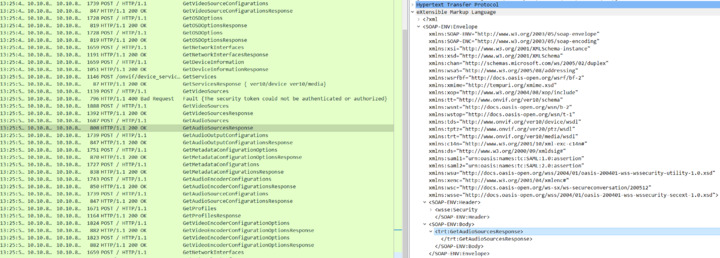
Most of the responses from server are completely empty. Only Opening and closing tags like one the first screen shot.
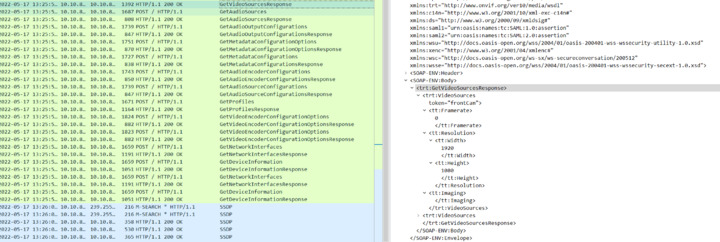
Other responses have only basic information included like MAC address, IP address, codec and resolution. The rest are zeros, false or empty. Video source token, profile token and video configuration token are the same which is not right. Settings like framerate and quality are 0. We are not even asking for video stream URI because of missing information.