I have created an application that exports recorded video. I can run the application from the same machine where the recording server is hosted. However, if I run it from another machine (on the same network) I get this message: “Recording server is offline”
I’m able to log in to the server and run other commands, like retrieving the list of cameras. However, the export fails to work. Is there possibly a firewall issue or something that is keeping the recording server from receiving communication?
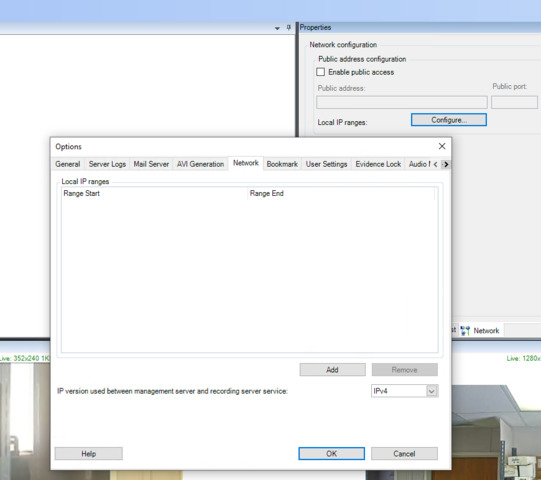
Hi. Can you check the video live and playback from Smart Client work with the Recording server from the remote machine? If they don’t work either, then you need to check the firewall settings, and also you can check the settings of the IP ranges in the Management Client → Recording Servers → → “Network” tab in the Properties panel → Network configuration. Check there are no special settings here, also under “Configure…” button, if you use the same local network.
There were some technical issues and the system has been down for the past couple of days. It’s back up now. However, it looks like something else changed because now the XProtect client can’t even access the server (see first image below). Originally it was just an issue with the Recorder. And I’ve triple checked it’s the correct IP address. It works when pointing at that IP from the host machine. Are there certain ports I need to make sure are open? Also, it doesn’t look like any settings are setup in the Network configuration (see second image below). Should there be?
Image is not available
I’ve confirmed video live and playback work from the Smart Client from the remote machine. However, I’m still getting the “Recording server is offline” message when running my application. I also turned off the firewall on the host machine just to see if that was an issue.
Please test; does the Export Sample from the MIP SDK work or does it give the same error?
If the sample works please try to analyse where your code is different in doing the export.
One hunch (or wild guess):
Do you have -
VideoOS.Platform.SDK.Export.Environment.Initialize();
-in your code?
I’ve confirmed that my code is able to export video when on the same machine as the Recording Server. Which makes me believe there is some setting on the Recording Server or some network setting that is denying access to the Recording Server from a separate server (on the same network) and therefore gives the “Recording server is offline” error. Let me know if this is what you guys think and what I can do moving forward.
Thanks
I ran “telnet {endpoint} 7563” in a command prompt and was able to connect to the Recording Server. Still no luck running the application though. I’m still getting the “Recording server is offline” error. Do I need to install any other Milestone software on the remote machine I’m running this from? Currently only the Milestone XProtect Client is installed on that machine. I assume all the necessary libraries are included in the built project, but I wanted to double check.
My mistake. I finally got a chance to move the built ExportSample project out to the remote server and run it. It was able to run and export video successfully. However, I do have…
VideoOS.Platform.SDK.Export.Environment.Initialize();
… in my code already. The only thing that sticks out not being the same is I don’t have this line (I’m assuming it’s only necessary for UI components, which I don’t use)…
VideoOS.Platform.SDK.UI.Environment.Initialize();
… and I’m using the manual login call…
VideoOS.Platform.SDK.Environment.Login(uri, false);
… rather than using the Login Form that the example uses. But I assume my login is fine as it doesn’t return an error and…
VideoOS.Platform.SDK.Environment.IsLoggedIn(uri)
… returns true on subsequent calls.
Please let me know if there’s anything else to check for. Also, I apologize for all the code snippets.
Please try to include - VideoOS.Platform.SDK.UI.Environment.Initialize();
I have a gut feeling it might be needed even if not using the ImageViewerControl or other UI elements. At least we will be wiser after your testing.
No luck after including that line. Still getting the “Recording server is offline” error message from IExporter.LastErrorString property.
Would you like me to include my code so you can take a look at everything?
If the ExportSample works and your code does not (testing same user, same server and same camera) we must suspect there is something in your code. I wonder if not the essential part of the code is so small you can just show a snippet.
Please clarify: Is this MIP SDK 2019R1? What product and version is the XProtect server?
I do believe it is something in our code, but I find it strange that is appears to work just fine on the Milestone host server.
As for the versions. We are using MIP SDK 2019 R1. I’m not exactly sure what you mean by which product, but we are using XProtext Corporate 2018 R3 on the server.
Lastly, regarding the code snippet, we are using a single file as the bridge between our code and the Milestone API so it basically just contains API calls. I don’t see any issue with including it here…
using System;
using System.Collections.Generic;
using System.Configuration;
using System.Diagnostics;
using System.IO;
using System.Linq;
using System.Net;
using System.Text;
using System.Threading.Tasks;
using System.Timers;
using VideoOS.Platform.SDK.Platform;

namespace MilestoneService
{
    class ComponentProtocol : IComponentProtocol
    {
        private Uri uri;
        private string userId, password, credentialType;
        EventLog componentLog;
        public ComponentProtocol()
        {
            // -- Initialize log
            componentLog = new EventLog();
            if (!EventLog.SourceExists("Component Protocol"))
            {
                EventLog.CreateEventSource("Component Protocol", "Milestone Service");
            }
            componentLog.Source = "Component Protocol";
            componentLog.Log = "Milestone Service";

            InitializeEnvironments();
        }

        private void InitializeEnvironments()
        {
            try
            {
                VideoOS.Platform.SDK.Environment.Initialize();
                VideoOS.Platform.SDK.UI.Environment.Initialize();
                VideoOS.Platform.SDK.Export.Environment.Initialize();
                componentLog.WriteEntry("Environments initialized.");

                SetupConfiguration();
                componentLog.WriteEntry("Configuration Setup.");

                componentLog.WriteEntry("Login result: " + Login().ToString());
            }
            catch (Exception e)
            {
                componentLog.WriteEntry("Exception in InitializeEnvironment(): " + e.Message + "\n" + e.ToString());
            }
        }

        private void SetupConfiguration()
        {
            uri = !string.IsNullOrEmpty(ConfigurationManager.AppSettings["milestoneServer"]) ? new UriBuilder(ConfigurationManager.AppSettings["milestoneServer"]).Uri : new UriBuilder("http://localhost").Uri;
            userId = !string.IsNullOrEmpty(ConfigurationManager.AppSettings["milestoneUsername"]) ? ConfigurationManager.AppSettings["milestoneUsername"] : "milestoneUser";
            password = !string.IsNullOrEmpty(ConfigurationManager.AppSettings["milestonePassword"]) ? ConfigurationManager.AppSettings["milestonePassword"] : "milestonePassword";
            credentialType = !string.IsNullOrEmpty(ConfigurationManager.AppSettings["milestoneCredentialType"]) ? ConfigurationManager.AppSettings["milestoneCredentialType"] : "basic";    // basic or windows
        }

        public bool Login()
        {
            bool isLoggedIn = VideoOS.Platform.SDK.Environment.IsLoggedIn(uri);
            if (isLoggedIn) return true;

            CredentialCache cc = null;
            if (credentialType == "windows")
            {
                cc = VideoOS.Platform.Login.Util.BuildCredentialCache(uri, userId, password, "Negotiate");
            }
            else
            {
                cc = VideoOS.Platform.Login.Util.BuildCredentialCache(uri, userId, password, "Basic");
            }
            VideoOS.Platform.SDK.Environment.AddServer(uri, cc);

            bool canLoad = false;
            try
            {
                VideoOS.Platform.SDK.Environment.Login(uri, false);
                canLoad = true;
            }
            catch (ServerNotFoundMIPException snfe)
            {
                componentLog.WriteEntry("Server not found.");
                canLoad = false;
            }
            catch (InvalidCredentialsMIPException ice)
            {
                componentLog.WriteEntry("Invalid credentials.");
                canLoad = false;
            }
            catch (Exception ex)
            {
                componentLog.WriteEntry("Other error connecting to: " + uri.DnsSafeHost + "\n" + ex.Message);
                canLoad = false;
            }

            return canLoad;
        }

        public void Logout()
        {
            VideoOS.Platform.SDK.Environment.Logout(uri);
        }

        private Timer _refreshTimer;
        private void setRefreshTimer()
        {
            _refreshTimer = new Timer(60000);
            _refreshTimer.Elapsed += _refreshTimer_Elapsed;
            _refreshTimer.Start();
        }

        private void _refreshTimer_Elapsed(object sender, ElapsedEventArgs e)
        {
            componentLog.WriteEntry("Login keep alive result: " + Login().ToString());
        }

        private Dictionary<Guid, VideoOS.Platform.Data.IExporter> exporters = new Dictionary<Guid, VideoOS.Platform.Data.IExporter>();
        public Tuple<bool,Guid> GetPlayback(string cameraId, string filePath, DateTime startTime, DateTime endTime)
        {
            componentLog.WriteEntry("Get Playback: " + cameraId);
            Guid id = Guid.NewGuid();
            VideoOS.Platform.Data.IExporter _exporter;

            if (!Login())
            {
                componentLog.WriteEntry("GetPlayback(): Login failed.");
                return new Tuple<bool, Guid>(false, id);
            }

            VideoOS.Platform.Item camera = GetCameraItem(cameraId);
            if (camera == null)
            {
                componentLog.WriteEntry("GetPlayback(): Camera null for id: " + cameraId);
                return new Tuple<bool, Guid>(false, id);
            }

            bool isStarted = false;

            // -- Codec and AudioSampleRate are standard right now, we can move to be configurable in the future if necessary - CD
            VideoOS.Platform.Data.AVIExporter aviExporter = new VideoOS.Platform.Data.AVIExporter()
            {
                Filename = camera.Name,
                Codec = "Intel IYUV codec",
                AudioSampleRate = 8000
            };

            _exporter = aviExporter;
            exporters.Add(id, _exporter);

            _exporter.Init();
            _exporter.Path = Path.Combine(filePath);
            _exporter.CameraList = new List<VideoOS.Platform.Item>() { camera };
            _exporter.AudioList = new List<VideoOS.Platform.Item>();    // -- this is empty for now
            isStarted = _exporter.StartExport(startTime.ToUniversalTime(), endTime.ToUniversalTime());

            try
            {
                if (isStarted)
                {
                    componentLog.WriteEntry("Export started...");
                    return new Tuple<bool, Guid>(true, id);
                }
                else
                {
                    int lastError = _exporter.LastError;
                    string lastErrorString = _exporter.LastErrorString;
                    componentLog.WriteEntry("Export error code: " + lastError);
                    componentLog.WriteEntry("Export error message: " + lastErrorString);

                    _exporter.EndExport();

                    exporters.Remove(id);
                    return new Tuple<bool, Guid>(false, id);
                }
            }
            catch (Exception ex)
            {
                componentLog.WriteEntry("Exception starting export: " + ex.Message + "\n" + ex.ToString());

                exporters.Remove(id);
                return new Tuple<bool, Guid>(false, id);
            }
        }

        public int GetPlaybackProgress(Guid id)
        {
            if (!exporters.ContainsKey(id))
            {
                componentLog.WriteEntry("Given ID not found: " + id);
                return -1;
            }

            VideoOS.Platform.Data.IExporter _exporter = exporters[id];
            if (_exporter == null)
            {
                componentLog.WriteEntry("Exporter is null for given ID: " + id);
                return -1;
            }

            int progress = _exporter.Progress;
            int lastError = _exporter.LastError;
            string lastErrorString = _exporter.LastErrorString;
            if (lastError > 0)
            {
                componentLog.WriteEntry("Export error code: " + lastError);
                componentLog.WriteEntry("Export error message: " + lastErrorString);
                if (_exporter != null)
                {
                    _exporter.EndExport();
                    _exporter = null;
                }

                exporters.Remove(id);
                return -1;
            }
            if (progress >= 0)
            {
                componentLog.WriteEntry("Progress: " + progress + "/100");
                if (progress == 100)
                {
                    componentLog.WriteEntry("Done!");
                    _exporter.EndExport();
                    _exporter = null;
                    exporters.Remove(id);
                }
            }
            return progress;
        }

        private VideoOS.Platform.Item GetCameraItem(string cameraId)
        {
            Guid cameraGuid = new Guid(cameraId);
            return VideoOS.Platform.Configuration.Instance.GetItem(cameraGuid, VideoOS.Platform.Kind.Camera);
        }
    }
}
I cannot see anything wrong on first inspection. Can I persuade you to upload a project I can run and debug here?
Please upload the zipped files to a folder carrying the case number (MSC364867) as folder name. If the folder does not exist, please create it.
EMEA FTP server details:
FTP url: msftp.milestone.dk
Username for uploading files: UpLoad
Password for uploading files: 1qazxsw2
PS. When I asked for product I tried to find whether you used Corporate, Expert or .. from the XProtect product range, so your answer was precisely what I aimed for..
Just uploaded it. I also included a ReadMe.txt file out side of the zipped project files. Just to give you a general idea of the setup of things and how to run everything.
Every time the service is called by the client it initializes, this is known to cause problems. Please let the service initialize all the environments at start up only.
VideoOS.Platform.SDK.Environment.Initialize();
VideoOS.Platform.SDK.UI.Environment.Initialize();
VideoOS.Platform.SDK.Export.Environment.Initialize();
I recommend that the service logs in at start up also not every time it is called.
Please do these changes, if the service does still not work let me do the same debugging for the changed version. I do expect it to solve the issue.
Output window during my debugging:
MIP: Error: Configuration Initialization ():Duplicate serverid:localhost
ConnectionCheck for:http://localhost/, Took:110ms
Exception thrown: ‘VideoOS.Platform.SDK.Platform.InvalidCredentialsMIPException’ in VideoOS.Platform.SDK.dll
Thanks Bo! It looks like that might have solved the issue. We still need to test it hooking it into our full application, but the MilestoneClient test seemed to work just fine.
I do have a question about the AVIExporter.StartExport(…) function. In the ExportSample project in the SDK, it looks like it uses universal time
_exporter.StartExport(dateTimePickerStart.Value.ToUniversalTime(), dateTimePickerEnd.Value.ToUniversalTime());
We are doing it this way as well. However, we’re seeing some strange timing issues and I don’t see anything in the documentation specifying if the DateTime’s should be in local or UTC time. Can you confirm which format is correct?
Using Universal Time is the right choice and the safe choice.
If DateTimeKind is set to local while the the actual time is utc it might cause it to act wrong but this will never happen with the code you show above. If you experience issues I would suspect that you have a PC in your setup that is setup wrongly, that the timezone is not correctly configured.