For development purposes, I currently have an Ubuntu box running the AI Bridge via Docker Compose. I have an IVA that is also running on the same virtual network in order for it to reference by name the AI Bridge.
I’m at a point where I have to get our IVA onto K8s; however, in an attempt to save time and money, I’d prefer to avoid having to reformat the Ubuntu box to install Ubuntu Server (I’m assuming this is necessary since NVIDIA says the EGX stack (or whatever it’s called now) seems to require Ubuntu Server) just to run the AI Bridge on K8s, too.
My question might be a bit silly but I’ve never had to try this: Is there a straightforward/easy way to run a Docker-based virtual network alongside a K8s-based deployment such that our IVA (on K8s) can reference the AI Bridge (on Docker’s virtual network)?
Thank you in advance regardless.
I don’t know of any easy straightforward way to do this. It is possible to run AI Bridge (with docker-compose) and your IVA (with k8s) on two different machines. However, there will still be some networking to configure. It might take more time to get up and running compared to just running everything on k8s.
Thanks, John.
AI Bridge says it requires the EGX stack to be installed, which in turn requires Ubuntu Server: Do you know if it’s possible to run AI Bridge without Ubuntu Server? Or does it require specific features from it? I’m ok with individually installing items from the EGX stack, but if AI Bridge requires Ubuntu Server, or if the EGX stack relies on Ubuntu Server-specific features, it looks like I’ll have to reformat the server I’m currently using or get another one.
Thanks as always for your help.
AI Bridge does not have any dependencies to Ubuntu Server. Also, we have been running the EGX stack on Ubuntu Desktop without any issues even though it is not officially supported. So, I don’t think you will face any issues running everything on Ubuntu Desktop.
Got it–thanks!
I’m in the middle of trying to install their Cloud Native Core (formerly EGX) via an Ansible playbook, but I’m currently running into issues with their CUDA validator. Hopefully someone on the NVIDIA forums gets back to me soon!
Thanks once again!
Thought I’d send a quick update by letting you know I ran into some issues installing the EGX stack on Ubuntu Desktop (which I guess NVIDIA won’t officially support since the hardware isn’t “certified”), but updating the GPU driver to their latest production 515.x version fixed a lot of it.
I’m now down to an issue with the `nvidia-driver-daemonset` pod in that it won’t init, saying the `nvidia-driver-ctr` is waiting to start. As a shot in the dark, would you happen to have run into this before, or know how else I might be able to troubleshoot? The logs, pod description and events listing don’t really seem to say all that much.
Regardless, thank you for the help you’ve given in this thread.
I have not seen this issue before. To verify that it actually works on Ubuntu 22.04 Desktop, I did a fresh install on a machine and followed the following guide:
https://github.com/NVIDIA/cloud-native-core/blob/master/install-guides/Ubuntu_Server_v7.0.md
It did not give me any errors. Only note is that the “calico-kube-controllers-…” pods would not start until after the node had been untainted. The guide is showing that it will run right away, so in that way it is a bit misleading.
Can I ask if you’ve tried via their Ansible playbook for 7.0? I’ve tried 6.2 and 7.0 and both result in the “nvidia-driver-daemonset” pod being stuck on “Init:0/1” with the only log entry saying “Error from server (BadRequest): container “nvidia-driver-ctr” in pod “nvidia-driver-daemonset-xxxxx” is waiting to start: PodInitializing”.
I’m really hoping I can get the Ansible-version of this setup as configuring everything by hand is less-than-ideal, but if that’s the only way, then I suppose I’ll just have to bite the bullet.
Thanks once more!
Yes, one of my colleagues tried that. She was using the Ansible playbook 7.0 on Ubuntu Desktop 22.04 and she did not get that error you see. However, this was using a clean machine (a fresh install of Ubuntu).
After much digging, I finally figured out that the container wasn’t starting as the actual init container in the pod had prevented it with a legitimate condition, saying that an NVIDIA driver was already deployed to the host. So, it looks like CNC/EGX is installed.
I believe I also have most of the AI Bridge now running in K8s via the Helm chart in NGC. That said, I do have a couple questions (and I do apologize ahead of time if these are naive):
- I’m pretty sure I deployed in debug mode; however, I can’t seem to connect to port 4000 (“connection refused”) from another box on my network like I used to when running AI Bridge w/ Docker Compose, nor can I seem to even connect to it from the same box as the K8s cluster. All pods looks to be up and running, so I’m not 100% sure where to look or what to check. The endpoint(s) reported by the webservice pod for web traffic is all HTTP.
- Is it still ok to run the cluster with “vps-authorization” set to “false” if still running an older version of XProtect (e.g. 2021 R2)?
Thank you once again for all your help (and patience) with this. I’ve been working with AI Bridge for so long via Docker Compose that this is requiring a bit of a paradigm and knowledge shift on my part. Once I start putting our IVA into K8s, I’ll likely have additional questions, but those can wait.
Sounds great. And yes, Kubernetes is quite advanced, but once get the hang of it, it is actually really nice.
To check if you are running in debug mode, you can run the following command “kubectl get services”. In debug mode you should see output similar to this (you might have more entries than shown here)
The prefix “aib” is the release name I used when I deployed the helm chart, so you might have a different prefix.
The relevant services to look for are those named “aib-ingress-xxx”. For instance the “aib-ingress-webservice” service allows traffic arriving from 10.10.16.34 on port 4000 and 4001 to be forwarded into the cluster to 10.104.31.165. If you have a single node setup, then 10.10.16.34 should be the IP address of that node. Except for the “aib-ingress-webrtc-0”, all “aib-ingress-xxx” services will not be present if not running in debug mode.
Regarding “vps-authorization”, then it works the same way as when running with docker-compose. So, yes, you can set it to “false” if you are running with an older version of XProtect.
I can by the way recommend that you deploy the Kubernetes Dashboard on your cluster. It gives you a web interface through which you can basically do the same as with kubectl. You can read more about it here: https://kubernetes.io/docs/tasks/access-application-cluster/web-ui-dashboard/. It is really nice for quickly investigating the state of the cluster.
Thank you for this!
So I do see this from kubectl:
`aib-ingress-webservice LoadBalancer 10.108.52.44 192.168.1.131 4000:31506/TCP,4001:30998/TCP`
…on my K8s node. But if I try to hit that IP (or its DNS name), it says “Connection Refused”. I have no firewall running on the node (`ufw` reports being inactive).
In the logs of the webservice pod, I do see this:
Verifying gateway graph ...
Verifying gateway graph failed (will retry in 5 seconds):  FetchError: request to http://aib-aibridge-fuseki:3030/repositories/voyager/query?query=PREFIX%20rdf%3A%20%3Chttp%3A%2F%2Fwww.w3.org%2F1999%2F02%2F22-rdf-syntax-ns%23%3E%0A%09PREFIX%20core%3A%20%3Chttp%3A%2F%2Fwww.milestonesys.com%2Fontologies%2Fdaim%2Fcore%23%3E%0A%09PREFIX%20gway%3A%20%3Chttp%3A%2F%2Fwww.milestonesys.com%2Fontologies%2Fdaim%2Fgateway%23%3E%0A%09PREFIX%20xsd%3A%20%3Chttp%3A%2F%2Fwww.w3.org%2F2001%2FXMLSchema%23%3E%0A%09%0A%09SELECT%20%3Fgateway%0A%09WHERE%0A%09%7B%0A%09%09GRAPH%20%3Chttp%3A%2F%2Fwww.milestonesys.com%2Fontologies%2Fdaim%2Fgateway%231b80eaa0-203d-4dc0-ae3b-9bf4b85ec992%3E%0A%09%09%7B%0A%09%09%09%3Fgateway%20rdf%3Atype%20gway%3AGateway%20.%0A%09%09%09%3Fgateway%20core%3Aid%20%221b80eaa0-203d-4dc0-ae3b-9bf4b85ec992%22%5E%5Exsd%3Astring%20.%0A%09%09%09%3Fgateway%20core%3AmajorVersion%201%20.%0A%09%09%09%3Fgateway%20core%3AminorVersion%200%20.%0A%09%09%09%3Fgateway%20core%3ApatchVersion%200%20.%0A%09%09%7D%0A%09%7D failed, reason: connect ECONNREFUSED 10.104.189.56:3030
    at ClientRequest.<anonymous> (/root/bin/node_modules/@zazuko/node-fetch/lib/index.js:1483:11)
    at ClientRequest.emit (events.js:400:28)
    at ClientRequest.emit (domain.js:475:12)
    at Socket.socketErrorListener (_http_client.js:475:9)
    at Socket.emit (events.js:400:28)
    at Socket.emit (domain.js:475:12)
    at emitErrorNT (internal/streams/destroy.js:106:8)
    at emitErrorCloseNT (internal/streams/destroy.js:74:3)
    at processTicksAndRejections (internal/process/task_queues.js:82:21) {
  type: 'system',
  errno: 'ECONNREFUSED',
  code: 'ECONNREFUSED'
}
Looking at the “fuseki” services:
aib-aibridge-fuseki                      ClusterIP      10.104.189.56    <none>          3030/TCP                                       4d22h
aib-ingress-fuseki                       LoadBalancer   10.99.132.201    192.168.1.131   3030:30708/TCP                                 4d20h
The logs for that pod also keep spitting out, “Not all topics available yet (will retry in 5 seconds)”, but I’m guessing that’s a separate issue.
All pods from the AI Bridge look to be running and the init pod completed.
Maybe I’ve done something really dumb/obvious but it’s escaping me.
Thank you, as ever, for your help!
From the output of “kubectl get services” I can see that the IP address of the machine running the K8s cluster is 192.168.1.131. With this you should be able to access the GraphiQL interface using http://192.168.1.131:4000. I assume that this is what you have tried. You can also try http://192.168.1.131:30998. This will bypass the ingress controller and you will be routed directly to the webservice pod / container. Note that the port number 30998 will be different if you re-deploy the service. If this works, then there could be something wrong with nginx ingress controller.
Regarding the errors in the log files, then it is quite normal to see these during startup. After the “init” has completed successfully, then you should however not see them anymore.
Yes, I’ve tried all of the above with no luck. It’s all “connection refused”, even when trying it on the same machine as the K8s cluster.
I do notice that just using the domain (or IP) on port 80 does bring up an Nginx 404 page, so Nginx is at least responding somewhat.
Are there any other logs I can check to help troubleshoot? The Fuseki pod’s logs look ok, at least from what I can tell, and the webservice pod’s logs aren’t showing anything different than yesterday.
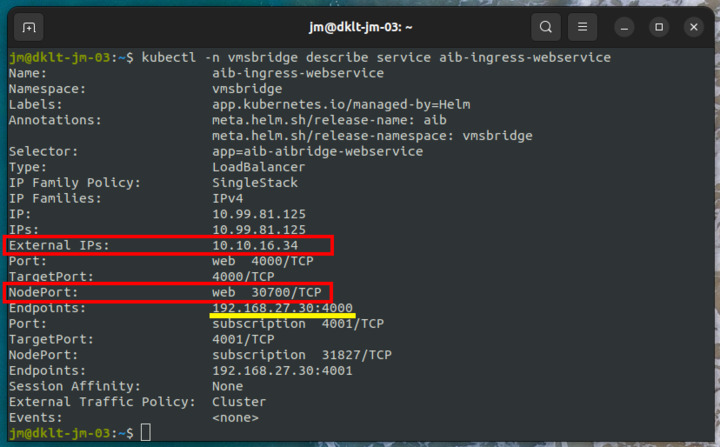
I will show you how it looks for my cluster and then you can try to compare if there are any differences with your setup.
First try to run the following command (leave out the “-n vmsbridge”; this is because I have deployed the AI Bridge in a namespace named “vmsbridge”.
Here we can see that this service (only available when running in debug mode) will forward all traffic from 10.10.16.34:30700 to 192.168.27.30:4000 (IP of pod running the aibridge-webservice).
Now let us investigate the aibridge-webservice (the suffix of the pod will be different on your machine).
And we can see that it is accepting data arriving on 192.168.27.30:4000.
To test the web service, you can run the following command
![image]()
The problem could also be related to the web service not running properly. Here is a dump of how the log files look for my pod.
It is expected that there will be some errors in the beginning (because the other containers are not ready yet). However at some point you should see the “Server started” message and now everything should be working.
The AI Bridge was deployed with the following command
helm dependency update vmsbridge
helm -n vmsbridge install aib vmsbridge \
  --set vms.url=http://dkws-jm-03.milestone.dk \
  --set general.debug=true \
  --set general.externalIP=10.10.16.34 \
  --set general.externalHostname=research-cluster \
  --set ingress-nginx.enabled=true \
  --set ingress-nginx.controller.service.externalIPs=[10.10.16.34]
Thanks again for this, John.
I think we might be getting somewhere: The cluster and services look pretty much the same as yours; however, I notice the following difference in the logs for the webservice:
...

Creating new Kafka admin client succeeded

Creating new Kafka producer ...

{"level":"WARN","timestamp":"2022-08-25T17:51:14.748Z","logger":"kafkajs","message":"KafkaJS v2.0.0 switched default partitioner. To retain the same partitioning behavior as in previous versions, create the producer with the option \"createPartitioner: Partitioners.LegacyPartitioner\". See the migration guide at https://kafka.js.org/docs/migration-guide-v2.0.0#producer-new-default-partitioner for details. Silence this warning by setting the environment variable \"KAFKAJS_NO_PARTITIONER_WARNING=1\""}

Creating new Kafka producer succeeded

Creating new Kafka consumer ...

Creating new Kafka consumer succeeded

Verifying gateway graph ...

Verifying gateway graph succeeded

Verifying existence of kafka topics ...

Not all topics available yet (will retry in 5 seconds)

Not all topics available yet (will retry in 5 seconds)
And those last two lines just keep repeating, so it looks like the webservice itself hasn’t started.
In the proxy pod, I see this in the logs:
...

2022-08-25T17:50:39Z Server starting ...

2022-08-25T17:50:39Z Verifying gateway graph ...

2022-08-25T17:50:44Z Verifying gateway graph failed (will retry in 5 seconds): Post "http://aib-aibridge-fuseki:3030/repositories/voyager/query": context deadline exceeded (Client.Timeout exceeded while awaiting headers)

2022-08-25T17:50:54Z Verifying gateway graph failed (will retry in 5 seconds): Post "http://aib-aibridge-fuseki:3030/repositories/voyager/query": context deadline exceeded (Client.Timeout exceeded while awaiting headers)

2022-08-25T17:50:59Z Verifying gateway graph succeeded

2022-08-25T17:50:59Z Verifying existence of topics in kafka cluster ...

2022-08-25T17:51:00Z Creating kafka cluster admin failed (will retry in 5 seconds): kafka: client has run out of available brokers to talk to (Is your cluster reachable?)

2022-08-25T17:51:05Z Topics [voyager.topics.daim.vmsbridge.stream_subscriptions, voyager.topics.daim.gateway.config_responses] do not yet exist; will wait 5 seconds and check again

2022-08-25T17:51:10Z Topics [voyager.topics.daim.vmsbridge.stream_subscriptions, voyager.topics.daim.gateway.config_responses] do not yet exist; will wait 5 seconds and check again
…with the last two entries repeating over and over.
I looked in the Kafka Zookeeper and broker pods, and nothing in the logs shows any kind of error.
Should I just uninstalling the deployment and install again? Or have I messed something up?
The `values.yaml` file contains pretty much the same values as you have above in your command line config, and I’m using the same `register.graphql` as I was using when I ran this via Docker Compose.
Hopefully we get to the bottom of this soon! Thanks again!
Yes, now we are definitely getting closer. Apparently the kafka topics are not getting created and the services are waiting for this to happen before they will startup. Actually how these kafka topics are created has changed between v1.3 and v1.4 of the AI Bridge. For v1.3 it was configured as part of the kafka broker. However, with v1.4 we are now using another kafka image. This image does not support creating kafka topics up front. Therefore this functionality is moved into to the “init” container.
Just to be sure, are you actually using the v1.4 of Helm Chart? Did you fetch it with this command:
helm fetch https://helm.ngc.nvidia.com/isv-milestone/partners/charts/aibridge-1.4.0.tgz --username='$oauthtoken' --password=<YOUR API KEY>
I was just wondering if you somehow was running a mix of version 1.3 and 1.4 and therefore the kafka topics are not created. This could happen if you downloaded the 1.3 helm chart and then just updated the version number inside it to 1.4.
It would be great if you could send me the log file of the “init” container. By default it will get deleted when it succeeds and then you cannot see the log file any more. To avoid this, you need to delete the line
"helm.sh/hook-delete-policy": before-hook-creation,hook-succeeded
from the aibridge-init.yaml file (in the templates folder).
Here is how my log file looks. You can specifically see how it is creating the topics and succeeds.
Ok, for some reason uninstalling and re-installing the Helm Chart (which is v1.4, I confirmed) fixed things and now I can at least hit the GraphQL endpoint. My init container’s logs looks very similar to yours now.
However, on querying the AI Bridge, I’m noticing that none of the topics I specified in “register.graphql” have been created; at least, when queried for in GraphQL, the eventTopics and metadataTopics returned are empty. I’m trying to look through the logs but nothing is really jumping out at me.
Thanks once again for your help. Hopefully this topics issue is the last of the issues and I can get back to using the AI Bridge!
The “register.graphql” file will be stored in a config map named “aib-config” (aib is the release name I used when the helm chart was deployed, so yours might be different). You can list the config maps with the following command
kubectl get configmaps
And to see the content of “aib-config”, you can run
kubectl describe configmap aib-config
This will show you the content of the “register.graphql” file and you can compare to see if it contains what you expect. When I run it, I get output like shown below
Name:         aib-config
Namespace:    vmsbridge
Labels:       app.kubernetes.io/managed-by=Helm
Annotations:  meta.helm.sh/release-name: aib
              meta.helm.sh/release-namespace: vmsbridge

Data
====
register.graphql:
----
{
  url: "${VMS_URL}"
  username: "${VMS_USER}"
  password: "${VMS_PASS}"
  apps: [ {
    id: "c7107546-4be9-44cf-9d99-054fb92ab336"
    name: "Traffic analysis"
    description: "Analyze traffic flow and detect unsual patterns"
    eventTopics: [ {
      name: "speeding"
      description: "Speeding detection"
      eventFormat: ANALYTICS_EVENT
    }, {
      name: "trafficjam"
      description: "Traffic jam detection"
      eventFormat: ANALYTICS_EVENT
    }, {
      name: "wrongway"
      description: "Wrong-way driving detection"
      eventFormat: ANALYTICS_EVENT
    } ],
    metadataTopics: [ {
      name: "vehicles"
      description: "Detected and tracked cars"
      metadataFormat: ONVIF_ANALYTICS
    }, {
      url: "https://www.dr.dk"
      name: "objects"
      description: "Detected cars, bicycles and persions in traffic"
      metadataFormat: ONVIF_ANALYTICS
    }, {
      url: "https://tv2.dk"
      name: "objects"
      description: "Detected cars, bicycles and persions in traffic"
      metadataFormat: ONVIF_ANALYTICS_FRAME
    }, {
      url: "https://www.google.com"
      name: "objects"
      description: "Detected cars, bicycles and persions in traffic"
      metadataFormat: DEEPSTREAM_MINIMAL
    } ]
    videoTopics: [ {
      name: "anonymized"
      description: "Video with blurred license plates"
      videoCodec: MJPEG
    }, {
      name: "anonymized"
      description: "Video with blurred license plates"
      videoCodec: H264
    }, {
      name: "anonymized"
      description: "Video with blurred license plates"
      videoCodec: H265
    } ]
  } ]
}

Events:  <none>
Apologies for the super late reply. I was reassigned to another project that needed my help, and I’ve just been put back onto the project involving AI Bridge.
I experienced the issue above as I didn’t “read the manual” properly. Once I moved the register.graphql file into the config/ directory and reinstalled the Helm chart, the topics came up. I also now realize that I could specify an override in the arguments to helm install.
Thank you again for your patience and help. I’m sure I’ll be back with more questions shortly.