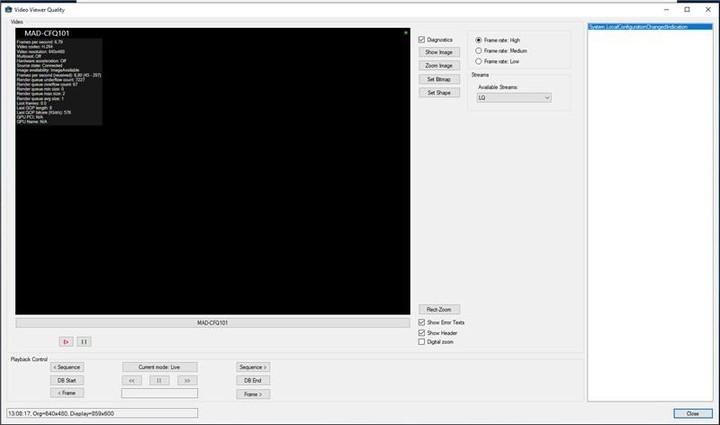
During a migration from SDK2017R3 to SDK2020R3 we noticed that whenever our imageViewerControl is resized above the actual size of the displayed stream, the stream is not rendered anymore (black screen, but diagnostics infos can still be displayed and show everything is “normal”).
Restoring the imageViewerControl to a size smaller than the displayed stream, brings back the video stream rendering.
This can very easily reproduced with any 2020R3 SDK samples (ie: VideoQualityViewer or other sample dynamically adjusting the viewer size).
Just choose to display a low res stream and stretch the sample video above stream resolution.
Please do note that this behavior of the imageViewerControl can not be reproduced with SDK2017R3.
I tested Videoviewer sample and Smart Client but we could not see the issue. We are suspecting if the new adaptive streaming works properly. Can you please tell me, what the camera you are using, what the streams are, what the setup is?
I should have mentioned an important point: the OS version is an impacting factor.
While the issue is 100% reproductible using any of our Windows 7 workstation.
The issue is slightly harder to reproduce using a Windows 10 workstation.
However, we still encountered this issue with a single Win10 VM so far, while 2 others Win10 (physical machine or Virtual machine) are not displaying the described behavior.
Btw, the smartclient 2020R3 used on the (so far) single faulty Win10 is showing the exact same behavior as the SDK.
The SDK migration being our main concern, what’s important here is that the issue is not at all present using SDK2017r3 with the same SDK sample running on the same win7 or win10 workstations (including the faulty win10 machine).
Notes:
We tried to update the SDK sample by switching On/Off the adaptive streaming property without any improvement.
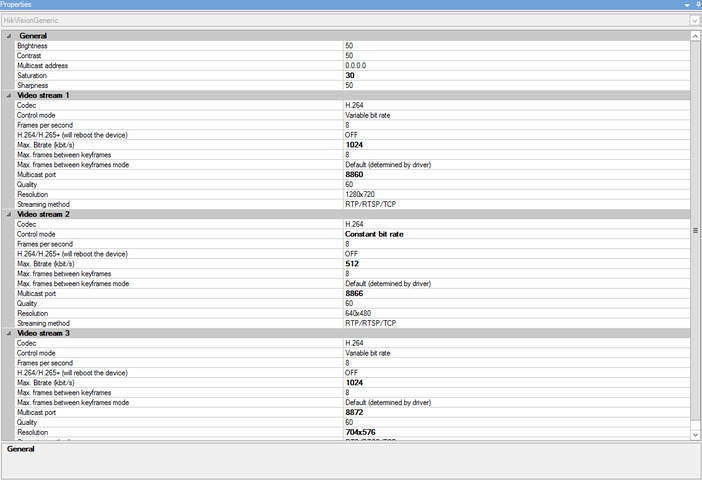
Camera is an Hikvision DS-2D with 2 streams purposely configured with “low res” 1280x720/8fps and 640x480/8fps
Clients are either Win7 x64 or Win10 x64 with Intel/NVidia GPU or VmWare SVGA video card.
Regarding the Windows 10 issue, as you saw the same issue on Smart Client, then it sounds like rather general issue. So please ask again in the support community, you should get better help from the partners using the support community.
However, the questions asked here is not at all about the Smart client.
It is about an SDK 2020r3 feature not working as expected on a supported OS, used in the context of an Xprotect Corporate 2020r3.
We are using a Win10 enterprise on the client side → Supported OS according to your link.
Using this supported Win10 enterprise, we encountered the described issue using an SDK 2020r3 sample code, and for your information only, same issue also occurs with SC 2020r3.
Using this same Win10 enterprise, we do not encounter the issue with the same sample code from SDK 2017r3… The only different software piece between the tests is the SDK version used by the sample.
According to these previous statements, What could be the problem?
Could it be the SDK2020r3?
or could it be a specific activated OS feature not working with SDK2020r3?
We have tried to reproduce the issue but no success. Can you please add screen captures about your camera settings and camera streams on Management Client?
Here is a screenshot from the camera configuration.
There are 3 streams but we are using stream 1 and stream 2 only with this camera.
The described issue can be reproduced with both streams 1 and 2 whenever the rendering surface from imageViewerControl gets larger than stream native resolution.
We found out the cause and solution for the issue.
Cause: DX11 was not available on one of the Win10 VM machine and SDK2020r3 does not like it at all when a user attempts to increase the rendering surface, while SDK2017r3 can live with it.
Reason: this particular VM was created using Vmware Player 15 and set virtualHW.version = “16” (virtualHW.version is found in .vmx file)
Solution: Switch to Vmware Player 16 and manually set virtualHW.version = “18” to enable DX11 on the VM. SDK2020r3 can now behave as expected.
Suggestion: It should not be too hard for the SDK to display or trace a simple warning whenever DX11 (or required future version) is not available on the target machine.
reason why it “works” in 2017 version is because there is no DX11 involved yet, this was introduced in 2020R3. We will look into how it would be best to display such an error, however i must say that i have not heard of any other case that involved machine without DX11 as it is installed automatically with OS basically for many years now. So i dont know how the priority of making the “popup” would be. Regarding troubleshooting faster for devs i suggest you use DebugView - https://docs.microsoft.com/en-us/sysinternals/downloads/debugview - as we actually report some information on the startup of SC about the state of the hardware and such .. likely you would have seen some DX11 init failing in that view.
The output i mentioned in DebugView should also be visible when using the SDK as “deep down” its same initialization. I can only agree that more logging would be beneficial for all, and we are hoping to be able to prioritize this more in the future.
In the mean time i think for more “tech savvy” people i can recommend looking in the tool DebugView for quick troubleshooting.