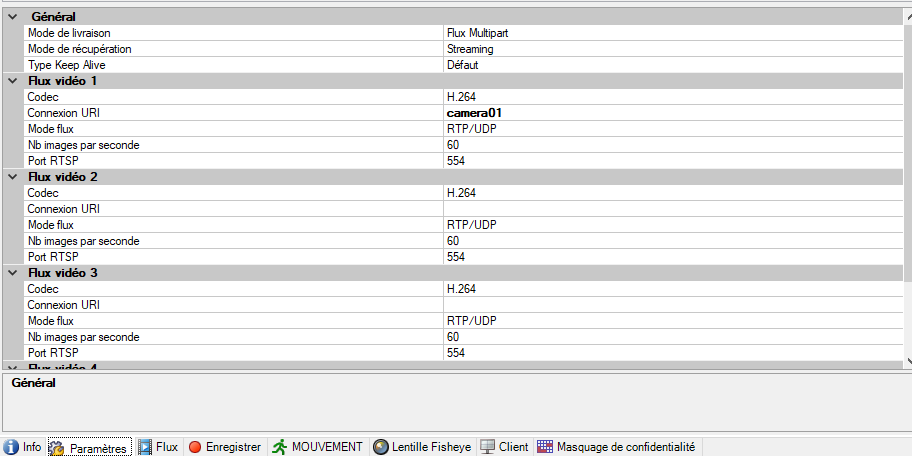
I need to find and edit programmatically the codec of a camera.
I did this with:
var configStream = configAPI.GetItem(string.Format("{0}[{1}]", VideoOS.ConfigurationAPI.ItemTypes.DeviceDriverSettings, cameraFquid.ObjectId));
foreach (var childConfig in configStream.Children)
{
    foreach (var property in childConfig.Properties)
    {
        if (!property.IsSettable)
            continue;
        switch (ExtractNameFromKey(property.Key))
        {
            case "Codec":
                if (!string.IsNullOrEmpty(codec) && !string.Equals(property.Value, codec))
                     property.Value = codec;
                break;
            default:
                break;
        }
    }

    configAPI.SetItem(childConfig);
}
However, for some manually edited (on XProtect Admin) cameras, GetItem throw an not found exception whereas I have some stream and infos:
How do I access to the codec of thoses cameras and programatically edit it ?
Your code works for me.
I tested with the Universal Driver because the image you posted looks like it is using this.
Can you elaborate on what error you see exactly? Please include if there is a special camera / camera driver that is involved. Some cameras might work and others fail, if you can include your observations on this it might be a valuable clue.
PS. I personally prefer the strongly typed classes (VideoOS.Platform.ConfigurationItems classes). I had an old snippet of code I would like to show..
public void MySetDeviceDriverProperties()
{
	ManagementServer ms = new ManagementServer(Configuration.Instance.ServerFQID);
	Camera camera = ms.RecordingServerFolder.RecordingServers.FirstOrDefault().
		HardwareFolder.Hardwares.FirstOrDefault(x => x.Name.Contains("Universal")).
		CameraFolder.Cameras.FirstOrDefault(y => y.Name.Contains("Universal"));
	ICollection<DeviceDriverSettings> deviceDriverSettingsCollection = camera.DeviceDriverSettingsFolder.DeviceDriverSettings;
	DeviceDriverSettings deviceDriverSettings = deviceDriverSettingsCollection.FirstOrDefault();
	ICollection<StreamChildItem> streamChildItems = deviceDriverSettings.StreamChildItems;
	StreamChildItem streamChildItem = streamChildItems.FirstOrDefault(x => x.DisplayName.Contains("1"));
	string codec = streamChildItem.GetProperty("Codec");
}
I tried your code. I can indeed get the info without errors that way, but setting the property codec does not change the codec in admin…
                StreamChildItem streamChildItem = streamChildItems.FirstOrDefault(x => x.DisplayName.Contains("1"));
                var previous = streamChildItem.GetProperty("Codec");
                streamChildItem.SetProperty("Codec", codec);
                logger.Debug($"codec changed from <{previous}> to <{streamChildItem.GetProperty("Codec")}>"); //<-- log received : codec changed from <h264> to <mpeg>
after running program I checked in Admin:
You need to save the new setting. This gets complicated in that there is no Save() method on the StreamChildItem, and that means you need to save it on the underlying DeviceDriverSettings.
I extended my code snippet to illustrate this..
ManagementServer ms = new ManagementServer(Configuration.Instance.ServerFQID);
Camera camera = ms.RecordingServerFolder.RecordingServers.FirstOrDefault().
	HardwareFolder.Hardwares.FirstOrDefault(x => x.Name.Contains("Universal")).
	CameraFolder.Cameras.FirstOrDefault(y => y.Name.Contains("Universal"));
ICollection<DeviceDriverSettings> deviceDriverSettingsCollection = camera.DeviceDriverSettingsFolder.DeviceDriverSettings;
DeviceDriverSettings deviceDriverSettings = deviceDriverSettingsCollection.FirstOrDefault();
ICollection<StreamChildItem> streamChildItems = deviceDriverSettings.StreamChildItems;
StreamChildItem streamChildItem = streamChildItems.FirstOrDefault(x => x.DisplayName.Contains("1"));
string codec = streamChildItem.GetProperty("Codec");
streamChildItem.SetProperty("Codec", "h264");
deviceDriverSettings.Save();
I tried this code and got an error :
VideoOS.Platform.Proxy.ConfigApi.ValidateResultException: Une exception de type ‘VideoOS.Platform.Proxy.ConfigApi.ValidateResultException’ a été levée.
edit 1: I think it doesn’t recognise “mpeg”… it may be a false alarm
edit 2: Okay it works, thank you.
Final code :
private void ChangeCodecNewUniversalDriver(FQID cameraId, string codec)
{
    try
    {
        logger.Debug($"Change codec to {codec} for camera {cameraId}");
        if (GetCamera(cameraId, out Camera camera)
            && camera.DeviceDriverSettingsFolder?.DeviceDriverSettings.FirstOrDefault() is DeviceDriverSettings deviceDriverSettings
            && deviceDriverSettings.StreamChildItems?.FirstOrDefault(x => x.DisplayName.Contains("1")) is StreamChildItem streamChildItem)
        {
            var previous = streamChildItem.GetProperty("Codec");
            streamChildItem.SetProperty("Codec", codec);
            logger.Debug($"codec changed from <{previous}> to <{streamChildItem.GetProperty("Codec")}>");

            deviceDriverSettings.Save();
        }
        else { TryAnotherWay(cameraId, codec); }

    }
    catch (Exception ex)
    {
        logger.Error(ex);
        TryAnotherWay(cameraId, codec);
    }
}

private static bool GetCamera(FQID cameraId, out Camera camera)
{
    try
    {
        camera = new Camera(cameraId);
        return true;
    }
    catch (Exception)
    {
        camera = null;
        return false;
    }
}

private void TryAnotherWay(FQID cameraId, string codec)
{
    logger.Debug("trying another way :");
    try { ChangeCodecNewUniversalDriver2(cameraId.ObjectId.ToString().ToUpper(), codec); }

    catch (Exception ex2)
    {
        logger.Debug("it did not work either T_T...");
        logger.Error(ex2);
    }
}

private void ChangeCodecNewUniversalDriver2(string cameraId, string codec)
{
    logger.Debug($"Change codec to {codec} for camera {cameraId}");
    if (GetCamera2(cameraId, out Camera camera)
        && camera.DeviceDriverSettingsFolder?.DeviceDriverSettings.FirstOrDefault() is DeviceDriverSettings deviceDriverSettings
        && deviceDriverSettings.StreamChildItems?.FirstOrDefault(x => x.DisplayName.Contains("1")) is StreamChildItem streamChildItem)
    {
        var previous = streamChildItem.GetProperty("Codec");
        streamChildItem.SetProperty("Codec", codec);
        logger.Debug($"codec changed from <{previous}> to <{streamChildItem.GetProperty("Codec")}>");

        deviceDriverSettings.Save();
    }
}

private static bool GetCamera2(string cameraId, out Camera camera)
{
    ManagementServer ms = new ManagementServer(Configuration.Instance.ServerFQID);

    if (ms.RecordingServerFolder.RecordingServers.First() is RecordingServer rs
        && rs.HardwareFolder?.Hardwares.Any() == true)
    {
        foreach (Hardware hd in rs.HardwareFolder.Hardwares)
        {
            foreach (Camera c in hd.CameraFolder.Cameras)
            {
                if (c.Id == cameraId)
                {
                    camera = c;
                    return true;
                }
            }
        }
    }
    camera = null;
    return false;
}
Good news; you got it working. Thank you for sharing the final code.