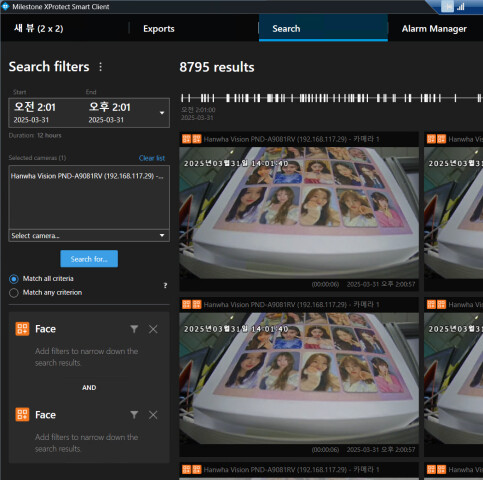
Hello, I’m developing a search page using the search agent. I found some weird behavior.
When I searched for face events, it returned 3837 results. However, when I added the same filter duplicated in the current filters, it returned 8795 results in both ‘any’ and ‘all’ cases. Shouldn’t it return 3837×2 (7674) results?
Looking at our plugin logs, the search engine gets 2 different search requests and returned the same number (3837) of results per request to the client.
+ When I added the same filter(face) three times, it returns 21,951 results which is 7,317 results per request
I would have expected the result to be the same even if you add the filter multiple times. We recommend that the Id of SearchResultData is the same for same result from same video (please see Search result section in following https://doc.developer.milestonesys.com/html/gettingstarted/intro_searchagent.html).
I have not been able to reproduce the issue on our side.
If you can narrow down the search result, it should be able to identify the the results only returned by one of the filter on the amount of icons in upper-left corner of the result item.
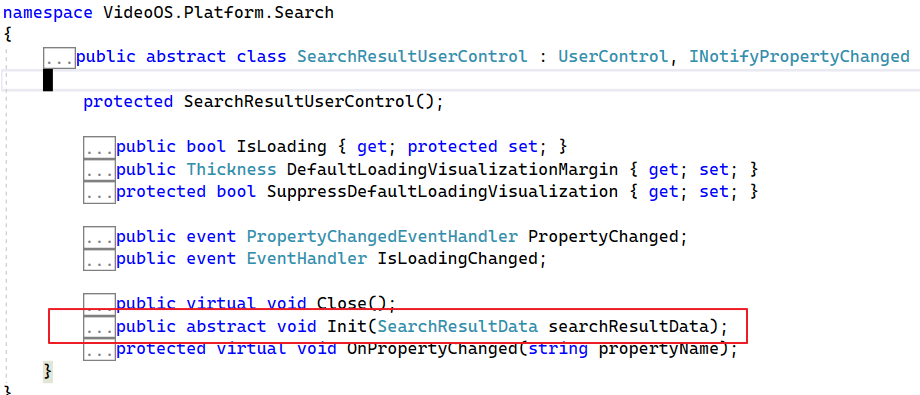
As you mentioned, I can find the results that have only one icon on the result control. However, I don’t understand how the Match all criteria and Match any criterion work. In case there is only one icon on the upper left, the Init method of SearchResultUserControl is called, but when there is more than one icon, it isn’t called.
The “Match all criteria” and “Match any criterion” options determine how search results are combined when multiple search categories are used:
Match all criteria (AND logic):
This option ensures that only search results that satisfy all the specified search criteria are combined into a single result. For example, if you are searching for events from multiple categories (e.g., motion detection and access control), a result will only be created if the events overlap in time and meet all the criteria. This is useful when you want to narrow down results to those that strictly match all conditions.
Match any criterion (OR logic):
This option combines search results that satisfy any of the specified search criteria. If events from different categories overlap in time, they are merged into a single result, even if they only match one of the criteria. This is useful when you want to broaden the search and include results that meet at least one condition.
In both cases, overlapping results from the same camera within the same time span are merged to avoid redundancy. The difference lies in how strictly the criteria are applied when determining which results to combine.