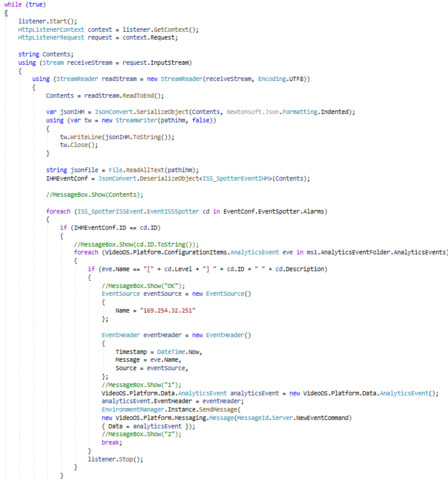
I’m working on a plugin which has a thread running in the background of the plugin, this thread is an httplistener server which listens to a specific address and waits to receive data, when httplistener sees data it analizes it and if it’s “OK” the data will be used to send a message to the alarm list of Smart Client.
A list of analitic events is created during initialization, we use a json file to programmatically generate this analitic event. We use the information from these analitic events to compare with the data frame received and sent the alarm, but it doesn’t work.
Do you have any idea what is missing for it to work?
I used AnalyticsEventTriggerViaLibrary as an example
I’m using both, management client (admin) to test the code with a button but for the final use i want to do it automatically by inserting the code inside the background part of the plug in with service (server event) target environment .
This is the tree view of my projet, they are many other point that actually work but this part have no link to my actually problem
I did test in all environments. I tested with the sample code mentioned.
A Smart Client -Background plugin can use the NewEventCommand
An Event Server -Background plugin can use the NewEventCommand
A Management Client -Background plugin cannot use the NewEventCommand
I will ask Milestone Development but I think it by design. The Management Client is designed for configuration purposes and sending a new event or alarm is not configuration but rather operational.
Please test with an Event Server plugin if this is what you aim to develop anyways.
I want to usec and i use a Event Server Background plugin for this application but it’s dosen’t work …
this is all the code i have now that’s dosen’t work, if you see above on my last comment this code is inside the background part (ISS_SpotterBackgroundPlugin.cs)
using Newtonsoft.Json;
using System;
using System.Collections.Generic;
using System.IO;
using System.Net;
using System.Text;
using System.Threading;
using VideoOS.Platform;
using VideoOS.Platform.Background;
using VideoOS.Platform.Data;
using VideoOS.Platform.Messaging;

namespace ISS_Spotter.Background
{
    /// <summary>
    /// A background plugin will be started during application start and be running until the user logs off or application terminates.<br/>
    /// The Environment will call the methods Init() and Close() when the user login and logout,
    /// so the background task can flush any cached information.<br/>
    /// The base class implementation of the LoadProperties can get a set of configuration,
    /// e.g. the configuration saved by the Options Dialog in the Smart Client or a configuration set saved in one of the administrators.
    /// Identification of which configuration to get is done via the GUID.<br/>
    /// The SaveProperties method can be used if updating of configuration is relevant.
    /// <br/>
    /// The configuration is stored on the server the application is logged into, and should be refreshed when the ApplicationLoggedOn method is called.
    /// Configuration can be user private or shared with all users.<br/>
    /// <br/>
    /// This plugin could be listening to the Message with MessageId == Server.ConfigurationChangedIndication to when when to reload its configuration.
    /// This event is send by the environment within 60 second after the administrator has changed the configuration.
    /// </summary>
    public class ISS_SpotterBackgroundPlugin : BackgroundPlugin
    {
        private bool _stop = false;
        private Thread _thread;

        /// <summary>
        /// Gets the unique id identifying this plugin component
        /// </summary>
        public override Guid Id
        {
            get { return ISS_SpotterDefinition.ISS_SpotterBackgroundPlugin; }
        }

        /// <summary>
        /// The name of this background plugin
        /// </summary>
        public override String Name
        {
            get { return "ISS_Spotter BackgroundPlugin"; }
        }

        /// <summary>
        /// Called by the Environment when the user has logged in.
        /// </summary>
        public override void Init()
        {
            _stop = false;
            _thread = new Thread(new ThreadStart(Run));
            _thread.Name = "ISS_Spotter Background Thread";
            _thread.Start();

        }

        /// <summary>
        /// Called by the Environment when the user log's out.
        /// You should close all remote sessions and flush cache information, as the
        /// user might logon to another server next time.
        /// </summary>
        public override void Close()
        {
            _stop = true;
        }

        /// <summary>
        /// Define in what Environments the current background task should be started.
        /// </summary>
        public override List<EnvironmentType> TargetEnvironments
        {
            get { return new List<EnvironmentType>() { EnvironmentType.Service }; } // Default will run in the Event Server
        }

        /// <summary>
        /// the thread doing the work
        /// </summary>
        private void Run()
        {
            EnvironmentManager.Instance.Log(false, "MIPPlugin1 background thread", "Now starting...", null);
            while (!_stop)
            {

                EventIssSpotter IHMEventConf;
                IHMEventConf = new EventIssSpotter();

                string[] prefixe = { "http://127.0.0.1:3030/journal-events/" };

                string pathihm = @"C:\ProgramData\Milestone\XProtect Event Server\toto.json"; // @"C:\ProgramData\Milestone\ISS Spotter\toto.json";

                HttpListener listener = new HttpListener();
                foreach (string s in prefixe)
                {
                    listener.Prefixes.Add(s);
                }
                listener.Start();

                while (true)
                {
                    HttpListenerContext context = listener.GetContext();
                    HttpListenerRequest request = context.Request;

                    string Contents;
                    using (Stream receiveStream = request.InputStream)
                    {
                        using (StreamReader readStream = new StreamReader(receiveStream, Encoding.UTF8))
                        {
                            Contents = readStream.ReadToEnd();

                            var jsonIHM = JsonConvert.SerializeObject(Contents, Newtonsoft.Json.Formatting.Indented);
                            using (var tw = new StreamWriter(pathihm, false))
                            {
                                tw.WriteLine(jsonIHM.ToString());
                                tw.Close();
                            }

                            string jsonfile = File.ReadAllText(pathihm);
                            IHMEventConf = JsonConvert.DeserializeObject<EventIssSpotter>(Contents);
                            //MessageBox.Show("[" + IHMEventConf.Level + "] " + IHMEventConf.ID + " " + IHMEventConf.Description);

                            EventSource eventSource = new EventSource()
                            {
                                Name = "192.168.168.39"
                            };

                            EventHeader eventHeader = new EventHeader()
                            {
                                Timestamp = DateTime.Now,
                                Message = "[" + IHMEventConf.Level + "] " + IHMEventConf.ID + " " + IHMEventConf.Description,
                                Source = eventSource,
                            };

                            VideoOS.Platform.Data.AnalyticsEvent analyticsEvent = new VideoOS.Platform.Data.AnalyticsEvent();
                            analyticsEvent.EventHeader = eventHeader;

                            EnvironmentManager.Instance.SendMessage(
                        new VideoOS.Platform.Messaging.Message(MessageId.Server.NewAlarmCommand) { Data = analyticsEvent });
                        }
                    }
                }
                Thread.Sleep(2000);
            }
            EnvironmentManager.Instance.Log(false, "MIPPlugin1 background thread", "Now stopping...", null);
            _thread = null;

        }
    }
}
Do you see any error logged in the Event Server MIP log? ([C:\ProgramData\Milestone\XProtect](file:C:/ProgramData/Milestone/XProtect) Event Server\logs\MIPLogs)
If you set a breakpoint can you verify the content of the analytics event object in the SendMessage?
I don’t see any error in the Event Server log, and i already verify the content and it’s correct, i even test if the code is well executed and its ok too … i dont understand why it work on the sample plugin and not in my code.
I would use a trial and error approach. First put in the sample code in the Event Server plug-in and verify that it works. Then bit by bit exchange the code and values with that you want to use, see when it breaks. How and when it breaks should give the answer to what is missing or in other ways faulty.
I am in doubt if it will help but I made my test code available to you. My test code was done by adding to the Property plugin sample, so to use it you need to put it into that sample..