Hello,
Is there a way to send PTZ commands over the REST api? Like “go to zoom: x, pan: y, tilt:z” etc?
I see that it might be theoretically possible to create a PTZ with those settings on the fly and then tell the camera to go to it, but that seems hacky and I’m hoping there’s a way to set PTZ properties directly.
Thanks!
Please look at the tasks for a Camera documented here:
https://doc.developer.milestonesys.com/mipvmsapi/api/config-rest/v1/#tag/DeviceConfig/operation/postTaskForCameras
I believe that “go to zoom: x, pan: y, tilt:z”" would be the SetPtzAbsolutePosition task.
Thank you for your suggestion. I did give this a shot, and the API does return a SUCCESS, but the camera never actually moves.
Note that I have already confirmed the endpoint ptzPresets task=Goto works fine and the camera does move.
If you try GetPtzAbsolutePosition does it work?
What is the camera (make, model, firmware version)? Have you tried more than one camera model?
If you find the camera in the Supported Devices list, what does it say on support for PTZ?
https://www.milestonesys.com/support/software/supported-devices/xprotect/
GetPtzAbsolutePosition returns Success, but with pan, tilt and zoom of all 0.
It is a Honeywell HC70WZ5E30, it’s not on the supported list.
Jump to preset does work. I can send a preset jump command and the camera does move, however absolute position doesn’t seem to work. The API is validating the input - i.e. if I called set absolute position with values out of range I get an error response back. But if I send valid data, the camera never moves.
I will be testing more cameras throughout the day and will update this thread if I learn anything interesting.
I have seen this before.
Most cameras are of Absolute Positioning kind, which means the camera can return the absolute coordinates.
Some cameras (maybe primarily older models) are of Relative Positioning kind, which means they can be panned right left etc. but cannot return coordinates.
If your camera was on the list you could look up the kind of PTZ it uses.
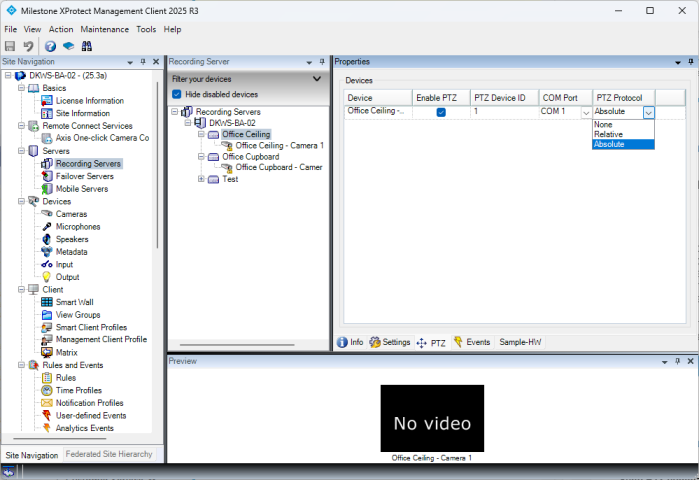
There might be a slim hope: Sometimes cameras have the option that you can set whether the PTZ Protocol is Absolute or Relative. I happen to have a test camera like this.