Sending ONVIF_ANALYTICS messages using REST

XProtect version 21.1b with path and Processing Server plugin installed.

AI Bridge version 1.4 deployed as docker-compose

I use lazydocker to check logs :

airbridge-broker - don’t have logs

airbridge-proxy - I can see errors in these logs when I work with ANALYTICS_EVENT

I can send ANALYTICS_EVENT with REST and I am able to see it in Smart Client

When I send ONVIF metadata with postman I don’t see bounding boxes in Smart Client and I have 0 messages in Metadata LiveViewer (cameras are subscribed to topics)

I try to send this message with POST to http://HOSTNAME:8382/metadata/c7107546-4be9-44cf-9d99-054fb92ab336/vehicles/onvif_analytics

<tt:MetadataStream xmlns:tt="http://www.onvif.org/ver10/schema">
<tt:VideoAnalytics>
<tt:Frame UtcTime="2022-09-02T11:07:40.397+02:00" SourceStreamID="025af0bb-f007-4d86-8d0b-33871de32e83/28dc44c3-079e-4c94-8ec9-60363451eb41">
<tt:Object ObjectId="2">
<tt:Appearance>
<tt:Class>
<tt:ClassCandidate>
<tt:Type>Vehical</tt:Type>
<tt:Likelihood>0.86</tt:Likelihood>
</tt:ClassCandidate>
</tt:Class>
<tt:VehicleInfo>
<tt:Type>Car</tt:Type>
<tt:Brand>Ford</tt:Brand>
<tt:Model>Mustang</tt:Model>
</tt:VehicleInfo>
<tt:Shape>
<tt:BoundingBox bottom="0.46875" right="0.321875" top="0.515625" left="0.275"/>
<tt:CenterOfGravity y="0.298" x="0.492"/>
</tt:Shape>
</tt:Appearance>
</tt:Object>
</tt:Frame>
</tt:VideoAnalytics>
</tt:MetadataStream>

Questions:

  1. How can I debug sending metadata? Where can I check the logs for metadata? What parameters should I verify?
  2. I have modified UtcTime as well I always get OK 200 in postman but I see 0 metadata in Management Client / Metadata Live Viewer / Smart Client. Could it be a problem with SourceStreamID ? I use the same as in ANALYTICS_EVENT which is working fine

1)

One first thing to verify is whether the subscription you made from XProtect is reaching the AI Bridge. In the log file of the proxy container you should see a log entry similar to this (one for each metadata subscription)

2022-09-02T11:25:07Z VPS metadata connection established (metadata.c7107546-4be9-44cf-9d99-054fb92ab336.objects.onvif_analytics.d365898e-10ea-4124-a803-08cd00e0aba5_28dc44c3-079e-4c94-8ec9-60363451eb43) with source video resolution [1920x1080]

Note that lazydocker only shows the log files for the last hour. You can also run the following command to get the log file

docker-compose logs --no-log-prefix daim-vmsbridge-proxy

From the above example log entry we can see that XProtect is subscribing to a metadata topic with

  • app id: c7107546-4be9-44cf-9d99-054fb92ab336
  • name: objects
  • metadata format: onvif_analytics
  • source stream id: d365898e-10ea-4124-a803-08cd00e0aba5_28dc44c3-079e-4c94-8ec9-60363451eb43

The corresponding REST endpoint will be

http://dklt-jm-03:8382/metadata/c7107546-4be9-44cf-9d99-054fb92ab336/objects/onvif_analytics

The AI Bridge will parse the XML that it receives and extract the SourceStreamID attribute. If the SourceStreamID matches the source stream id from the log entry, then the message will be forwarded to XProtect.

You can also send the message to the following source stream specific REST endpoint and then you don’t need to include the SourceStreamID in the ONVIF XML.

http://dklt-jm-03:8382/metadata/c7107546-4be9-44cf-9d99-054fb92ab336/objects/onvif_analytics/d365898e-10ea-4124-a803-08cd00e0aba5_28dc44c3-079e-4c94-8ec9-60363451eb43

When the first metadata message is forwarded back to XProtect you will see a log message in the proxy container that is similar to this

2022-09-02T11:44:12Z Forwarding metadata in onvif_analytics format from source d365898e-10ea-4124-a803-08cd00e0aba5/28dc44c3-079e-4c94-8ec9-60363451eb43 (gRPC / REST) to VPS connection started

If there has been no metadata to forward for about 10 seconds, you will see the following log message

2022-09-02T11:46:51Z Forwarding metadata in onvif_analytics format from source d365898e-10ea-4124-a803-08cd00e0aba5/28dc44c3-079e-4c94-8ec9-60363451eb43 to VPS connection stopped after 75 frames (did not get data for 10.205200934s)

2)

Yes, it could definitely be an issue with the source stream id. If the AI Bridge does not recognize the source stream id, the message will be thrown away.

Actually, the UUID you use in the Analytics Event is a camera id (and not a stream id). Below is shown an example that will query both camera ids and video stream ids. It is the video stream id that you need to use as the source stream id. A stream id will always be two GUIDs separated by a forward slash (just like in your XML file).

query {
  cameras {
    id
    videoStreams {
      id
    }
  }
}

Thanks for the fast reply)

I don’t see any VPS connections in proxy logs.

There are devices with VPS drivers in Recording Server.

In proxy I have

2022-09-02T12:55:49Z Event map updated
- event.d7107546-4be9-44cf-9d99-054fb92ab336.alarms.analytics_event -> [ http://192.168.2.238 ]
2022-09-02T12:56:31Z Event map updated
- event.d7107546-4be9-44cf-9d99-054fb92ab348.alarms.analytics_event -> [ http://192.168.2.238 ]

In webservice I have the following error of topic creation

{"level":"ERROR","timestamp":"2022-09-02T12:56:08.568Z","logger":"kafkajs","message":"[Connection] Response CreateTopics(key: 19, version: 3)","broker":"aibridge-kafka-broker:29092","clientId":"vmsbridge/webservice","error":"Topic creation errors","correlationId":17,"size":342}
{"level":"ERROR","timestamp":"2022-09-02T12:56:41.860Z","logger":"kafkajs","message":"[Connection] Response CreateTopics(key: 19, version: 3)","broker":"aibridge-kafka-broker:29092","clientId":"vmsbridge/webservice","error":"Topic creation errors","correlationId":22,"size":342}

Is it a problem with VPS drivers in my Xprotect installation?

Ok, if you don’t see the log entries in the proxy service, then most likely the VPS connection is unsuccessful. You can see the URL that the VPS driver is using here:

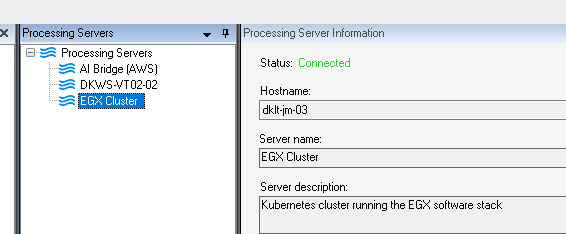
One problem could be that the hostname used does not resolve to the machine running the AI Bridge. This not an uncommon problem when mixing Windows and Linux environments. Can you ping the hostname from the machine running the Recording Server?

Regarding the errors in the webservice log, then it is expected to see errors like this until the service is fully started (when you see the log entry “Server started”). All the containers are started at the same time and they will try to communicate with each other right away. For instance, the webservice container will try to work with the kafka container but every call it makes will fail until it is up and running. The webservice will just retry until it succeeds.

The hostname should be fine because otherwise, I think I wouldn’t be able to see AI Bridge application at all in the management client.

The communication between the AI Bridge and XProtect must work both ways. So, AI Bridge must be able to connect to XProtect to e.g. send events and register the AI Bridge application in the Management Client. This way seems to work for you.

The other way from XProtect to AI Bridge is needed e.g. when sending metadata back to XProtect. The connection status shown in the Management Client will reveal if it can connect to the AI Bridge. It should be “Connected” as shown below. Is this this case for your setup?

Also, I can see from the “ping” command that you get an IPv6 address. Is that the IP address of the machine running the AI Bridge?

Please also check the XProtect log file DeviceHandling.log (found under \ProgramData\Milestone\XProtect Recording Server\Logs). Ideally, it should be without errors. If the host in the VPS driver setting doesn’t match the AI Bridge, you’ll get errors like this:

2024-03-13 16:11:48.541+01:00 [ 89] ERROR - 4b42c3b5-fc05-444d-8c27-6abdcfca6562 VpsThread - VpsThread - Error: Unable to connect to the remote server

When you change the setting, you’ll get an info like this:

2024-03-13 16:13:01.023+01:00 [ 129] INFO - 4b42c3b5-fc05-444d-8c27-6abdcfca6562 VPS - DriverParametersChanged - Parameters: VPSNODES,http://172.27.30.83:8787/metadata/18683B51-CC46-4063-9B8E-ED06C61ADA9E/PersonsInColorBoxes/onvif_analytics/c6d66ee0-7756-45fb-bdfb-78a1189c743a/28dc44c3-079e-4c94-8ec9-60363451eb40

If there are no log entries in DeviceHandling.log related to the VPS driver, even when you change the settings, please try to uncheck/check the Processing server Metadata App subscription for the related camera!

The AI Bridge proxy container log should eventually show an successful entry like this:

2024-03-13T15:13:10Z VPS metadata connection established (metadata.18683b51-cc46-4063-9b8e-ed06c61ada9e.personsincolorboxes.onvif_analytics.c6d66ee0-7756-45fb-bdfb-78a1189c743a_28dc44c3-079e-4c94-8ec9-60363451eb40) with source video resolution [555x333]

When adding metadata, there’s also the general behaviour, that you can only add metadata with a timestamp that is higher than what is already in the XProtect media metadata database, for the device.

If you (try to) add metadata with an earlier timestamp, you

  • Won’t see the “0/1” metadata animation in the Management Client (since nothing is accepted)
  • Will see a log entry in ‪\ProgramData\Milestone\XProtect Recording Server\Logs\DeviceHandling.log, like:
    • 2024-07-17 19:34:22.534+02:00 [ 138] ERROR - 26da28cf-bb7f-410e-9445-358ab46336f2 StableFPS_T800 (localhost) - Camera 1 [PersonsInMinimalBoxes] - Metadata Unable to add one or more frames to the frame collector (Logged only once a minute). Error code = 5

2025-08-07 16:52:32.231+03:00 [ 107] ERROR - 83ce20d8-f86c-4356-a803-e6fb88686a69 Universal 1 channel driver (10.5.1.230) - Camera 1 [objects-onvif_analytics] - Metadata (onvif_analytics) Unable to add one or more frames to the frame collector (Logged only once a minute). Error code = 5

I am getting this message, how to solve the issue

Hi Ofer,

I guess you get this error because there is already written metadata for the timestamp you supply in the ONVIF analytics metadata document (or later). XProtect can not overwrite existing metadata, so please supply a timestamp that is later than what has previously been written for the the particular metadata device.

<tt:MetadataStream xmlns:tt="http://www.onvif.org/ver10/schema">
  <tt:VideoAnalytics>
    <tt:Frame UtcTime="2022-09-02T11:07:40.397+02:00"  ...

the timestamp is in the UtcTime attribute of the Frame element, and should match the timestamp of the video frame it is describing.

I am sending current time + 10 s utc timestamp, and already made sure that duplicate is not sent.

now about, timestamp of the video frame, it is coming from a ntp synced rtsp source. How can we verify timing is correct between meta data and rtsp source.