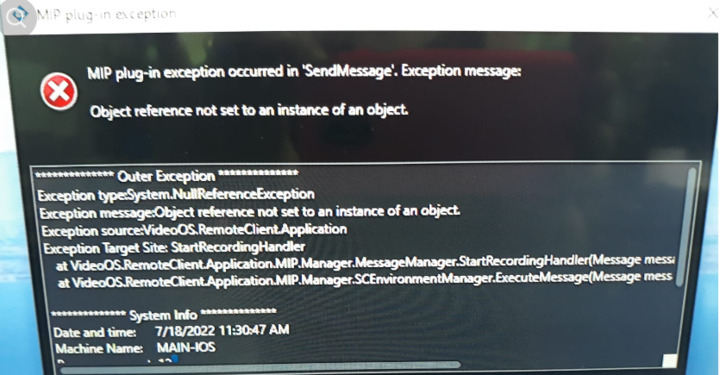
SendMessage with StartRecordingCommand - an exception is received

SendMessage with StartRecordingCommand - Exception

Hi,

With my plug-in, when sending a message StartRecordingCommand for a selected camera item in Admin Client , the SC throws up an error message.

Using SDK 2022 R1

var playbackWorkspace = ClientControl.Instance.GetWorkSpaceItems()

            .FirstOrDefault(item => item.Name.Equals(EWorkspaceType.Live.ToString()));

            if (playbackWorkspace != null)

            {

                                    EnvironmentManager.Instance.SendMessage(

                    new Message(MessageId.Control.StartRecordingCommand,

                    playbackWorkspace.FQID), playbackWorkspace.FQID);

            }

Thank you in advance for your help

Firstly, please do not use the phone picture for showing the error message. Please send us error messages as text, you can add a picture and in that case please take a screen capture.

Can you please check if playbackWorkspace or playbackWorkspace.FQID is null? Also, is this playbackWorkspace valid camera item?

Please debug the plugin and see if it is valid -

https://developer.milestonesys.com/s/article/debugging-techniques-for-Smart-Client-plugins

Please test if unmodified Message Tester sample works for you -

https://doc.developer.milestonesys.com/html/index.html?base=samples/pluginsamples/messagetester/readme.html&tree=tree_1.html

if the sample works you could reuse source code from that sample.

Hello Rie !

1.What is a default place for log files of the SmartClient with exceptions messages?

2.playbackWorkspace is not null and playbackWorkspace.FQID is not null

  1. As far as I understand,the playbackWorkspace is a camera item.In any case, the recording that we can play is done when starting the recording process via SmartClient.

Hi Zhanna,

[C:\ProgramData\Milestone\XProtect](file:C:/ProgramData/Milestone/XProtect) Smart Client, you will find MIPLog there.

https://supportcommunity.milestonesys.com/s/article/Enable-XProtect-Smart-Client-logging-automatically-and-manually?language=en_US

NOTE – If you want to see logs, go to [C:\ProgramData\Milestone](file:C:/ProgramData/Milestone) and you go to service name/app name folder there. Then, you will find logs under the folder.

Have you tested if unmodified Message Tester sample works for you?

https://doc.developer.milestonesys.com/html/index.html?base=samples/pluginsamples/messagetester/readme.html&tree=tree_1.html

if the sample works, you could reuse source code from that sample.

Hi Rie,

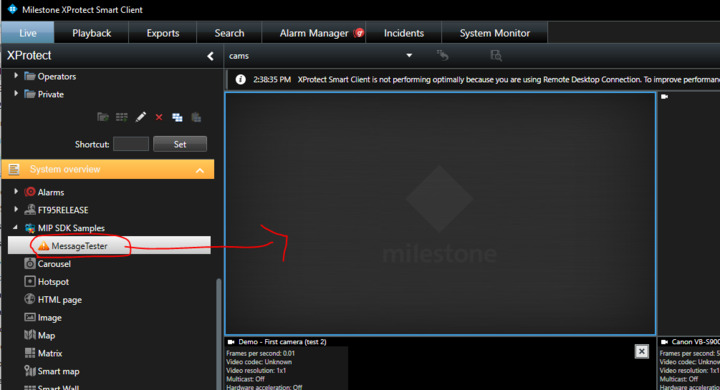
Unfortunately I don’t see the part of Message Tester in gui.The MessageTester.dll is stored in %PROGRAMFILES%\Milestone\MIPPlugins\MessageTester folder.
MessageTester sources are taken from

https://github.com/milestonesys/mipsdk-samples-plugin

Maybe the problem is that MessageTester is released for XProtect 2022 R2, and we are working with XProtect 2022 R1 release?

Thank you

I can see Message Tester in your image in the previous reply. Your settings are correct.

What you need to do is –

Start Smart Client – go to Setup mode – select “MessageTester” under MIP SDK Sample – drag and drop it on a view – escape from Setup mode.

Thank you!