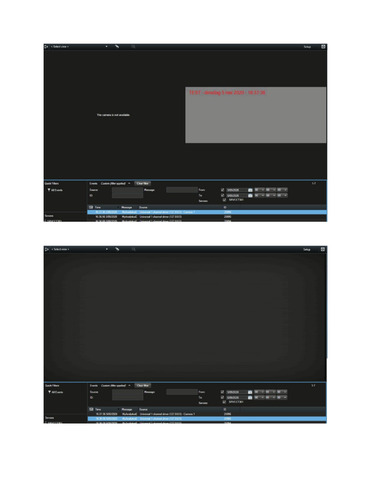
I believe that what you describe when referring to ReferenceList is recorded video and your observation is that the recorded video is not showing for an alarm that has no camera associated with it. This is by design, an alarm preview should not present pictures from a camera not associated with the alarm.
There is a Snapshot feature for Analytics Events which is independent of camera associations. You can see this used in the LibraryEventGenerator sample.
It is important to note that using this you are not referring to recorded images in the recording server but instead saving images in the SQL database. It is important to be aware of the extra resources usage by implementing this, you can introduce usage that will cause the requirements for SQL Server for the XProtect site to grow.
There is a big difference between using the recoded images in the recording server and using snapshot images stored to the SQL, I hope I have interpreted your question correctly, if my answer does not fit please elaborate on your question.
Are you using Alarm directly and seeing the same issue as described? If not, for further investigation, can you please document your code for us to get a deeper understanding?
I updated the TriggerAnalyticsEventSDK sample to include snapshots.
In attachment the code and some screenshots.
If I choose a camera as source for the event, the alarm preview pane shows the snapshots. If I choose something else than a camera, the snapshot is not shown.
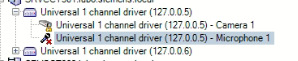
According to your image, your microphone is disable, this “disable” means that the device (the microphone) is not existing, it is like a deleted device. Can you please enable your microphone?
I modified the sample and did the initial test. I retested because I wanted to test with a microphone, now I find that only cameras works, precisely as you have observed. I too find that if the source is an event or a microphone the snapshot is not shown. I am unable to understand now how I could have different test results last time I tested..
I will discuss with Milestone Development whether the it is a design choice that snapshots are only displayed if the source is a camera.
While investigating the issue we found that if the Alarm Preview plugin sample is deployed the snapshot is shown even if the source is not a camera and no cameras are associated with the event or alarm definition. The suggested workaround is that you develop your own alarm preview plugin, you might be able to find relevant information to display in your own alarm preview plugin. (It is not possible to make an alarm preview plugin that does not display.)
Milestone does recommend that you upgrade the Smart Client.
If there is a reason for not wanting to upgrade the Smart Client I will make a request with Milestone Development for another patch, in that case let me know by posting your feedback here