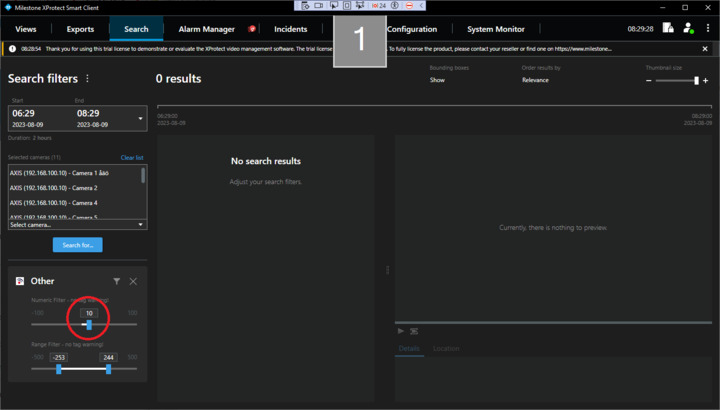
We have made a Search Plugin with different search filters and when using a slider filter (SliderFilterConfiguration) with negative Minimum value the slider is displayed with a the correct negative minimum value but the slider cannot be moved to a negative number.
public override FilterConfigurationBase GetFilterConfiguration()
{
return new SliderFilterConfiguration { DisplayMode = EditControlDisplayMode.SnapToParentWidth,
Minimum = -100, Maximum = 100 };
}
In the image above the Numeric Filter slider at 10 cannot be moved below 0.
(The Range Filter can be moved to negative values)
Smart Client 2023 R1
Hi Anders
Thank you for asking this question.
I can easily reproduce the issue you’re seeing, and must unfortunately conclude that this seems to be an untested case. As you mention, the UI shows it correctly, but the interaction does not work as one would expect. We have a small bug in the code which means the controls behavior is not correctly aligned with it’s visualization in this particular configuration. The bug is present in the current release (Smart Client 2023 R2) and all earlier versions including Search.
We’re looking into fixing it, and I am pretty confident that a fix for it will be included in the next release (2023 R3).
Hi Nicolai,
Thanks for the reply, then I know.
Looking forward to 2023 R3.
Regards
Anders