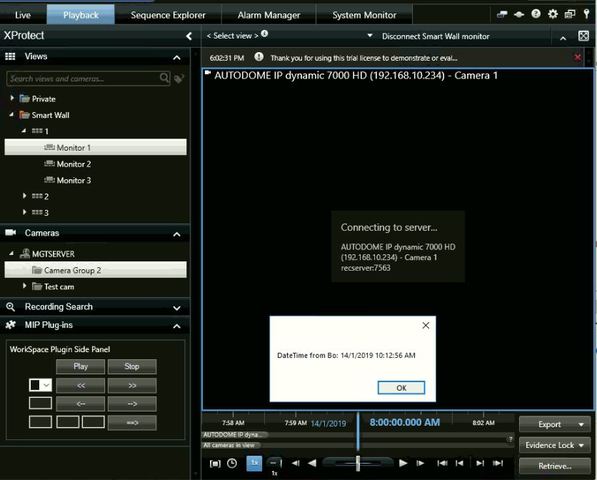
What is the command or proper way to retrieve the current playing time on the SmartClient Playback Control?
I was trying to implement a button where when it was clicked,
the playback will go back n seconds before current time (the time pointing
by the controller, not the system current time(DateTime.Now)).
n is defined by user.
I tried using PlaybackTimeInformationData.CurrentTime
but I get random time from it.
FQID FQID_PlaybackController = ClientControl.Instance.GeneratePlaybackController();

PlaybackController playbackController;
playbackController = ClientControl.Instance.GetPlaybackController(FQID_PlaybackController);

PlaybackTimeInformationData playbackTimeInformationData = new PlaybackTimeInformationData()
{
          item = FQID_PlaybackController,
};
DateTime _dateTime = new DateTime();
_dateTime = playbackTimeInformationData.CurrentTime;
_dateTime.
Message message = new Message(MessageId.SmartClient.PlaybackCommand, FQID_PlaybackController, new PlaybackCommandData
            {
                Command = PlaybackData.Goto,
                DateTime = _dateTime.AddSeconds(-n)
            });
            ClientControl.Instance.CallOnUiThread(() => EnvironmentManager.Instance.SendMessage(message, null, null));
I think I’m quick close to it but still missing something,
hope to hear from you soon!
Thanks in advance.
=)
According to VideoOS.Platform.Messaging.PlaybackTimeInformationData Class Reference this class is only implemented in stand-alone, so it will not work in the Smart Client environment.
Use instead:
--
const String VideoOS.Platform.Messaging.MessageId.SmartClient.GetCurrentPlaybackTimeRequest = “SmartClient.GetCurrentPlaybackTimeRequest”
This request can be send by a plug-in executing in the Smart Client and the .Net Library to retrieve the current time of the playback.
the result is a DateTime.
--
https://doc.developer.milestonesys.com/html/index.html?base=miphelp/class_video_o_s_1_1_platform_1_1_messaging_1_1_message_id_1_1_smart_client.html&tree=tree_search.html?search=playbacktimeinformationdata
Thanks for the reply.
I tried with “SmartClient.GetCurrentPlaybackTimeRequest” as shown in the code snippets below, adapted from
private void OnResize(object sender, EventArgs e){…}
function from
\PluginSamples\SCBookmark\Client\BookmarkSampleSidePanelUserControl.cs
but the result (shown in image attached) is correct with the date but not the HH:mm:ss time.
        private void GetCursorTime()
        {
            FQID FQID_PlaybackController = ClientControl.Instance.GeneratePlaybackController();

            Collection<object> result;
            result = EnvironmentManager.Instance.SendMessage(
                new Message(MessageId.SmartClient.GetCurrentPlaybackTimeRequest),
                FQID_PlaybackController);

            if (result != null && result[0] is DateTime)
                System.Windows.Forms.MessageBox.Show("DateTime from Bo: " + (DateTime)result[0]);
        }
You are now generating a new playback controller and not getting the one default used by the Smart Client (no use of GetPlaybackController).
I ran a test, and I would like to recommend that you can simply leave the PlaybackController out (and get the default)..
This works for me in my testing..
Collection<object> result;
result = EnvironmentManager.Instance.SendMessage(new Message(MessageId.SmartClient.GetCurrentPlaybackTimeRequest));
if (result != null && result[0] is DateTime)
{
    DateTime show = DateTime.UtcNow;
    show = (DateTime)result[0];
    show = show.ToLocalTime();
    System.Windows.Forms.MessageBox.Show("DateTime from Bo: " + show);
}
Note that you will get the time in UTC, which explains the conversion in my code..