SmartWall CameraView Properties Edit

Hello,

I need to set all the video stream to fill the entire space, so there is no black band.

In the smart client there is a parameter maintain image aspect ratio.

I did look for the related propertie “maintainimageaspectratio” and i set it to false with this code running as a background plugin on a SmartClient:

 private void RefreshOverlay(ImageViewerAddOn imageViewerAddOn)
        {
            if (imageViewerAddOn.CameraFQID != null && imageViewerAddOn.CameraFQID.ObjectId != Guid.Empty)
            {
                List<Item> childs = imageViewerAddOn.WindowInformation.ViewAndLayoutItem.GetChildren();
                int pos = 0;
                foreach (Item child in childs)
                {
                    if (child.Properties.ContainsKey("maintainimageaspectratio"))
                    {
                        if (child.Properties["maintainimageaspectratio"] == "True") 
                        {
                            
                            ClientControl.Instance.CallOnUiThread(() => child.Properties["maintainimageaspectratio"] = "False");
 
                            //imageViewerAddOn.WindowInformation.ViewAndLayoutItem.PropertiesModified();
                            //string properties = imageViewerAddOn.WindowInformation.ViewAndLayoutItem.ViewItemConfigurationString(pos);
                            ClientControl.Instance.CallOnUiThread(() => imageViewerAddOn.WindowInformation.ViewAndLayoutItem.InsertBuiltinViewItem(pos, ViewAndLayoutItem.CameraBuiltinId, child.Properties));
                            List<Item> x = ClientControl.Instance.GetSmartWallItems();
                                }
                    }
                    pos++;
                }
               
            }
        }

This code doesn’t work perfectly, it works sometimes but not every time.

Is there a better way to do it, may be more on the server side ?

I did open a ticket for this on the support but they said that there is no way to do this for the SmartWall …

Regards,

Florent
I am sorry delayed reply, Milestone Development will start an investigation.

I got a message from Milestone Development, it said;

You state this in your question: “I need to set all the video stream to fill the entire space, so there is no black band.”

We are unsure whether that means all video streams in all of Smart Client, or only the ones in Smart Wall.

Can you please clarify it?

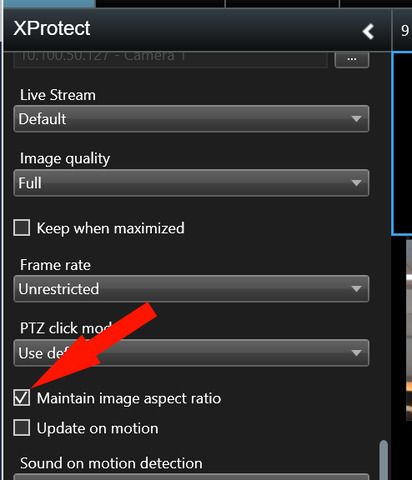
If it is in all of Smart Client, you can simply edit the view items in Setup mode and untick the “Maintain image aspect ratio” for all your cameras; see the picture below.

It’s for the SmartWall and the option is not displayed.

Thank you for your reply, Milestone Development start further investigation, let me get back to you when I receive a news from them.

Hi Florent

Could you please elaborate on exactly what you mean by:

“This code doesn’t work perfectly, it works sometimes but not every time.”

My assumption is that sometimes the black bands are removed (ie. the replaced view item has a correct value for “maintainimageaspectratio”) in some cases but not in all. We will need a little more detail from you in order to investigate that further.

Apart from that, I think you should consider an improvement in your code. Line 14 in the code from your post, updates the existing property dictionary instead of creating a local copy before making the change. I suggest you try code similar to this (note this is just a subset of your original code):

if (child.Properties.ContainsKey("maintainimageaspectratio"))
{
	if (child.Properties["maintainimageaspectratio"] == "True")
	{
		var propertiesCopy = child.Properties.ToDictionary(p => p.Key, p => p.Value);
		propertiesCopy["maintainimageaspectratio"] = "False";
		ClientControl.Instance.CallOnUiThread(() => imageViewerAddOn.WindowInformation.ViewAndLayoutItem.InsertBuiltinViewItem(pos, ViewAndLayoutItem.CameraBuiltinId, propertiesCopy));
	}
}