Sometimes export is not working with mobile SDK

Hi,

I’m using the sdk to export some recording from a milestone installation. I have a web platform where the users can log in and select a start date and time and an end date and time, these two strings are converted in timestamp and with the sdk I’m exporting the video. It works but some times it freezes.

In the console log I can see that it correctly makes the login and starts the export proccess but it does not really export the file, the progress bar is not showed and nothing happens. But if I try in one hour maybe it works again.

What can it be? In the console there are not errors.

Thanks!

Best regards

Hello Davide,

can you check if there is something suspicions in the Mobile server log usually located at [C:\ProgramData\Milestone\XProtect](file:C:/ProgramData/Milestone/XProtect) Mobile Server\Logs

You can also attach it here so we can also have a look to search for some clues.

Kindly regards

Teodor

Hello Teodor,

I’ve checked the log file and these are the only lines outputed when I start an exportation

2021-05-17;07:17:42;Info;LicenseWrapper;CheckTwoStepVerification is False

2021-05-17;07:17:42;Info;LicenseWrapper;CheckTwoStepVerification is False

2021-05-17;07:17:43;Info;LicenseWrapper;ManageAlarms is True

2021-05-17;07:17:43;Info;CommunicationCommandQueue;LogIn; OK;admin

2021-05-17;07:17:45;Info;PlaybackVideoSourceExt.VideoFetchThread;Exitted

2021-05-17;07:17:45;Info;PlaybackVideoSourceExt.VideoFetchThread;Exitted

Best regards!

Hello,

I’ve done other test on a different site with a different Edition of Milestone. After 4/5 correctly exported video I’m having the same issue.

These are the log of this system:

2021-05-17;08:12:10;Info;LicenseWrapper;CheckTwoStepVerification is False

2021-05-17;08:12:10;Info;LicenseWrapper;CheckTwoStepVerification is False

2021-05-17;08:12:11;Info;LicenseWrapper;ManageAlarms is True

2021-05-17;08:12:11;Info;CommunicationCommandQueue;LogIn; OK;admin

2021-05-17;08:12:14;Info;CommunicationManager.CheckConnectionsAreAlive();User Timed Out! ChannelID: 01c03684-4b0e-432c-8b61-f540892cda5d

2021-05-17;08:12:22;Info;CommunicationManager.CheckConnectionsAreAlive();User Timed Out! ChannelID: aa5c839d-6422-402f-9ce5-257ecc9debff

2021-05-17;08:12:28;Info;LicenseWrapper;CheckTwoStepVerification is False

2021-05-17;08:12:28;Info;LicenseWrapper;CheckTwoStepVerification is False

2021-05-17;08:12:28;Info;LicenseWrapper;ManageAlarms is True

2021-05-17;08:12:28;Info;CommunicationCommandQueue;LogIn; OK;admin

2021-05-17;08:12:29;Info;PlaybackVideoSourceExt.VideoFetchThread;Exitted

2021-05-17;08:13:09;Info;LicenseWrapper;CheckTwoStepVerification is False

2021-05-17;08:13:09;Info;LicenseWrapper;CheckTwoStepVerification is False

2021-05-17;08:13:10;Info;LicenseWrapper;ManageAlarms is True

2021-05-17;08:13:10;Info;CommunicationCommandQueue;LogIn; OK;admin

2021-05-17;08:13:20;Info;LicenseWrapper;CheckTwoStepVerification is False

2021-05-17;08:13:20;Info;LicenseWrapper;CheckTwoStepVerification is False

2021-05-17;08:13:21;Info;LicenseWrapper;ManageAlarms is True

2021-05-17;08:13:21;Info;CommunicationCommandQueue;LogIn; OK;admin

2021-05-17;08:13:28;Info;CommunicationManager.CheckConnectionsAreAlive();User Timed Out! ChannelID: 3ea30349-f8ce-436b-a5ec-82a299659a5d

2021-05-17;08:13:30;Info;CommunicationManager.CheckConnectionsAreAlive();User Timed Out! ChannelID: 0411987a-2291-4f93-8ac9-441258396034

2021-05-17;08:13:36;Info;LicenseWrapper;CheckTwoStepVerification is False

2021-05-17;08:13:36;Info;LicenseWrapper;CheckTwoStepVerification is False

2021-05-17;08:13:37;Info;LicenseWrapper;ManageAlarms is True

2021-05-17;08:13:37;Info;CommunicationCommandQueue;LogIn; OK;admin

2021-05-17;08:13:37;Info;PlaybackVideoSourceExt.VideoFetchThread;Exitted

2021-05-17;08:13:40;Info;CommunicationManager.CheckConnectionsAreAlive();User Timed Out! ChannelID: 53983146-7095-44dd-95b3-e11e751e9112

As you can see in the following images the connection and the login is correct but nothing happens.

Milestone Export

And the live view of the camera works correctly.

I add that if I try to export from the smart client the same period it always works correctly.

Best regards
Hello Davide,

I have made 20+ exports from the latest version of the XProtect and they are working like a charm in my environment. Can you please tell me what version of Milestone XProtect you are using?

You have stated that you are using the Web SDK. Did you build your own web application using the SDK or you are using the WebClient to make the exports?

Can you provide us with Wireshark trace of the communication between the browser and the Mobile server on HTTP so that we can investigate where the problem may lay.

Best regards

Teodor

Hello Teodor,

I’ve made other exports but I have the same problems. I’ve tried on multiple devices but same results.

I’m using Milestone 2020 R3.

I attach the wireshark of an export that failed.

Best regards.

Hello Davide,

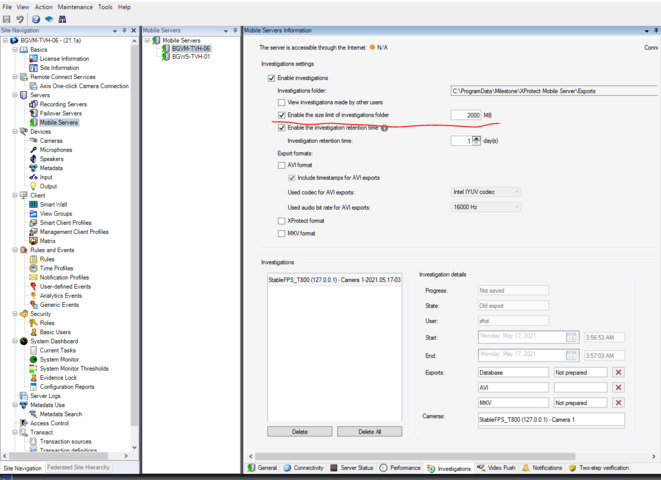
from the Wireshark log I can see that whenever you are sending the GetExport command to check the Status of the export the Mobile server returns State=“-10” . If you check the GetExport command documentation (https://doc.developer.milestonesys.com/mipsdkmobile/reference/protocols/mobile_command.html#command_GetExport) you can see that -10 means that the Export folder limit was reached. In order to fix this you can delete some exports or increase the folder limit from Management client

Hi,

thanks for you support. I’ve modified the limit. The only thing is that my C disk has not so much free space, can I change the destination folder of the exports?

Best regards.

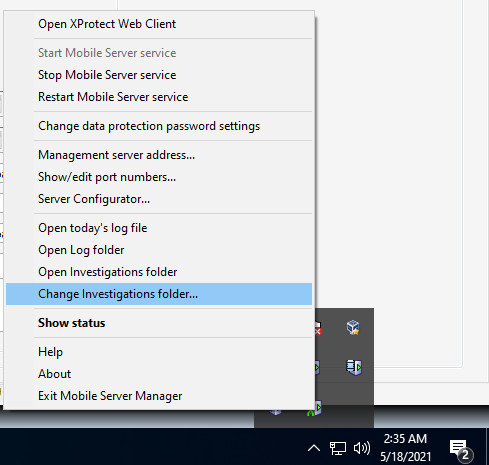
Yes you can. You have to right click on the Mobile Server tray icon and then you can change it from the menu there:

Best regards

Teodor

I’ve correctly change the limit and the folder. Now everything is working fine.

Thanks for your help!

Best regards! Have a nice day!