At the beginning of 2019 I developed an application (Component Integration) for scheduled exports of video recordings, both in XProtect and MKV format.
The first revision was based on the 2019R1 SDK. Over time I have added other features, up to the previous revision based on the SDK 2020R2.
One of the functions used by the Customers is that each schedule in XProtect format the application adds the latest recordings, starting from the previous schedule, in the same destination folder so that with the Player it is possible to view all the recordings from the first to the last schedule.
Starting from SDK 2020R3, but it’s the same for 2021R1, this functionality is no longer guaranteed since a subsequent export to the same destination folder generates the error “Project.scp file already exists in the export location. Filepath: [C:\Users\…\Documents\Export\](file:C:/Users/…/Documents/Export/) Project.scp (1)” at the Start of the export procedure.
Since, starting from SDK 2020R3, some changes have been made to the export library (DBExporter), which unfortunately the documentation does not clarify enough, I ask if there is a method to restore the aforementioned functionality.
Many Thanks,
Frediano
The option for adding to an existing export was removed for two reasons:
- We introduced tampering detection and adding to a previous export is considered tampering
- The old solution had several flaws and had to be used with caution as it could result in an incomplete or even unreadable export (e.g. by exporting different cameras or overlapping time periods)
We are sorry for the problems this is causing you.
Bob, I hope you are joking. Can you tell me how to do an incremental export?
I am aware that the feature needs to be used carefully, but I have several customers who have been using it for a couple of years with no problems, what do I tell them now?
Can you at least make sure that using the libraries of the 2020R2 SDK everything works correctly even on platforms> of 2020R2?
Many Thanks,
Freddy
The tampering functionality would not work if you were able to do what you do, so it is a conflict of what Milestone consider a security enhancement.
I took the liberty of opening a Support case for you (MSC635994), it will be a chance to discuss possible workaround for your specific integration implementation.
Bob, I compiled the application with the 2020R2 SDK and tried it both on 2020R3, and on 2021R1 and everything works fine, including queuing in the same folder.
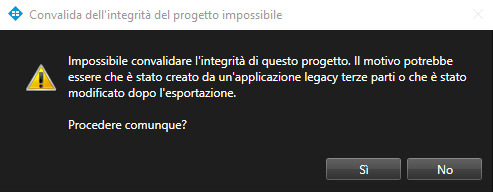
Unfortunately the Player, which does not find the tampering key, at startup it gives the previous message and then it starts up normally.
The problem is that most of the End Customers are law enforcement agencies and they interpret the message as if they were providing altered videos.
Many Thanks,
Freddy
If you export in Milestone format from a version 2020R3 or newer (Smart Client or MIP SDK) the export will include a SCP file with information that allows it to be verified that it has not been changed after the export, this is the new anti-tampering precaution.
If you export in Milestone format from a version 2020R2 (Smart Client or MIP SDK) the export will include a SCP file without this information.
If you use the older export playing it back using a new (2020R3 or newer) Smart Client Player, you will get the warning.
If you want to use the newer Smart Client Player, you should use the newer Smart Client or MIP SDK to create the export.
In general Milestone does recommend to use the newest MIP SDK. (Currently this is MIP SDK 2021R1.)