Strange error saving item

Please can someone tell me what this error means:

2025-06-04 11:12:34.313+02:00 [ 80] ERROR - SecurityPanelItemManager.SaveItem >>> Unable to Save Item “XYZ” - Error: PUT Unexpected statuscode BadRequest in ‘http://mpadtvccapp1.veronesi.com/API/rest/v1/mipItems/08637b00-ba07-4b0f-8764-37d956be01d0’ - The MIP item could not be saved.

Many Thanks,

Frediano

I guess it means the MIP item cannot be saved, an explanation which is not leading closer to what the issue is. Please try to find the code in your plugin that causes this, it would be interesting for me to see and try to reproduce. First verify that no parameter has a wrong value, then let me see this as a snippet of code or similar.

The plugin runs where? (In which environment: Smart Client, Management Client, Event Server?)

What version is the environment? Is it the same a the XProtect VMS?

What version of the MIP SDK NuGets have you used building your plugin?

sorry for delay, I preferred to do some other test before to answer.

The message I sent you is from a plugin developed for rev. 2022R2, for the manufacturer of a family of intrusion panels that has sold more than 100, but it comes from 2025R1 Corporate installation. When the plugin component that operates in the ES environment (and manages the protocol with the control units) detects a change in the control unit’s status, it updates the item properties so that the status can be updated on the SCs.

The instruction used is:

Configuration.Instance.SaveItemConfiguration(_PluginId_, _PluginItem_)

which has always worked for years now.

The problem is that from a couple of weeks this same error occurs in other applications, both Plugins and External Components. This is from External Component developed more than 5 years ago, Platform Corporate 2023R3 with SDK (NUGET) 2023R3:

Configuration.Instance.SaveItemConfiguration(Common.LogSyncPluginId, Common.PluginItem);

internal static Guid LogSyncPluginId = new Guid(“5B30636B-298D-495C-A012-D5C8AE10B967”);

Item Common.PluginItem = Configuration.Instance.GetItemConfigurations(Common.LogSyncPluginId, null, Common.LogSyncKind)[0]; (plugin has just one item)

Error Saving Plugin Item: PUT Unexpected statuscode BadRequest in ’

http://hp-freddy/API/rest/v1/mipItems/7d2a2c4c-5269-40d0-aa5e-4a21c28e8d59

’ - The MIP item could not be saved.

Also in this case the need to save Item depend from the variation of a Property (normal text field). I recompiled the entire application using both SDK 2024R2 and 2025R2, but the situation does NOT change.

What kind of test can I do to help you?

I forgot to mention one important thing: I did the following tests with a plugin on Corporate 2023R3 + SDK 2023R2 and with an external component always on Corporate 2023R3 + SDK 2025R2, but the same thing happens also on platforms with revision greater than 2023R3:

            List<Item> items = Configuration.Instance.GetItemConfigurations(Common.LogSyncPluginId, null, Common.LogSyncKind);
 
                Configuration.Instance.SaveItemConfiguration(Common.LogSyncPluginId, Common.PluginItem);

whithout any instruction in beetwen and 2nd row fire same error

Frediano

I think I need to know where in your BackGroundPlugin. I have tried this doing similar (if not the completely the same) in an Event Server BackgroundPlugin in both Init and an EventHandler methods, and I cannot reproduce. Not on newest version and not on a XProtect Corporate 2023R3. I wonder if you are doing it more than once or something else..

Ideally, if you could do a small minimal implementation plugin and give me the source code, then I can hopefully reproduce.

Bo, we are talking about 2 applications, a plugin and an external component, developed a few years ago and verified by Milestone, which have not undergone any changes over time.

For a few weeks, only on some installations, including 2023R3 and 2025R1, have they started to give the highlighted problem.

I cannot give you the sources because the plugin requires an alarm control panel and the external component a Sysylog server.

Bo,

I added the following line

Configuration.Instance.ConfigurationApiManager.UseRestApiWhenAvailable = false;

before calling SaveItemConfiguration, and now everything works fine.

The problem seems to be related to the REST API

I tried to reproduce in a Event Server plugin, but the error might be in the standalone external component.

Where do you see the error logged?

[C:\ProgramData\Milestone\XProtect](file:C:/ProgramData/Milestone/XProtect) Event Server\logs\MIPLogs

or

[C:\ProgramData\Milestone\MIPSDK](file:C:/ProgramData/Milestone/MIPSDK)

The suspicion has always been the REST API as the error has indicated this. I didn’t think of using the UseRestApiWhenAvailable flag. You should think of it as a temporary workaround. I hope knowing which logs you are looking into will help me find the root cause of this issue.

I removed “UseRestApiWhenAvailable = false” and attached are the log files, including mine where you find the exception message.

But I found out what causes the error…

Configuration.Instance.RefreshConfiguration(Common.LogSyncKind);

called before instruction “SaveItemConfiguration” (remember that it has always been there). Removing “RefreshConfiguration” now all works fine.

Do you need other infos?

I cannot see attached log files when you reply to the forum via email. Can I persuade you to go to the forum and make a post where you put the logs?

Correction: the error does not appear only the first time, the subsequent times it repeats. I show you in my log file.

This is the start of the Service:

2025-06-18 15:56:17.781 | INFO | .ctor | Service Init

2025-06-18 15:56:17.789 | INFO | Helpers.ServiceConfiguration.ReadParameters | Reading Configuration Parameters

2025-06-18 15:56:19.213 | INFO | OnStart | Service Started

This is the first schedule of sending Audit Log to Syslog server:

2025-06-18 15:57:19.223 | INFO | ServiceSchedule | Scheduled MIP Log Export

2025-06-18 15:57:19.224 | INFO | Helpers.ServiceConfiguration.ReadParameters | Reading Configuration Parameters

2025-06-18 15:57:20.724 | INFO | ServiceSchedule | Logged on XProtect

2025-06-18 15:57:21.422 | INFO | ServiceSchedule | Reading Audit Register

Here it save the item to update timestamp of the last Audit record read – NO Error

2025-06-18 15:57:28.591 | INFO | Helpers.LogExporter.SendSysLogRecords | Packets Sent = 21

Here it save the item to update the last message sent to Syslog server – NO Error

2025-06-18 15:57:28.725 | INFO | ServiceSchedule | Logged out from XProtect

This is the second schedule (frequency = 2 m):

2025-06-18 15:59:28.732 | INFO | ServiceSchedule | Scheduled MIP Log Export

2025-06-18 15:59:28.733 | INFO | Helpers.ServiceConfiguration.ReadParameters | Reading Configuration Parameters

2025-06-18 15:59:29.315 | INFO | ServiceSchedule | Logged on XProtect

2025-06-18 15:59:29.375 | INFO | ServiceSchedule | Reading Audit Register

2025-06-18 15:59:31.762 | ERROR | SetDbParameters | Error Saving Plugin Item: PUT Unexpected statuscode BadRequest in ’

http://hp-freddy/API/rest/v1/mipItems/7d2a2c4c-5269-40d0-aa5e-4a21c28e8d59

’ - The MIP item could not be saved.

2025-06-18 15:59:35.453 | INFO | Helpers.LogExporter.SendSysLogRecords | Packets Sent = 34

2025-06-18 15:59:35.524 | ERROR | SetDbParameters | Error Saving Plugin Item: PUT Unexpected statuscode BadRequest in ’

http://hp-freddy/API/rest/v1/mipItems/7d2a2c4c-5269-40d0-aa5e-4a21c28e8d59

’ - The MIP item could not be saved.

2025-06-18 15:59:35.541 | INFO | ServiceSchedule | Logged out from XProtect

This is the third schedule …:

2025-06-18 15:59:28.732 | INFO | ServiceSchedule | Scheduled MIP Log Export

2025-06-18 15:59:28.733 | INFO | Helpers.ServiceConfiguration.ReadParameters | Reading Configuration Parameters

2025-06-18 15:59:29.315 | INFO | ServiceSchedule | Logged on XProtect

2025-06-18 15:59:29.375 | INFO | ServiceSchedule | Reading Audit Register

2025-06-18 15:59:31.762 | ERROR | SetDbParameters | Error Saving Plugin Item: PUT Unexpected statuscode BadRequest in ’

http://hp-freddy/API/rest/v1/mipItems/7d2a2c4c-5269-40d0-aa5e-4a21c28e8d59

’ - The MIP item could not be saved.

2025-06-18 15:59:35.453 | INFO | Helpers.LogExporter.SendSysLogRecords | Packets Sent = 34

2025-06-18 15:59:35.524 | ERROR | SetDbParameters | Error Saving Plugin Item: PUT Unexpected statuscode BadRequest in ’

http://hp-freddy/API/rest/v1/mipItems/7d2a2c4c-5269-40d0-aa5e-4a21c28e8d59

’ - The MIP item could not be saved.

2025-06-18 15:59:35.541 | INFO | ServiceSchedule | Logged out from XProtect

… and so on …

Now the same but using “UseRestApiWhenAvailable = false” (NO Error).

Start of Service:

2025-06-18 16:09:32.679 | INFO | .ctor | Service Init

2025-06-18 16:09:32.684 | INFO | Helpers.ServiceConfiguration.ReadParameters | Reading Configuration Parameters

2025-06-18 16:09:33.547 | INFO | OnStart | Service Started

First Schedule:

2025-06-18 16:10:33.563 | INFO | ServiceSchedule | Scheduled MIP Log Export

2025-06-18 16:10:33.564 | INFO | Helpers.ServiceConfiguration.ReadParameters | Reading Configuration Parameters

2025-06-18 16:10:35.144 | INFO | ServiceSchedule | Logged on XProtect

2025-06-18 16:10:35.898 | INFO | ServiceSchedule | Reading Audit Register

2025-06-18 16:10:43.832 | INFO | Helpers.LogExporter.SendSysLogRecords | Packets Sent = 35

2025-06-18 16:10:43.920 | INFO | ServiceSchedule | Logged out from XProtec

Second Schedule:

2025-06-18 16:12:43.935 | INFO | ServiceSchedule | Scheduled MIP Log Export

2025-06-18 16:12:43.936 | INFO | Helpers.ServiceConfiguration.ReadParameters | Reading Configuration Parameters

2025-06-18 16:12:44.618 | INFO | ServiceSchedule | Logged on XProtect

2025-06-18 16:12:45.150 | INFO | ServiceSchedule | Reading Audit Register

2025-06-18 16:12:47.994 | INFO | Helpers.LogExporter.SendSysLogRecords | Packets Sent = 6

2025-06-18 16:12:48.042 | INFO | ServiceSchedule | Logged out from XProtect

Third Schedule:

2025-06-18 16:14:48.053 | INFO | ServiceSchedule | Scheduled MIP Log Export

2025-06-18 16:14:48.055 | INFO | Helpers.ServiceConfiguration.ReadParameters | Reading Configuration Parameters

2025-06-18 16:14:48.708 | INFO | ServiceSchedule | Logged on XProtect

2025-06-18 16:14:48.725 | INFO | ServiceSchedule | Reading Audit Register

2025-06-18 16:14:51.315 | INFO | Helpers.LogExporter.SendSysLogRecords | Packets Sent = 9

2025-06-18 16:14:51.373 | INFO | ServiceSchedule | Logged out from XProtect

… and so on …
I tried to reproduce using the new info, I am still not able to.

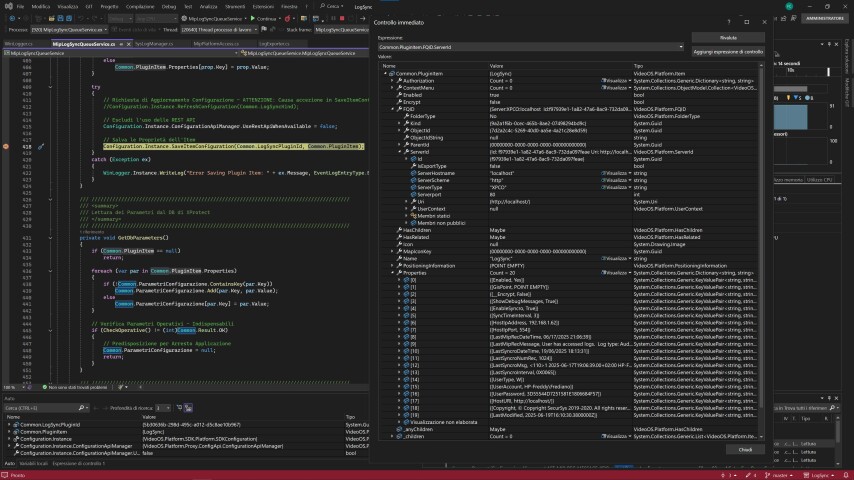
I have a hunch that I might need more info on the Common.PluginItem; is it a regular item with a Properties collection or is it something else? Perhaps you can outline how the Item, and its FQID, looks like.

This is PluginItem:

Frediano

I can reproduce, if and only if I also have a standalone that saves the same MIPItem, not when working with an plugin alone. But as you have this I assume I have finally reproduced what you have observed.

If you can reproduce with only the plugin running, and have an idea why I cannot reproduce please let me know.

We will at Milestone Development work with the reproduction I made.

The situation is quite complicated.

I had to do an intervention on a system where almost nothing of a plugin developed a few years ago worked, of which there are over 100 installed around Europe.

Since it is a sensitive site, it was difficult to convince the Client to let me access it remotely and when I did I found several errors including the one reported in the post.

Continuing the checks I realized that, although several hot-fixes had been released (Corporate 2025R1) none of them had been installed on the platform, I then asked the Client to do so and report back to me if the errors disappeared.

After a couple of days the Customer communicated that all the problems had been solved but prevented us from connecting to verify in person.

As I have told you, it is unlikely that the Customer will notice the error in the post, so I cannot be sure that this error has also been resolved.

However, I can tell you that I did the same tests on my platform (Corporate 2023R3), the one from which I sent you the reports, and also on a Corporate 2023R1 platform, but in both cases the problem does not occur, so it could only be due to the lack of the 2025R1 hot-fixes.

Frediano

Let me explain what I reproduced. I made a standalone app which can read and save a MIP Item, and I made an Event Server plugin which can read and save the exact same MIP Item (using GetItemConfiguration and SaveItemConfiguration).

If is start the app (A) and the plugin (P) I can observe:

  1. If I save from A and read from P I can save from P.
  2. If I save from A and save from P I get the error (The MIP item could not be saved).
  3. If I save from P and read from A and save from A I get the error.
  4. If I save from P and save from A I get the error.

(1) is the nice scenario, no error. (2-4) is expected behavior, we try to use an outdated item to save, this is the equivalent to having two Management Client trying to rename the same camera at the same time. (3) is what we will investigate deeper, we think it is faulty behavior, some caching that does not reset correctly when reading the newly updated item.

I would like feedback from you, whether this might be what you experience. It could be that you have is not what I have as there is an element of guessing involved.

Your reasoning doesn’t explain two things:

- why the plugin has worked properly for over 5 years

- if you disable the use of the REST API, everything works

I think you changed something with the introduction of the RS.

Frediano

Our analysis shows that there is a bug. Milestone Development is now working on a fix for the MIPSDK and the MIP environments (Smart Client, Management Client, Event Server). (Fix in VideoOS.Platform).

We will update you here when we have a fix / patch available for you.

Milestone Development have created patches that are available from - https://supportcommunity.milestonesys.com/KBRedir?art=000070650&lang=en_US

The NuGets have also been updated. Read about the Bug-fix maintenance release 25.2.3 here - https://doc.developer.milestonesys.com/mipsdk/index.html?base=gettingstarted%2Fmip2025R2_intro.html&tree=tree_home.html