We use VideoOS.Platform.Live.RawLiveSource to get the raw data, with the code as follows:
And, save as raw.data file. But, we find the stream have no I-frame, and fail to decode. Details please see the attachment.
And this phenomenon appeared all of a sudden. It was all good before January 15. we doubt whether the license have some limitations. But Product version is XProtect Corporate 2017 R2 Test, and the expiration data: 2018/7/5.
What reason may causes this phenomenon ? please give us some help, many thanks.
When using RawLiveSource with h264 (and similar) cameras you get one frame at the time, so not all the frames you get will be an i-frame. You might need to skip frames until you first get an i-frame.
But,the size of the raw.data is 440KB. There’s at least one i-frame. Do you mean the size of the file we saved(raw.data) is not big enough ?
How frequent there is an i-frame and how much data there is in between will be different depending on the camera and the setup. It does not sound right that there is no i-frame.
There should be help in understanding the data in the MIP Documentation: The GenericByteData format.
If you strip the Milestone header off the data it should be exactly what the camera sends.
This may not the problem of stream data, we suspected it was something wrong with the system environments.
Actually, we have try to change our PC system time to 2018.1.15,and everything is Ok.Our plugins is working well.
But,when change the PC system time back to the current time, It’s stop working again.
The phenomenon is quite strange,isn’t it?
Is there some limits(for example, license or somthing else depends on time) for the plugins?Any ideas? Thanks for help
It is a known issue that if your servers and the cameras are not in sync on their time, remember to include date and time zone when checking this, many cameras will not work. You will not see footage in the Smart Client either. I had half assumed that you know the camera was working by being able to see video in the client.
If you sync servers, clients and cameras does it solve the issue?
Thanks for the advice, we have tried, sync the time of servers、clients and the cameras.The servers and clients are installed on the same PC, and we set the camers time like this:
But,it still not working. we can not get the right stream with my Plugin.
And, when we changed the PC time to 2018/1/15 before, of course, time is out of sync between servers(2018/1/15) and camera(2018/1/23),
but it’s working. We can get the stream ,and see the live video with my plugin.
In addition, we can always see the live video in the Smart Client without load my plugin.
I am suspecting something wrong with the camera device. Can you try with another device?
(Honestly I think this is a mystery, the Smart Client will also use raw video, and it works..)
Actually, we hava tried several cameras. It’s meaningless.
The plugins we test is the released version which was released last year.
It have been used for a long time.
It was just strange, and we all have no ideas about this.
Is it correctly understood that this behavior of RawLiveSource is observed in a Smart Client plugin?
Could the changed behavior be introduced with a new version of the Smart Client?
Your XProtect Corporate is 2017R2. Could you test with an older Smart Client? Could you test with the newest Smart Client?
If you find that the issue is introduced with a certain version of the Smart Client it will be a very valuable clue.
we have test with 2016 R2 and 2017 R3.It’s all the some.
But we have a newfound. It’s about rawdata stream.
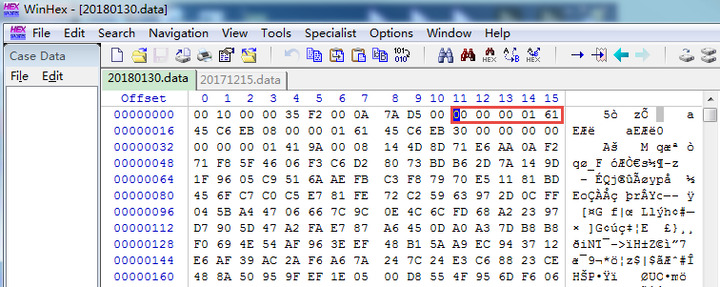
The raw data get from Milestone Client, have SI slice with start address 0x00000161, like this
![SI slice]() These SI cause we plugin resolution fail.
These SI cause we plugin resolution fail.
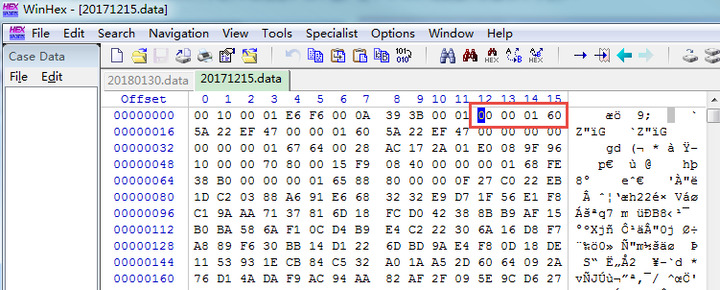
Then, we change the PC(which is install with XProtect Management Client 2017 R2)time, and test again. The raw data we get have no SI slice, and is the correct stream. see diagram below,
And we know,the stream data from Hikvision device have no SI slice these frame information.
So, why are these SI slice? Could you give us some advice? Thanks
The attachment are the data from Milestone Client.