When I click The Retrieve Data button,it shows success,but it only can playback several seconds, Then The progress bar of red supplementary record disappears.
Is this related to - https://developer.milestonesys.com/s/question/0D53X00006oMpf5SAC/when-i-click-the-retrieve-data-buttonit-shows-failed-why -?
If this is not related please add more context and rephrase the question.
sorry, this is not related.My question is:
You can see the bellow picture,it shows success,It also can playback.But it only can playback several seconds.
it can playback several seconds later,it shows bellow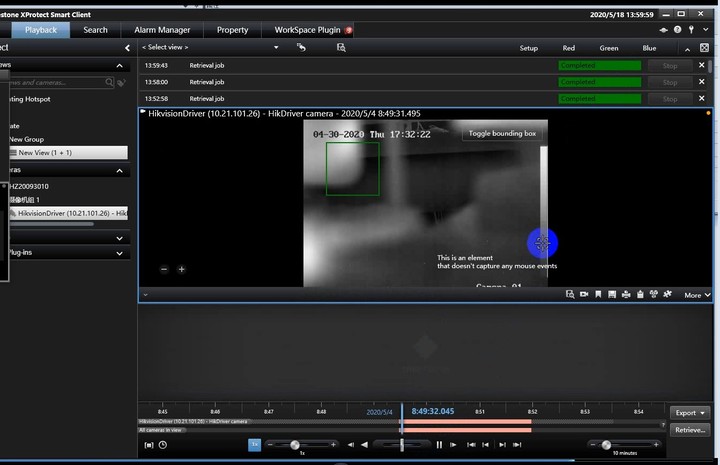
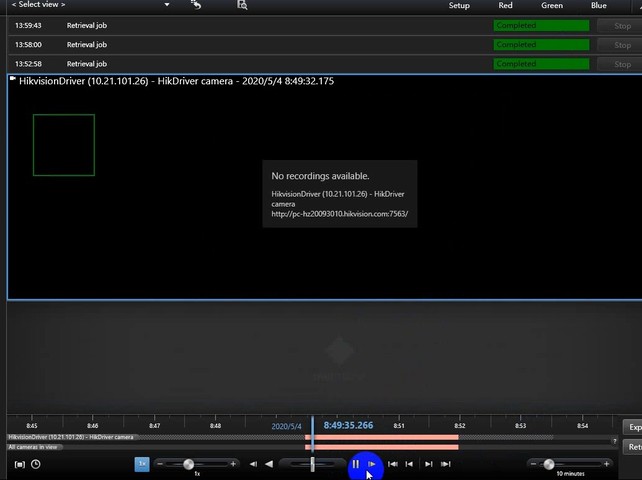
Than about one minutes ,the progress bar of red disappear.
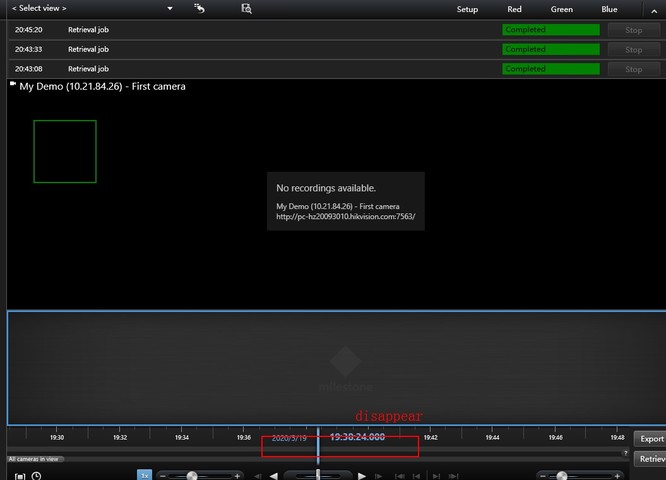
And the context? Is it correct to assume that you developed the driver for this camera using the Driver Framework?
yes, I confirm that I use the driver framework,Because when I debug the code, It always enter the read () function until the end.
What I want to know is when milestone replays the supplementary video, why it will disappear, and why the whole progress bar will disappear.
Refer to the three pictures above.
For this device, in the Management Client, when you pick the camera, on the Record tab, do you have the ‘Play back recording from remote system’ option turned on? (We would expect it to be off when you try to use remote retrieval.)
Can you by debugging or logging find out whether your driver is asked for data for the full retrieval period or your driver is asked for only the period you later is able to see played back?