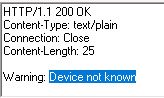
I’m trying to send alert with Trigger Analytics Event Sample application provided in MIP SDK. As mentioned in the sample I need to provide IP address of the camera in the Name tag
xx.xx.xx.xx
However after clicking on SendXML, it responds saying “Device not known”.
below is full response:
My question is, can you please let me know what is meant by camera URI which is expected in name tag above? I also tried guid but it does not work as well.
What should I put in Name tag so that it successfully recognize the camera and send alert to smart client?
yeah I was using IP address of the camera for the same but still it was not working. We figured out that if we use RTSP for streaming the camera then it does not work. It works only with Http streams!!!
The stream address is not considered when matching the event. I just tried setting up a universal driver device on my machine and simply putting the IP-address (1.2.3.4) in the Name node and it worked fine. What exactly are you writing in the Name? And what is the address of your hardware (as stated on the hardware Info tab in Management Client)?
well we had live camera attached to milestone. Let’s say it’s address is 10.72.51.10. But we configured it to receive the stream via RTSP protocol rather than usual http protocol. Now we have external application from another machine which wants to send alerts to Smart client for this camera. So we need to specify IP of camera in the Name node so that smart client can recognize the camera and show the recording/stream when clicked on the event. We used XML from the sample and put the ip of camera in the name node but it did not work for us. However when we changed the stream to http then it works. So my question now is, does alert work for camera having rtsp stream?
I did the exact same. Added a device using universal driver, configured it to use RTSP and then sent in the analytics event with the IP in the Source/Name node. It worked fine and the VMS matched the event with the device.
I also checked the code of the analytics event function and it checks against the address of the hardware - not the individual video stream - so the streaming protocol is not relevant. That is why I asked what is shown in the hardware Info tab in the Management Client.
I had the same issue, solved by adding a port number to Source/Name node but it’s not documented anywhere, please update documentation and include full description of matching analytic event xml to alarm definition
Furthermore, specific channels on video servers may be specified by appending the (0-indexed) channel number separated by a comma. This would therefore represent “Camera 4 on 10.100.50.23”: