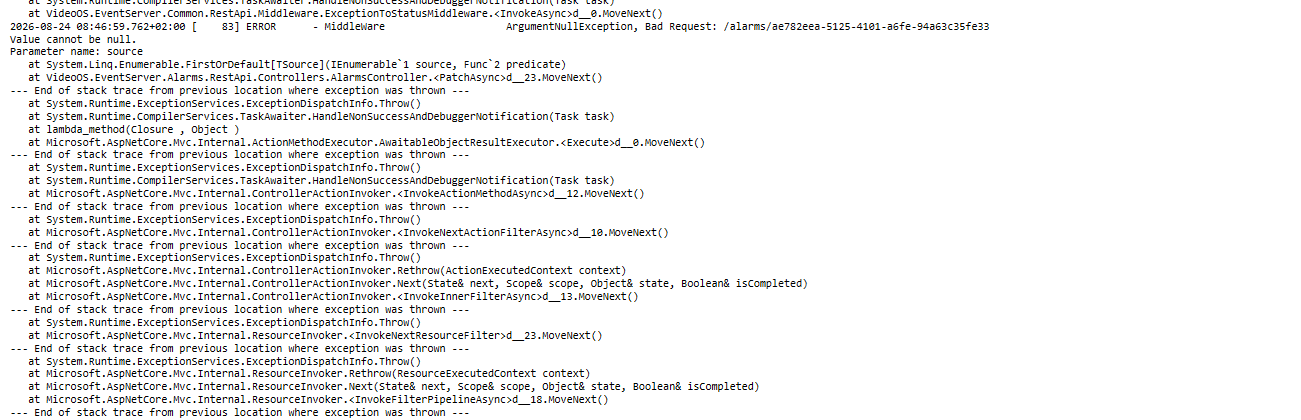
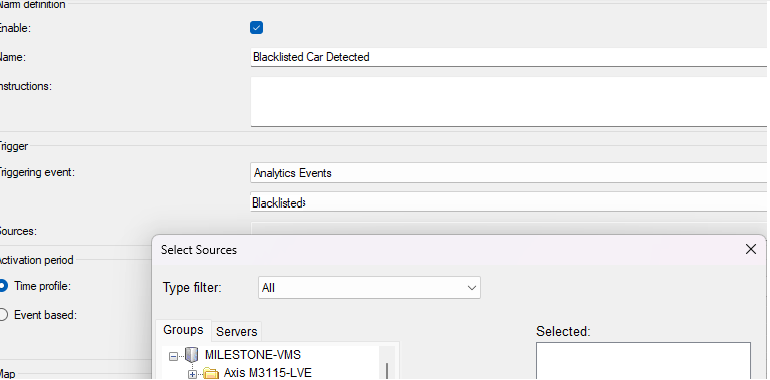
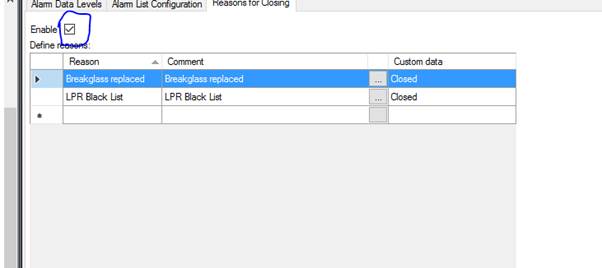
I am trying to close alarm on Milestone using the rest API. But I am getting Argument Null exception error for source parameter. This did previously work before upgrading to Milestone 2026
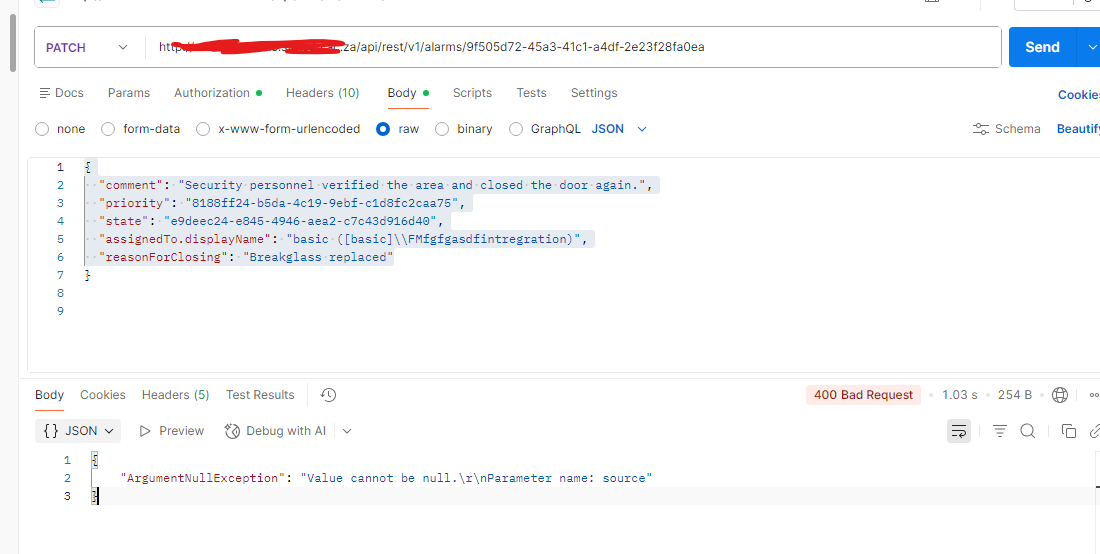
Do I need to add the source to the payload?
I am trying to close alarm on Milestone using the rest API. But I am getting Argument Null exception error for source parameter. This did previously work before upgrading to Milestone 2026
Do I need to add the source to the payload?
If I try to close the alarms on the Milestone XProtect Smart Client, I get the same error in the Event Server log. The rest of the system is functioning correctly.
To better understand the issue, could you provide some more details about the alarm source?
The alarm is triggered through the Milestone XProtect RESTful Alarms API using the following payload. The alarm source is a camera.
{
“name”: “Blacklisted Car Detected”,
“message”: “Blacklisted car in door 3”,
“source”: “cameras/e028f597-c64b-4f27-bb8d-08f5cd768e1c”,
“time”: “2023-02-28T18:10:12.4786334Z”
“data”: {
       "description": "string",

       "location": "string",

       "vendor": {

                  "name": "Impro",

                  "customData": "I"

                 }

      }
}
The alarm source is a camera.
We have only one source type for alarms.
The alarm is configured to link the camera source to the analytics event.
Tigger an alarm with :
url: /alarms
{
“name”: “Blacklisted Car Detected”,
“message”: “Blacklisted car in door 3”,
“source”: “cameras/e028f597-c64b-4f27-bb8d-08f5cd768e1c”,
“time”: “2023-02-28T18:10:12.4786334Z”
“data”: {
       "description": "string",

       "location": "string",

       "vendor": {

                  "name": "Impro",

                  "customData": "I"

                 }

      }
}
Close the alarm with:
url: alarms/a40f84a4-52e2-4299-8513-ab632899a021
{
“comment”: “Security personnel verified the area and closed the door again.”,
“priority”: “8188ff24-b5da-4c19-9ebf-c1d8fc2caa75”,
“state”: “e9deec24-e845-4946-aea2-c7c43d916d40”,
“assignedTo.displayName”: “basic ([basic]\\test)”,
“reasonForClosing”: “closed”
}
I think there may be a fundamental point that needs clarification.
In XProtect, the normal flow is:
This allows the VMS administrator to control which events should result in alarms.
From your description, it sounds like you may be creating an Alarm directly through the API rather than submitting an Event and letting the Alarm Definition generate the alarm. If that is the case, the Alarm Definition is bypassed entirely and therefore does not participate in the alarm lifecycle.
Could you comment on whether you are creating alarms directly, or whether you are submitting events that are matched by an Alarm Definition?
Most importantly: if you switch to using Events as the trigger mechanism, does the problem with closing the alarms still occur? That would help determine whether the issue is related to alarm generation or to the alarm state-management APIs themselves.
I reproduced your scenario on a 2026 R1 test installation and identified the (an) issue:
Your close payload includes "reasonForClosing": "closed". On my 2026 R1 system, when the Close Reasons feature is not enabled, the server rejects any non-null reasonForClosing value with HTTP 400:
“The Reasons for Closing feature is not allowed.”
You can check whether it’s enabled on your system:
GET /api/rest/v1/alarmCloseReasons
On our installation this returns:
{"data": {"enabled": false, "reasons": []}}
When setting reasonForClosing to null, the same alarm closes successfully (HTTP 202).
Fix — choose one:
Option A — Set reasonForClosing to null:
PATCH /api/rest/v1/alarms/{alarmId}

{
  "comment": "Security personnel verified the area and closed the door again.",
  "priority": "8188ff24-b5da-4c19-9ebf-c1d8fc2caa75",
  "state": "e9deec24-e845-4946-aea2-c7c43d916d40",
  "assignedTo.displayName": "basic ([basic])\\test",
  "reasonForClosing": null
}
Option B — Enable the feature and configure valid reasons:
"reasonForClosing": "closed" should then workRegarding the “ArgumentNull exception for source” in the Event Server log — I could not reproduce that specific error via the REST API. Could you share the full Event Server stack trace? It may be a separate issue in the internal error handling path. Also, does the error occur for every alarm or only for specific alarm sources?
For reference, I used these test steps :
# 1. Create alarm (your exact payload)
POST /api/rest/v1/alarms
{"name":"Blacklisted Car Detected","message":"Blacklisted car in door 3",
 "source":"cameras/{cameraId}","time":"2026-08-25T15:05:00Z",
 "data":{"description":"string","location":"string",
         "vendor":{"name":"Impro","customData":"I"}}}
# Result: 202, alarm created with state "New"

# 2. Close with reasonForClosing: "closed"
PATCH /api/rest/v1/alarms/{alarmId}
{"comment":"...","priority":"...","state":"<Closed GUID>",
 "assignedTo.displayName":"...","reasonForClosing":"closed"}
# Result: 400 — "The Reasons for Closing feature is not allowed."

# 3. Close with reasonForClosing: null
PATCH /api/rest/v1/alarms/{alarmId}
{"comment":"...","priority":"...","state":"<Closed GUID>",
 "assignedTo.displayName":"...","reasonForClosing":null}
# Result: 202 — alarm state changed to "Closed"
If I disable the Reasons for Closings, the Milestone XProtect Client software allows me to close the alarm, and the API closes the alarm with “reasonForClosing”: null.
When the reason for closing is enabled, I use the correct reason for closing. In our case, this is either “Breakglass replaced” or “LPR Black List.”
I also tested with a null value. However, the close functionality stops at the API level. When trying to close the alarm in the XProtect Smart Client, the closing function does not work.
We believe from your observations, which we could reproduce in the Milestone test labs, that there is a bug. Milestone Development is working on developing a fix. We will update you here when a fix becomes available.