Hi,
I am currently using MIP SDK 2014 ver and i encountered this error when i am trying to run live streams from milestones.
VideoOS.Platform.CommunicationMIPException: Unable to connect to toolkit! —> VideoOS.Toolkit.NotConnectedException: Unable to connect to toolkit!
at VideoOS.Toolkit.SourceToolkit.Connect(ISet`1 requestedPropertyNames, ISet`1& availablePropertyNames, TimeSpan timeout)
at VideoOS.Toolkit.SourceToolkit.Connect(ISet`1 requestedPropertyNames, ISet`1& availablePropertyNames)
at VideoOS.Platform.SDK.Media.SDKInternalMediaService.LiveVideoConnect(LiveVideoConnectParams parameters)
— End of inner exception stack trace —
at VideoOS.Platform.SDK.Media.SDKInternalMediaService.LiveVideoConnect(LiveVideoConnectParams parameters)
at VideoOS.Platform.Live.JPEGLiveSource.ConnectLiveSource()
at VideoOS.Platform.Live.JPEGLiveSource.PollThread()|VideoOS.Platform.CommunicationMIPException Unable to connect to toolkit! at VideoOS.Platform.SDK.Media.SDKInternalMediaService.LiveVideoConnect(LiveVideoConnectParams parameters)
at VideoOS.Platform.Live.JPEGLiveSource.ConnectLiveSource()
at VideoOS.Platform.Live.JPEGLiveSource.PollThread()
I have checked on the previous post on this issue but i tried and the same error keep appearing out.
Thank you!
Please use the newest MIP SDK.
Is the recording server running? Is the camera streaming? Do you see the camera working fine if using the Smart Client?
Does the MediaLiveViewer sample work for you (unmodified)? If this sample works you might learn something if you compare your code to that of the sample.
Sorry for the late reply!
Sorry but I need to use MIP 2014 as my current server is still using Milestone 2014
Recording Server is running.
I am using Direct Show for my streaming so it working fine.
I deployed the code on both Windows Server 2016 Standard and Windows Server 2016 DataCenter. Server 2016 Standard Ver is working fine while Windows Server 2016 DataCenter Ver is having the Toolkit problem.
All my configuration are fine as it works on the Server 2016 Standard Ver.
Can you please advise is there any workaround to this??
Thank you so much!
I must suspect there is something different in the two systems, Windows server Standard or Datacenter should behave the same, I have never heard otherwise, there is no known issues.
Are you able to identify differences in setup and behavior?
You do not need to use an old MIP SDK because you have an older XProtect VMS
https://developer.milestonesys.com/s/article/about-MIP-SDK-compatibility-with-XProtect-product-versions
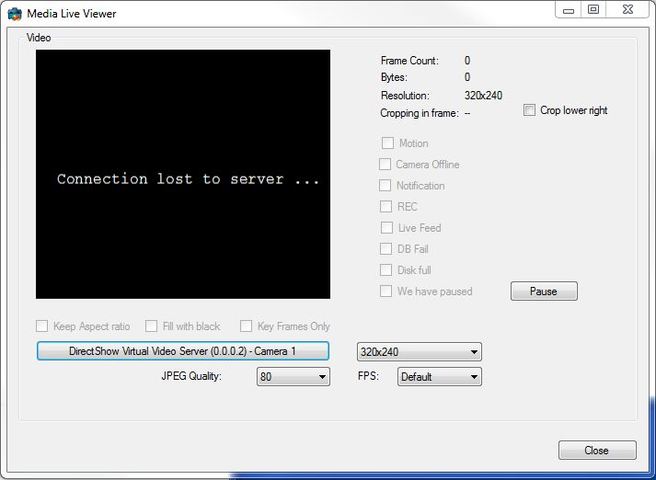
Anyway, as requested previously by you to run the MediaLiveViewer from the MIP SDK Component Samples, I tried on Windows 7, Windows Server 2016 Standard and Windows Server 2016 DataCenter. For both Windows 7 and Windows Server 2016 DataCenter, the MediaLiveViewer shows “Connection Lost to Server” as shown below.
However the same MediaLiveViewer works on the Windows Server 2016 Standard.
Can i ask is there any prerequisite installation need to be done, before using Softwares with MIP SDK??
Thanks a lot!
I am not aware of an prerequisite you might be missing.
Do you have the client installed or do you in each Windows have a full XProtect VMS?
I have an idea that it might be Hardware acceleration that cause this issue, but in that case the Smart Client would not work either. Does the Smart Client work? If you turn on Vdieo Diagnostics Overlay what does it show?
https://developer.milestonesys.com/s/article/how-to-use-the-XProtect-Smart-Client-video-diagnostic-overlay
The system that causing this problem, has a GPU card installed. Will this be the cause of the problem??
Currently I tried using the Smart Client and it is not working as well.
Anyway, we have resolved this problem as we found out that having too many IP addresses in the machine will also affect the Milestone Server. Another resolution could be simply network issue as the ports might get blocked by firewall.
Thanks for all the assistance!