Hi,
I am trying to log in to a Milestone Federated site using the VideoViewer component sample. I am logging in with a Windows AD user. The login is successful and there are no errors, but I am not able to see any cameras in the VideoViewer. It appears empty.
When I log in using the Smart Client with the same AD user, I am able to see all the cameras without any issue.
Could you please advise if any additional configuration or steps are required to access cameras from a federated site using the SDK?
Thank you.
You have to set this property on the DialogLoginForm to false..
| bool |
MasterOnly = true[get, set] |
|
If set to true the dialog will only log in to the site specified in the URI field. If set to false it will also log in to any MFA subsites. Default is true. |
Ref. MIP SDK Documentation
Hi Bo,
Thank you for your response.
I would like some additional clarification regarding Milestone Federated Architecture:
-
Regarding authentication, is it recommended to use only Windows AD users in a federated setup, or is it also supported to use basic users for login?
-
I am implementing discovery after logging in to a federated site and need to retrieve all cameras from both the master and child sites. Is the SDK discovery implementation different compared to a direct (non-federated) site?
-
Do we need to log in separately to each child site, or is logging in to the master site (with MasterOnly set to false) sufficient to access all federated cameras?
-
If there is a difference in the implementation, could you please suggest which MIP SDK component sample I can refer to for this discovery scenario?
Thank you.
No, only WIndows AD users can be used. Has to do with the basic design of Milestone Federated Architecture (MFA), not a limitation imposed by the MIP SDK. (A basic user on multiple sites will technically be multiple users, by using AD you can ensure it is the same users across the sites.)
No, the Configuration is a tree structure, only has more nodes when it comes to MFA.
MasterOnly set to false is sufficient.
Usually, the Multi-site viewer sample is the reference sample on having multiple sites, MFA or otherwise.
Talking about discovery, how the Configuration looks, I would like to recommend then Configuration Access sample but please note that it has the same limitation as the Video Viewer sample. Please set MasterOnly to false to use it in a MFA setting.
PS. I recommend that you set up a mini MFA in your test environment.
Hi Bo,
Thanks for the clarification.
Hi Bo,
I would like to clarify a related point.
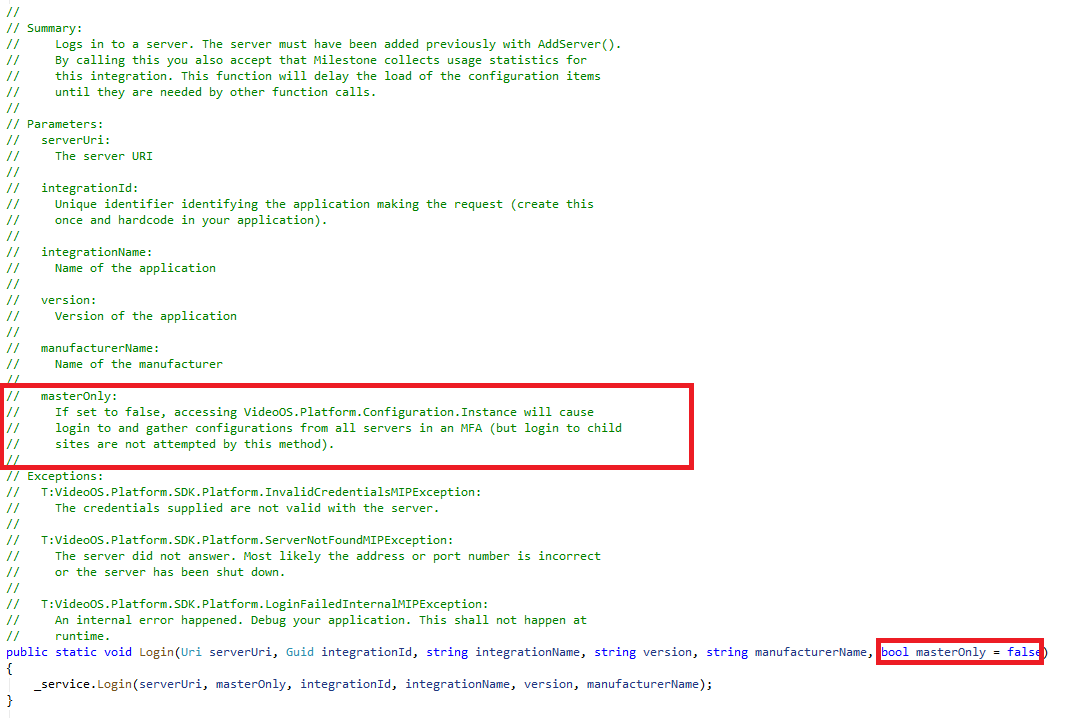
Since we are not using DialogLoginForm in our integration, could you please confirm whether the highlighted masterOnly parameter in the Login method corresponds to the same parameter setting used by DialogLoginForm?
Also, as per the parameter description(highlighted), it mentions: “but login to child sites are not attempted by this method”. Could you please clarify what this means, and what needs to be done to log in to child sites in a federated setup?
Thank you.
Yes, masterOnly has the same meaning in the DialogLoginForm and in the AddServer and Login methods (VideoOS.Platform.SDK.Environment).
I understand the confusion, but the description is actually correct—though it could be more explicit. Setting masterOnly to false will cause login and configuration data to be collected for all child sites when the configuration is accessed. The Loginmethod itself does not initiate this; it only performs the login to the master site.
Hi Bo,
I am able to retrieve the child sites using:
 However, I am not able to retrieve the folders and cameras inside these child sites. Calling GetChildren() on each child site does not return any folders or cameras, and using Configuration.Instance.GetItems() only returns EventGroups and AlertGroups of master site.
I tried to follow the component sample (ConfigAccessViaSDK), child site folders and cameras are getting listed in the sample, but since it is mainly focused on using UI components, I was not able to clearly understand how camera discovery for child sites is performed in the sample.
Could you please clarify what is the correct way to retrieve folders and cameras from child sites.
Below is the code used for Login and AddServer.
Hi Bo,
Could you please help clarify how to resolve the above issue?
What you are trying to do is pretty much what the Multi-site Viewer sample does, when you use the option “SDK loads all child sites”, I suggest you explore that sample.
The last line I suspect can cause the issue, this variable (LoginNetworkCredential) should not be changed after AddServer and Login, you can try to read it but I suspect writing to it after the login could damage the credential cache used internally by the MIP SDK. This is a guess on my behalf, but please test without this line.
Hi Bo,
My integration is currently using MIP SDK 2018 R2. Could you please confirm whether this version supports handling Milestone Federated sites? I understand that using the latest SDK is recommended, but it would be helpful to know if Federated sites are supported with MIP SDK 2018 R2.
The MIP SDK has supported Milestone Federated Architecture (MFA) for many years, including XProtect 2018 R2. There is no general limitation in the SDK that prevents federated sites from working in that version.
What can be a limitation is feature mismatch:
If any site in the federation uses functionality that was introduced after 2018 R2, that functionality will of course not be available when connecting with a 2018-era SDK or VMS. That limitation is not specific to MFA, but applies to any single site as well.
In other words, MFA itself is supported — but you cannot expect newer platform features to work against older VMS versions.
Hi Bo,
Thanks for your response.
I created a small test application using the MIP SDK 2025 R3. With MasterOnly set to false during both AddServer and Login, I was able to successfully retrieve all child sites and discover cameras across the federated setup.
However, when using the same implementation with MIP SDK 2018 R2, the behavior is different. Even with MasterOnly set to false, the child sites are not retrieved, and only the master site is accessible.
Could you please clarify if there are additional steps or configuration required in this version to access child sites?
Any guidance would be appreciated.
Thanks