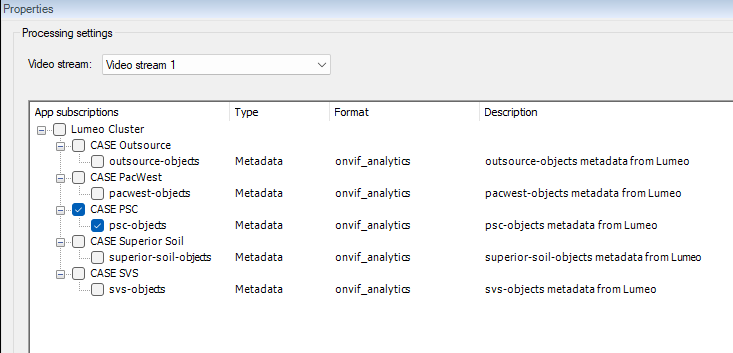
When the VMS system restarts, to get the connection going again, I have to un-click the App subscriptions under Processing settings, save, then enable again and save. Doesn’t seem like this is the way it should work, especially when you have 300+ cameras. Every command on the k8s end shows stream isn’t connected. And even after a fresh-deployment of a pod, still doesn’t work until I re-subscribe through the UI. How can I fix this?
Does this happens for all three topic types (Metadata, Video and Analytics Events)?
As we have discussed Metadata before, I wonder what the state of the VPS Drivers are on the VMS. Does the logs reveal anything?
Please share what version of the VMS and AI Bridge you are experiencing this with.
Right now I’m only doing metadata. I’m also using the latest AI bridge 2.0.5. and VMS version 2025 R3.
for DeviceHandling.log - this is when the system was shutdown - I currently have 4 different (pods/topics) The other 3 are identical to this output - This just showing one metadata topic registered

When system came back online:
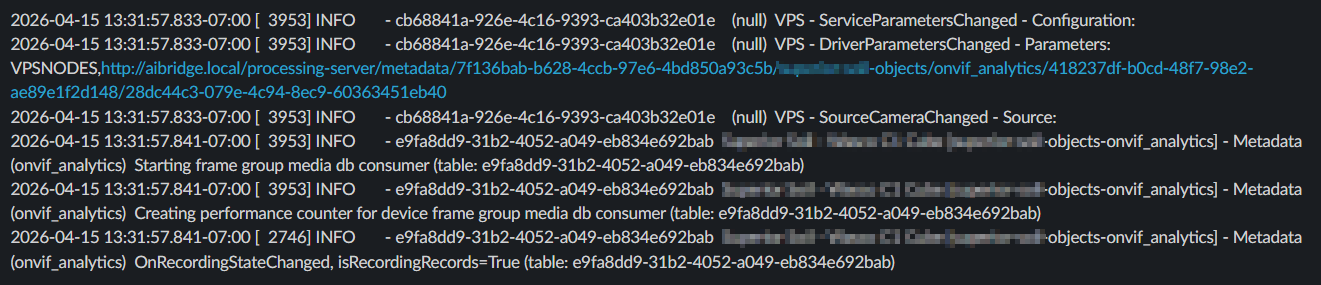
At this point, I noticed no bounding boxes coming through, ran some logs on k8s end:
kubectl logs -n aibridge deploy/aibridge-aibridge-connector --tail=200
2026/04/15 18:57:54 Could not observe endpoint: Post “https://172.16.0.247/ManagementServer/ServiceRegistrationService.svc”: dial tcp 172.16.0.247:443: connect: no route to host 2026/04/15 18:57:59 Could not observe endpoint: Post “https://172.16.0.247/ManagementServer/ServiceRegistrationService.svc”: dial tcp 172.16.0.247:443: connect: no route to host 2026/04/15 18:57:59 Could not get services from endpoint: Post “https://172.16.0.247/ManagementServer/ServiceRegistrationService.svc”: dial tcp 172.16.0.247:443: connect: no route to host 2026/04/15 18:57:59 Could not get unregistration requested app ids by endpoint: Post “https://172.16.0.247/ManagementServer/ServiceRegistrationService.svc”: dial tcp 172.16.0.247:443: connect: no route to host 2026/04/15 18:57:59 Could not observe endpoint: Post “https://172.16.0.247/ManagementServer/ServiceRegistrationService.svc”: dial tcp 172.16.0.247:443: connect: no route to host 2026/04/15 18:58:06 Could not observe endpoint: Post “https://172.16.0.247/ManagementServer/ServiceRegistrationService.svc”: dial tcp 172.16.0.247:443: connect: no route to host 2026/04/15 18:58:06 Could not get services from endpoint: Post “https://172.16.0.247/ManagementServer/ServiceRegistrationService.svc”: dial tcp 172.16.0.247:443: connect: no route to host 2026/04/15 18:58:06 Could not get unregistration requested app ids by endpoint: Post “https://172.16.0.247/ManagementServer/ServiceRegistrationService.svc”: dial tcp 172.16.0.247:443: connect: no route to host 2026/04/15 18:58:06 Could not observe endpoint: Post “https://172.16.0.247/ManagementServer/ServiceRegistrationService.svc”: dial tcp 172.16.0.247:443: connect: no route to host 2026/04/15 18:58:09 Could not observe endpoint: Post “https://172.16.0.247/ManagementServer/ServiceRegistrationService.svc”: dial tcp 172.16.0.247:443: connect: no route to host 2026/04/15 18:58:09 Could not get services from endpoint: Post “https://172.16.0.247/ManagementServer/ServiceRegistrationService.svc”: dial tcp 172.16.0.247:443: connect: no route to host 2026/04/15 18:58:09 Could not get unregistration requested app ids by endpoint: Post “https://172.16.0.247/ManagementServer/ServiceRegistrationService.svc”: dial tcp 172.16.0.247:443: connect: no route to host 2026/04/15 18:58:09 Could not observe endpoint: Post “https://172.16.0.247/ManagementServer/ServiceRegistrationService.svc”: dial tcp 172.16.0.247:443: connect: no route to host 2026-04-15T18:58:20Z Recording Server joined pool of endpoints to get status from (http://recordings.wifieye.local:7563/recorderstatusservice/recorderstatusservice2.asmx) 2026-04-15T18:59:35Z Status session established with Recording Server (http://recordings.wifieye.local:7563/recorderstatusservice/recorderstatusservice2.asmx)
which is during the time the server was shutdown, and at the end of the log it shows it connected.
kubectl logs -n aibridge deploy/aibridge-aibridge-proxy --tail=50
2026-04-15T18:12:33Z Forwarding metadata in onvif_analytics format from source 7dabe6a4-c0bd-4619-8205-4cb0970dfbf4/28dc44c3-079e-4c94-8ec9-60363451eb40 (gRPC / REST) to VPS connection started 2026-04-15T18:12:48Z Forwarding metadata in onvif_analytics format from source 7dabe6a4-c0bd-4619-8205-4cb0970dfbf4/28dc44c3-079e-4c94-8ec9-60363451eb40 to VPS connection stopped after 2 frames (did not get data for 14.677360588s) 2026-04-15T18:13:49Z Forwarding metadata in onvif_analytics format from source 7dabe6a4-c0bd-4619-8205-4cb0970dfbf4/28dc44c3-079e-4c94-8ec9-60363451eb40 (gRPC / REST) to VPS connection started 2026-04-15T18:14:09Z Forwarding metadata in onvif_analytics format from source 07b12fd9-0f86-42ac-b07c-949f0fc9eba7/28dc44c3-079e-4c94-8ec9-60363451eb40 (gRPC / REST) to VPS connection started 2026-04-15T18:14:22Z Forwarding metadata in onvif_analytics format from source 07b12fd9-0f86-42ac-b07c-949f0fc9eba7/28dc44c3-079e-4c94-8ec9-60363451eb40 to VPS connection stopped after 6 frames (did not get data for 11.377487071s) 2026-04-15T18:15:13Z Forwarding metadata in onvif_analytics format from source 7dabe6a4-c0bd-4619-8205-4cb0970dfbf4/28dc44c3-079e-4c94-8ec9-60363451eb40 to VPS connection stopped after 257 frames (did not get data for 13.001224688s) 2026-04-15T18:15:24Z VPS metadata connection closed (metadata.7f136bab-b628-4ccb-97e6-4bd850a93c5b.superior-soil-objects.onvif_analytics.418237df-b0cd-48f7-98e2-ae89e1f2d148_28dc44c3-079e-4c94-8ec9-60363451eb40) 2026-04-15T18:15:24Z VPS metadata connection closed (metadata.261dab1d-03d5-4bb6-b2fb-00c1d0a0ed24.psc-objects.onvif_analytics.9387bcff-735c-4833-a24b-9ed43719d484_28dc44c3-079e-4c94-8ec9-60363451eb40) 2026-04-15T18:15:24Z VPS metadata connection closed (metadata.e2fcb25e-f2df-4267-baf1-34070ce47ffc.svs-objects.onvif_analytics.07b12fd9-0f86-42ac-b07c-949f0fc9eba7_28dc44c3-079e-4c94-8ec9-60363451eb40) 2026-04-15T18:15:25Z VPS metadata connection closed (metadata.571e2c8e-ca99-41af-9170-988c6f844a8c.pacwest-objects.onvif_analytics.7dabe6a4-c0bd-4619-8205-4cb0970dfbf4_28dc44c3-079e-4c94-8ec9-60363451eb40)
even though it shows the connector re-established connection, the VPS connections never connected.
Checking into the broker - no routes were ever re-established -
kubectl logs -n aibridge deploy/aibridge-aibridge-broker --tail=100
Component: Broker
Built: Mon Mar 30 15:21:22 UTC 2026
GoVersion: go1.24.1
-brokers aibridge-aibridge-kafka-broker:29092
-grpc-port 8383
-log-file-enabled false
-log-max-age 15
-log-max-backups 15
-log-max-size 100
-rest-port 8382
-stream-subscriptions-topic voyager.topics.daim.vmsbridge.stream_subscriptions
2026-04-14T19:58:15Z Server starting …
2026-04-14T19:58:15Z Verifying existence of topics in kafka cluster …
2026-04-14T19:58:16Z Creating kafka cluster admin failed (will retry in 5 seconds): kafka: client has run out of available brokers to talk to: dial tcp 10.106.131.141:29092: connect: connection refused
2026-04-14T19:58:21Z Topic voyager.topics.daim.vmsbridge.stream_subscriptions does not yet exist; will wait 5 seconds and check again
2026-04-14T19:58:26Z Verifying existence of topics in kafka cluster succeeded
2026-04-14T19:58:26Z Creating new kafka producer …
2026-04-14T19:58:26Z Creating new kafka producer succeeded
2026-04-14T19:58:26Z Creating new kafka consumer for group ‘8531cca9-281c-48b3-9146-b8d8bf108e3d’ …
2026-04-14T19:58:26Z Creating new kafka consumer succeeded
2026-04-14T19:58:26Z Server started
2026-04-14T20:32:47Z New active routes (1 added)
-
metadata.e2fcb25e-f2df-4267-baf1-34070ce47ffc.svs-objects.onvif_analytics.07b12fd9-0f86-42ac-b07c-949f0fc9eba7_28dc44c3-079e-4c94-8ec9-60363451eb40
- 2b58556a-6bd8-4826-bcdb-00cb3d91eca7 → 10.244.0.92:8786
2026-04-14T21:14:05Z New active routes (1 added)
- 2b58556a-6bd8-4826-bcdb-00cb3d91eca7 → 10.244.0.92:8786
-
metadata.e2fcb25e-f2df-4267-baf1-34070ce47ffc.svs-objects.onvif_analytics.07b12fd9-0f86-42ac-b07c-949f0fc9eba7_28dc44c3-079e-4c94-8ec9-60363451eb40
- 2b58556a-6bd8-4826-bcdb-00cb3d91eca7 → 10.244.0.92:8786
-
metadata.571e2c8e-ca99-41af-9170-988c6f844a8c.pacwest-objects.onvif_analytics.7dabe6a4-c0bd-4619-8205-4cb0970dfbf4_28dc44c3-079e-4c94-8ec9-60363451eb40
- 51295283-4340-444d-b418-b61046473b64 → 10.244.0.92:8786
2026-04-14T21:14:46Z New active routes (1 added)
- 51295283-4340-444d-b418-b61046473b64 → 10.244.0.92:8786
-
metadata.571e2c8e-ca99-41af-9170-988c6f844a8c.pacwest-objects.onvif_analytics.7dabe6a4-c0bd-4619-8205-4cb0970dfbf4_28dc44c3-079e-4c94-8ec9-60363451eb40
- 51295283-4340-444d-b418-b61046473b64 → 10.244.0.92:8786
-
metadata.261dab1d-03d5-4bb6-b2fb-00c1d0a0ed24.psc-objects.onvif_analytics.9387bcff-735c-4833-a24b-9ed43719d484_28dc44c3-079e-4c94-8ec9-60363451eb40
- a1d9a5b5-bcca-4fd4-b469-5e4e7565531d → 10.244.0.92:8786
-
metadata.e2fcb25e-f2df-4267-baf1-34070ce47ffc.svs-objects.onvif_analytics.07b12fd9-0f86-42ac-b07c-949f0fc9eba7_28dc44c3-079e-4c94-8ec9-60363451eb40
- 2b58556a-6bd8-4826-bcdb-00cb3d91eca7 → 10.244.0.92:8786
2026-04-14T21:15:02Z New active routes (1 added)
- 2b58556a-6bd8-4826-bcdb-00cb3d91eca7 → 10.244.0.92:8786
-
metadata.e2fcb25e-f2df-4267-baf1-34070ce47ffc.svs-objects.onvif_analytics.07b12fd9-0f86-42ac-b07c-949f0fc9eba7_28dc44c3-079e-4c94-8ec9-60363451eb40
- 2b58556a-6bd8-4826-bcdb-00cb3d91eca7 → 10.244.0.92:8786
-
metadata.571e2c8e-ca99-41af-9170-988c6f844a8c.pacwest-objects.onvif_analytics.7dabe6a4-c0bd-4619-8205-4cb0970dfbf4_28dc44c3-079e-4c94-8ec9-60363451eb40
- 51295283-4340-444d-b418-b61046473b64 → 10.244.0.92:8786
-
metadata.261dab1d-03d5-4bb6-b2fb-00c1d0a0ed24.psc-objects.onvif_analytics.9387bcff-735c-4833-a24b-9ed43719d484_28dc44c3-079e-4c94-8ec9-60363451eb40
- a1d9a5b5-bcca-4fd4-b469-5e4e7565531d → 10.244.0.92:8786
-
metadata.7f136bab-b628-4ccb-97e6-4bd850a93c5b.superior-soil-objects.onvif_analytics.418237df-b0cd-48f7-98e2-ae89e1f2d148_28dc44c3-079e-4c94-8ec9-60363451eb40
- 9c54a3e1-9428-4c26-a801-8a51d031ac53 → 10.244.0.92:8786
2026-04-15T18:59:36Z New active routes (1 closed)
- 9c54a3e1-9428-4c26-a801-8a51d031ac53 → 10.244.0.92:8786
-
metadata.261dab1d-03d5-4bb6-b2fb-00c1d0a0ed24.psc-objects.onvif_analytics.9387bcff-735c-4833-a24b-9ed43719d484_28dc44c3-079e-4c94-8ec9-60363451eb40
- a1d9a5b5-bcca-4fd4-b469-5e4e7565531d → 10.244.0.92:8786
-
metadata.7f136bab-b628-4ccb-97e6-4bd850a93c5b.superior-soil-objects.onvif_analytics.418237df-b0cd-48f7-98e2-ae89e1f2d148_28dc44c3-079e-4c94-8ec9-60363451eb40
- 9c54a3e1-9428-4c26-a801-8a51d031ac53 → 10.244.0.92:8786
-
metadata.e2fcb25e-f2df-4267-baf1-34070ce47ffc.svs-objects.onvif_analytics.07b12fd9-0f86-42ac-b07c-949f0fc9eba7_28dc44c3-079e-4c94-8ec9-60363451eb40
- 2b58556a-6bd8-4826-bcdb-00cb3d91eca7 → 10.244.0.92:8786
2026-04-15T19:00:38Z New active routes (1 closed)
- 2b58556a-6bd8-4826-bcdb-00cb3d91eca7 → 10.244.0.92:8786
-
metadata.7f136bab-b628-4ccb-97e6-4bd850a93c5b.superior-soil-objects.onvif_analytics.418237df-b0cd-48f7-98e2-ae89e1f2d148_28dc44c3-079e-4c94-8ec9-60363451eb40
- 9c54a3e1-9428-4c26-a801-8a51d031ac53 → 10.244.0.92:8786
-
metadata.e2fcb25e-f2df-4267-baf1-34070ce47ffc.svs-objects.onvif_analytics.07b12fd9-0f86-42ac-b07c-949f0fc9eba7_28dc44c3-079e-4c94-8ec9-60363451eb40
- 2b58556a-6bd8-4826-bcdb-00cb3d91eca7 → 10.244.0.92:8786
2026-04-15T19:03:28Z New active routes (1 closed)
- 2b58556a-6bd8-4826-bcdb-00cb3d91eca7 → 10.244.0.92:8786
-
metadata.7f136bab-b628-4ccb-97e6-4bd850a93c5b.superior-soil-objects.onvif_analytics.418237df-b0cd-48f7-98e2-ae89e1f2d148_28dc44c3-079e-4c94-8ec9-60363451eb40
- 9c54a3e1-9428-4c26-a801-8a51d031ac53 → 10.244.0.92:8786
2026-04-15T19:19:46Z New active routes (1 closed)
- 9c54a3e1-9428-4c26-a801-8a51d031ac53 → 10.244.0.92:8786
-
no active routes
At this point, I tried re-registering the customer pods, and doing some restarts but nothing worked. Until I decided to just un-tick and tick the boxes back in the UI, and connections were made again. Which the logs show:

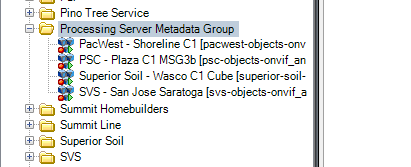
The VPS Drivers looked normal. I just found something odd from yesterdays recovery. I see metadata flowing under Devices/Metadata/Processing Server Metadata Group
but when you go under cameras metadata it looks like this. And currently receiving metadata on all 4 cameras.
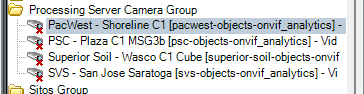
But when I go to Recording servers and the devices in question -

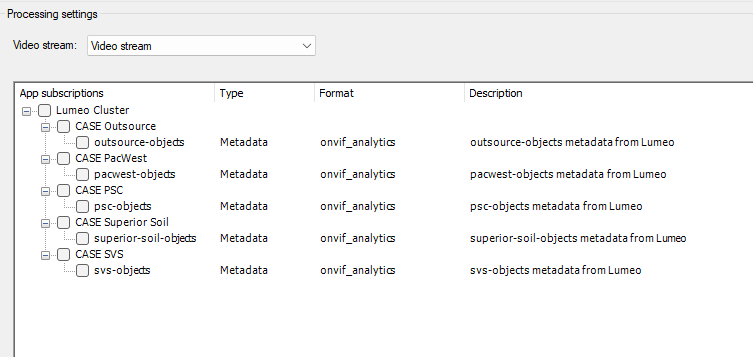
Hope this helps, and let me know if I’m missing anything
Just a reminder, any thoughts on this? its been a few days with no reply. Thanks
Hi Vincent,
I was able to reproduce this odd behaviour.
It looks to me that there’s a race-condition when starting the VMS that’s causing this issue.
I’ve seen that by restarting Recording Server it causes the metadata/video topics to re-connect after restarting the host that runs the VMS.
Can you please give it a try ?
Steps:
1 - Set topics injecting metadata or video
2 - Restart the VMS host
3 - Once the VMS has restarted, using the tray icon, restart Recording Server
4 - Check that the metadata gets injected.
Restarting the recording server indeed worked. Although it was only tested on network disconnection. Basically if I simulate a network disconnection, I get the same kind of result. The bridge recovers, but the metadata stops flowing unless I disable/enable the subscription metadata topic.
I would assume it will work if the VMS get’s restarted as well. Next time the Management Client server is scheduled for a restart, I’ll have to test also restarting the recording server. This fix is a lot better then having to manually disable/enable the subscription for every camera.
Another issue I see happening - If the AI Bridge server looses power, the bridge recovers, but the k8s pods die. I can’t seem to re-deploy a pod with the same register ID for the IVA app and have it work. Maybe I’m missing something. Now of course I have a script that can spin up a new version of that pod, but the registration ID will be different, hence then I have to enable a new subscription per camera - Now I have to manually enable a new topic sub, and clean house, as there will now be 2 different metadata devices in milestone, associated with the same camera. Now we have power redundancy, so this isn’t something I’m too worried about. But if something ever did break, and the AI bridge looses power, it will be a mess. I’m just currently in the testing phase so I’m looking at all possibilities of issues/downtime for the AI bridge.
Any thoughts?
Hi @Vincent,
In regards of registration of IVAs, we highly recommend the app to ‘self-register’ itself.
We have an IVA sample that showcase this:
PS: Based on this reported issue:
AI Bridge - Unable to run for a long period - General - Milestone Systems Developer Forum
we are reviewing the k8s AI Bridge template, so it works on k8s node’s reboots…
We will include some fixes on this in the next AI Bridge version release.
Correct, my IVA app registers itself automatically. And generates its own ID as well. The problem I see is that if or when a IVA app dies, it cannot be revived on the UI end. Meaning it doesn’t show up. Which means when I create another app, it will give itself another ID, which in turn will not line up with the existing metadata devices in the UI. Thanks for working on this.
In the sampleAPP posted above we always register with the same ID.
But let’s say that every app should handle a ‘restart’ gracefully. By re-registering with the same-ID and restoring its state.
Correct - my mistake, I didn’t mention it does this by default, and when that doesn’t work - (reinstating by the same ID) I have no other option but to create a new one. I’m currently looking through your code example as well, maybe there is something on my end that is preventing a graceful re-registering.
I’m dealing with some pretty bad inconsistences, that go beyond persistence states in k8s.
As testing, I was able to restart a pod with the same ID successfully. It shows up in the UI, along with camera subscriptions that was originally checked. Did a few that way, no problem. Then did the same exact thing to the next existing pod, then I start getting VMS registration errors, basically the VMS id doesn’t exist anymore or get Web service logs:
Response CreateTopics(key: 19, version: 3) {“timestamp”:“2026-04-23T18:46:15.164Z”,“logger”:“kafkajs”,“message”:“Response CreateTopics(key: 19, version: 3)”,“broker”:“aibridge-aibridge-kafka-broker:29092”,“clientId”:“vmsbridge/webservice”,“error”:“Topic creation errors”,“correlationId”:39,“size”:210}
At one point, I re-instated the bridge, new helm charts. everything fresh. Was able to restart pods with existing IDs, everything seemed normal, then out of the blue, all topic subscriptions disappeared. Every metadata device created has a red x on it. when you expand the metadata device - nothing is there.
I’m currently in the process to get approval to restart the recording server hoping that would help.
Also in the next update (on the plug-in side for processor servers) - Can there be a bulk Processor settings to add app subscriptions, where you can apply metadata app subscriptions to multiple cameras or group of cameras at once? Manually having to go through each camera and apply the app subscriptions when you have hundreds of cameras per topic is not efficient or ideal.
DeviceHandling.log - shows - Generally full of these errors:
-metadata-onvif_analytics] - Metadata (onvif_analytics) Stopping frame group media db consumer (table: 85d8c7e2-0e8b-48ff-841a-e08fdb058fc2)
metadata-onvif_analytics] - Metadata (onvif_analytics) OnRecordingStateChanged, isRecordingRecords=False (table: 7c83163a-26ef-47c4-b58b-3fbf84dc5d5f)
-metadata-onvif_analytics] - Metadata (onvif_analytics) Device communication stopped
2026-04-23 13:12:14.656-07:00 [ 5793] ERROR - 85a8c946-c2b3-4b49-b76d-810e410bbce6 VpsThread - VpsThread - Error: A task was canceled.
2026-04-23 13:33:31.504-07:00 [ 1103] ERROR - d2ae995d-8465-4a85-8833-36982c0c61f9 VpsThread - VpsThread - Error: Unable to connect to the remote server
I’ve confirmed the Driver parameters have not changed and look correct.
Please let me know if I may be missing something. thanks