Our software is talking to the MIPS SDK to connect to, get a list of cameras, and then getting a streaming control to view in our product.
This works well up to a point, but after a certain number of cameras is reached, the whole process simply disappears with a crash. Here are some Windows Event Logs for various files related to the crash. (Its one of about 4 to 6 different files every time) Our program is the Velocity.Video.Real.exe in these examples
Error type 1
Faulting application name: Velocity.Video.Real.exe, version: 1.1.9.5, time stamp: 0x64c1ae52
Faulting module name: ntdll.dll, version: 10.0.19041.3155, time stamp: 0x2daa62a8
Exception code: 0xc0000374
Fault offset: 0x000e6d63
Faulting process id: 0x3498
Faulting application start time: 0x01d9c3f70733616c
Faulting application path: [C:\Program](file:C:/Program) Files (x86)\Identiv\Velocity\Velocity.Video.Real.exe
Faulting module path: [C:\WINDOWS\SYSTEM32\ntdll.dll](file:C:/WINDOWS/SYSTEM32/ntdll.dll)
Report Id: be446426-e61f-4319-a47e-66ebfc82442d
Faulting package full name:
Faulting package-relative application ID:
Error type 2
Faulting application name: Velocity.Video.Real.exe, version: 1.1.9.5, time stamp: 0x64c1ae52
Faulting module name: CoreMessaging.dll, version: 10.0.19041.3208, time stamp: 0x859f2afe
Exception code: 0xc00001ad
Fault offset: 0x0001387c
Faulting process id: 0x3724
Faulting application start time: 0x01d9c3f6bbb64cae
Faulting application path: [C:\Program](file:C:/Program) Files (x86)\Identiv\Velocity\Velocity.Video.Real.exe
Faulting module path: [C:\WINDOWS\System32\CoreMessaging.dll](file:C:/WINDOWS/System32/CoreMessaging.dll)
Report Id: f0277205-5dc0-4ac9-a0e9-4a2f2dbcbe4f
Faulting package full name:
Faulting package-relative application ID:
Error type 3
Faulting application name: Velocity.Video.Real.exe, version: 1.1.9.5, time stamp: 0x64c1ae52
Faulting module name: KERNELBASE.dll, version: 10.0.19041.3208, time stamp: 0xbc1cd7c0
Exception code: 0x80000003
Fault offset: 0x00183952
Faulting process id: 0x2fa4
Faulting application start time: 0x01d9c3f6bfbe7a0d
Faulting application path: [C:\Program](file:C:/Program) Files (x86)\Identiv\Velocity\Velocity.Video.Real.exe
Faulting module path: [C:\WINDOWS\System32\KERNELBASE.dll](file:C:/WINDOWS/System32/KERNELBASE.dll)
Report Id: 3154e16a-b490-4fa5-b5aa-1761d8f73161
Faulting package full name:
Faulting package-relative application ID:
Error type 4
Faulting application name: Velocity.Video.Real.exe, version: 1.1.9.5, time stamp: 0x64c1ae52
Faulting module name: d3d9.dll, version: 10.0.19041.2788, time stamp: 0x69fef241
Exception code: 0xc0000005
Fault offset: 0x000e4d8b
Faulting process id: 0x78d8
Faulting application start time: 0x01d9c3e065e43fc7
Faulting application path: [C:\Program](file:C:/Program) Files (x86)\Identiv\Velocity\Velocity.Video.Real.exe
Faulting module path: [C:\WINDOWS\SYSTEM32\d3d9.dll](file:C:/WINDOWS/SYSTEM32/d3d9.dll)
Report Id: 3a00e7fe-facb-447c-a70e-a0a80887bedb
Faulting package full name:
Faulting package-relative application ID:
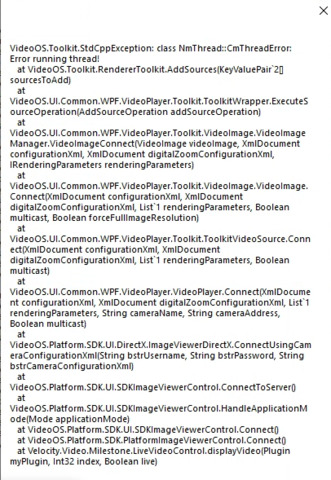
Also, from time to time, the sdk will cough up some errors:
Note: I can reproduce this in our software always. But I also wrote a simplified version of it using the sample code taken from the ImageViewerClient sample. This program is able to stream over 100 cameras without issue, but our software crashes when reach between 9 and 16.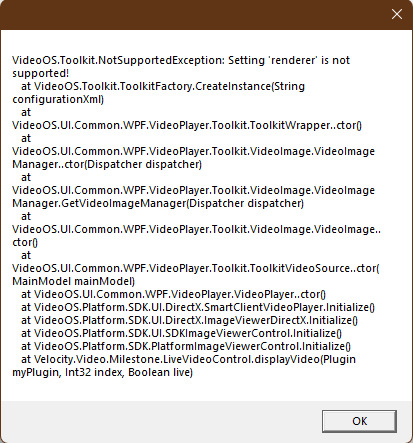
Does anyone have any insight as to what could cause this?