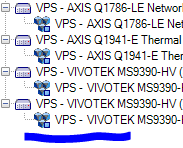
When we reboot the computer, the VPS device does not connect automatically. We need to deactivate and activate it again to make it work. What could be the reason behind this please?
The current version of the AI Bridge is hosted in NVIDIA’s GPU Cloud catalog. To download the required resources and read relevant documentation, log into NGC or create your own account here.
Access our private registry
Once you are logged into your NGC account, email us at developer@milestonesys.com with your name and the email address you are using for NGC. We will swiftly add you as a user, and you will receive a separate invite by email.
The VPS should work on XProtect Express+ 2023 R2. The 2023 R3 XProtect VMS release is the last release to include the Video Processing Service Toolkitsample.
The VPS Driver should work in 2023 R2 and beyond.
Please check the logs for any anomaly, especially the ‘DeviceHandling.log’ (typical Path: [C:\ProgramData\Milestone\XProtect](file:C:/ProgramData/Milestone/XProtect) Recording Server\Logs\DeviceHandling.log)