Our team is developing a web application that plays back recorded video stored in XProtect using the WebRTC API.
During playback, we overlay our video‑analysis results (bounding boxes and metadata) on top of the video frames.
However, we have noticed that the bounding boxes appear to move with a noticeable delay relative to the video displayed through WebRTC, which is causing issues for us.
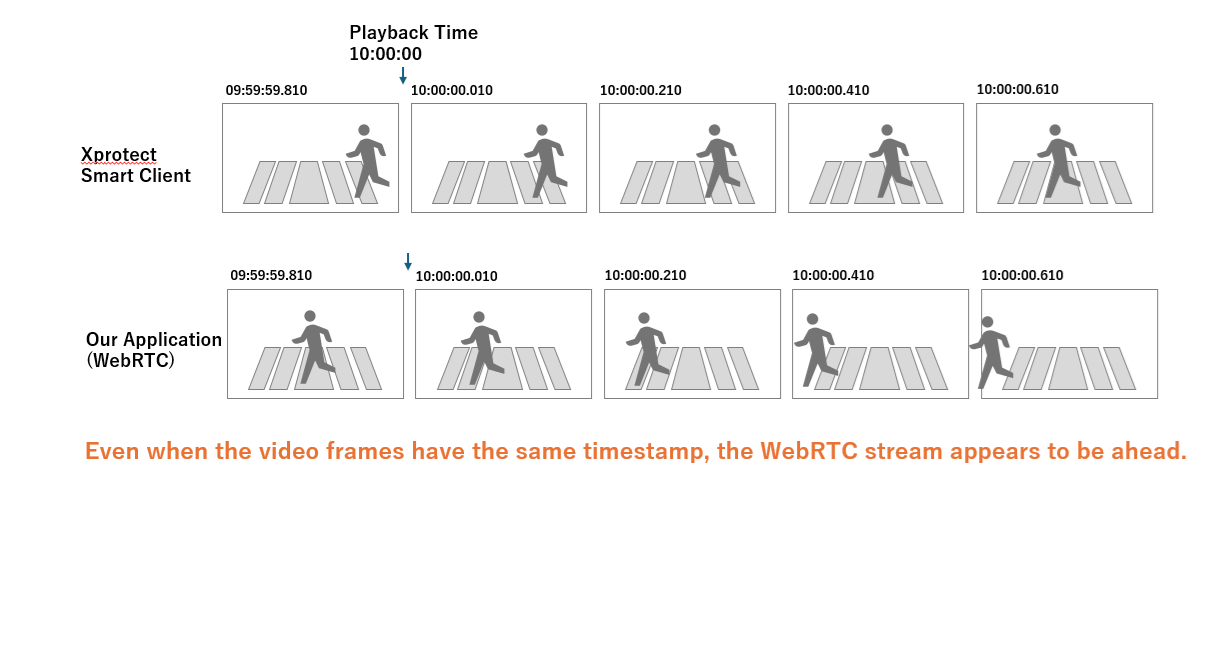
As part of our investigation, we compared WebRTC playback with Smart Client VOD playback.
We found that even when both are displaying frames with the same timestamp, the WebRTC stream appears to be approximately one second ahead.
In contrast, the Smart Client video aligns correctly with our analysis results and bounding boxes.
Is this difference in playback timing expected behavior?
Additionally, is there any recommended way to compensate for or correct this timing offset when using WebRTC playback?
Any guidance or clarification would be greatly appreciated.
One possible explanation is that the Smart Client is applying a video buffer. Please test the following:
In Smart Client, open your test view.
Enter Setup mode (via the Setup button).
In the left‑hand pane, locate Properties → Video Buffering.
Disable “Use default video buffer” and set Video buffer to None.
Please check whether this changes the behavior.
If it does not, Milestone Development has created a new API Gateway build that includes a potential fix. Note that this is an experimental fix for 2025 R2, not an official release. Your feedback—whether the fix resolves the issue or not—is important.
You can download the experimental fix here: [link].
This fix was developed for a similar case reported on 2025 R2. If you are running 2025 R3, please let us know and we can provide a build for that version. In any case, please specify which XProtect VMS version you are using.
The XProtect VMS version we are using is 2024 R2.
Have you confirmed any similar cases occurring on 2024 R2?
If you have confirmed occurrences on 2024 R2, please provide a fix build for 2024 R2.
Please note that the fix for 2025R2 is currently experimental. Milestone Development has validated that a similar experimental fix for 2024R2 is feasible and will be developing it. Please be patient, we will announce the experimental fix and provide a download link when it becomes available.
Note. Installing an 2025R2 API Gateway on a 2024R2 XProtect VMS will not work. If you would like to see it now you could set up a test server with XProtect 2025R2 VMS and the 2025R2 API Gateway experimental fix. If you do this experiment your feedback will be much appreciated.
An official fix. Right now there is an issue with updating the official web pages describing the cumulative patches and fixes and it might not be reflected in those pages.
When executing Start via the XProtect WebRTC JavaScript, the following error log is generated:
“Failed to initiate WebRTC session - Error: MultiUserEnvironment not initialized.”
Attached are the logs from the API Gateway.
Please provide the cause and solution urgently.
If an immediate resolution is not possible, kindly advise on how to restore functionality.
I am reporting this as a bug to Milestone Development for them to investigate. I will let you know their feedback.
My guess is that you can restore the functionality by installing the original API Gateway. Most easily in your browser do http://localhost/installation/admin/default-en-US.htm there you will find the original installer. Also - “C:\Program Files\Milestone\XProtect Download Manager\API Gateway Installer\2025 R3\All Languages\en-US\Milestone XProtect API Gateway 2025 R3 Installer.exe”.
The analysis by Milestone Development is that the change they made cannot have (directly) caused the issue you see. We have a suspicion that something else which lies outside the fix might have caused the issue. If you reverted to the original API Gateway it would be a very valuable clue whether the issue is still there or disappeared by reverting. Please let us know if you reverted the installation and the outcome if you did.
After restarting the server following the occurrence of this issue, the WebRTC JavaScript display started working successfully. We have not reverted the installation.
Please let us know if it is safe to continue using it as is.
Reason:
I inquired via chat whether it would be possible to configure case notifications to be sent to people other than the original inquirer.
I was advised that this could be arranged by mentioning the request in the case comments or case description for each case.
Note:
Both individuals already have Milestone accounts.
From the development team’s perspective, this looks like a general issue that can occur during a reinstall and is not specific to the new installer.
We have traced the behavior and believe it may be caused by a race condition during startup. In some cases, the service can start and attempt to acquire a token before registration with the identity provider (IDP) has fully completed. If that happens, token provisioning is not retried or reinitialized.
As a result, once the registration completes and the service is restarted, everything works as expected. This behavior can occur intermittently and may or may not surface during a reinstall.
Thank you for your response.
Understood — we will restart after applying the update.
We applied the patch you provided and compared video at the same timestamp between Milestone’s WebRTC sample application and SmartClient.
As a result, we confirmed that there is still a discrepancy between the two when viewing video at nearly the same timestamp.
Could you provide more details on what issue this patch is intended to fix?
We would like to confirm whether our issue is actually related to this patch.
Also, if there is anything else you notice or would like us to check, please let us know.
We have conducted additional testing on our side regarding the video timestamp discrepancy displayed via WebRTC.
We recorded footage of a clock using XProtect and played back the same timestamp on three different computers using WebRTC playback.
We found that the video start time differed across the three computers.
Notably, two computers with similar specifications showed nearly identical results, while a lower-spec laptop exhibited approximately a one-second offset compared to the other two.
Is this the type of behavior that the provided patch is intended to fix?
We would appreciate your confirmation.
The fix is the same as in the previous case, where it resolved the conformance issue with the standard requiring timestamps to advance at a 90,000 Hz rate.
Regarding the discrepancy, please keep in mind that the API Gateway adds an additional processing layer that must handle and re‑stream the video data. This inevitably introduces some overhead and can result in latency. Because the data is re‑timestamped at that layer, you may be comparing two different images from separate sources—the Recording Server Image Server (used by the Smart Client) and the API Gateway—for what appears to be nearly the same timestamp.
Is this tied to a specific business scenario where you expect to see the exact same frame, or is this simply an observation?
Thank you for the explanation regarding the API Gateway’s re-timestamping behavior.
To answer your question — yes, this is tied to a specific business scenario.
In our use case, we overlay annotation data (stored in a database based on timestamps from video analysis) on top of the video stream. When different clients request the same timestamp but receive different frames due to the API Gateway’s re-timestamping, the annotations become misaligned with the actual video being displayed. This is a real issue we are facing in our production environment.
Our expectation is that specifying the same timestamp should consistently return the same frame, regardless of the client or access path. Without this consistency, the overlay functionality cannot work reliably.
Is there any way to achieve frame-level consistency across clients — for example, by bypassing the re-timestamping in the API Gateway, or by obtaining the original Recording Server timestamp so that we can compensate for the offset on our side?
We would appreciate any guidance or potential workarounds you can suggest.
Thank you for your previous explanation. We understand that Smart Client and WebRTC retrieve video from different sources (Recording Server vs. API Gateway), which can result in different frames for the same timestamp.
However, we would like to revisit another issue we reported. We observed that even when requesting the same camera and the same timestamp via WebRTC, the playback start position differs across client PCs. As we reported previously, we tested with three PCs, and a lower-spec laptop showed approximately a one-second offset compared to the other two.
We have the following questions regarding this behavior:
When the same camera and the same timestamp are requested via WebRTC (i.e., through the same API Gateway), is the expected behavior that the same frame is always returned?
If the same frame is expected to be returned, are there any known factors on the API Gateway side that could cause the observed discrepancy between client PCs?
Is the patch you previously provided also related to this frame discrepancy between WebRTC clients?
We would appreciate your clarification on these points.
 bell icon