So im trying to send a video feed into VMS using a video topic but when i registered the topic along with a metadata and analytics event topic, only the REST URL for the video topic is null am i doing something working in setting up the video topic?
A Milestone developer with insights in AI Bridge will be looking into this shortly
Thank you appreciate it
Hi Youssef,
Yes, this is the expected behavior if the sourceStreamIDs argument was not provided. Therefore, the GraphQL query to obtain this information should be like this:
query videoTopicsInfo {
  videoTopics {
    topicAvailability(
      sourceStreamIDs: "<source camera id>/<source stream id>"
    ) {
      rest
      grpc
    }
  }
}
For example, I have a camera with the camera id and stream id “670ec728-4747-4d23-9ac5-27a17c61c458/28dc44c3-079e-4c94-8ec9-60363451eb40”
which I obtained by executing the following query:
query sourceVideoStreams {
  cameras {
    videoStreams {
      id
    }
  }
}

### I have one camera that has only one channel
### Expected output of the query
{
  "data": {
    "cameras": [
      {
        "videoStreams": [
          {
            "id": "670ec728-4747-4d23-9ac5-27a17c61c458/28dc44c3-079e-4c94-8ec9-60363451eb40"
          }
        ]
      }
    ]
  }
}
So, in my case the value for the sourceStreamIDs input argument is:
sourceStreamIDs: “670ec728-4747-4d23-9ac5-27a17c61c458/28dc44c3-079e-4c94-8ec9-60363451eb40”
While sourceStreamIDs is an array, it only accepts a single source stream id.
In the image below, you can see the GraphQL documentation for the topicAvailability type:

I agree with you that this information is that obvious. We are actively working on providing better documentation in the future.
I will be waiting for you answer,
Daniel
Thanks for the answer,
So if i understand this correctly im going to use the generated video stream REST URL to reference/use a certain camera present in the VMS and i can use a metadata topic to send metadata regularly to run on that camera stream(bounding boxes in my case) is that how it works?
Thanks yet again for the reply.
Hi Youssef,
Apologies for my late response.
My answer to your question is “not exactly”. Let me explain.
Let’s say that AIBridge is connected to a VMS that has one camera and an app is deployed and registered with metadata and video topics.
From the management client, the user has to navigate to the Cameras tab, then after selecting a camera, navigate to the processing server workspace to subscribe to the topics that are needed for sending back generated metadata and video to the VMS.
1- Click on the Cameras tab in management client
2- Select the source camera the app will generate video based on.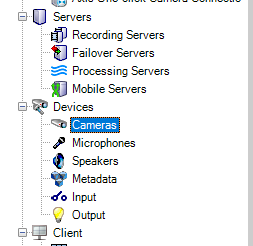
3- And finally, navigate to the processing server workspace to selecte the topics for metadata and video that are needed.
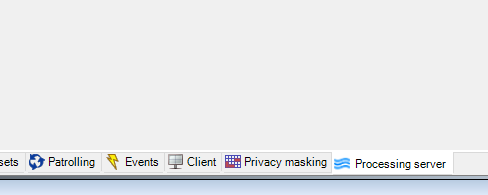
The subscribing action, will allow the processing server plugin to create virtual hardware linked with the camera that the user selected before subscribing to the topics.
For example, I have one app that is called traffic analysis and has a metadata topic
I did subscribe to the topic as shown in the image above. By clicking save in the management client, the processing sever plugin will create the virtual hardware. This virtual hardware will be where the generated metadata, sent by the app through AIBridge, is received.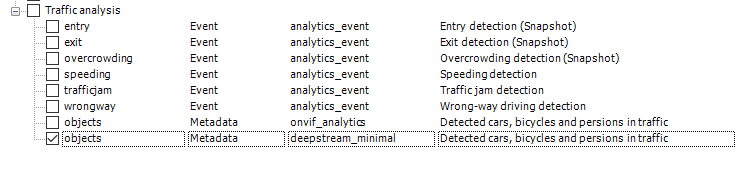
After refreshing the management client. I can see that the new hardware for metadata was created.
It happened that I have an AXIS camera, so for example here is a capture on how the virtual hardware for metadata looks like:

The name of the new hardware will always be like this “source_camera_name [topic_name] - topic_type (topic_format)” as shown in the image above as example.
Please do not send the video nor metadata targeting the virtual hardware id but use only the original source camera stream id from which this new hardware was created.
For both Video and Metadata, the rest endpoint require the sourceStreamId. Currently, we have different behavior between the video and the metadata topic availability query in graphql. If the sourceStreamId was not present in your query, for the video topics you will get a null value for the REST endpoint URL while for the metadata topics you will get REST endpoint URL missing the concatenation of the sourcestreamId. However, for both video and metadata REST endpoints the source stream id is required and must be part of the REST endpoint URL.
To query the video topic REST endpoint URL:
# This is how to obtain the REST URL for the video topic
query videoTopicsInfo {
  videoTopics {
    topicAvailability (sourceStreamIDs: "670ec728-4747-4d23-9ac5-27a17c61c458/28dc44c3-079e-4c94-8ec9-60363451eb40") {
      rest
      grpc
    }
  }
}
To query the metadata topic REST endpoint URL:
query metadataTopicsInfo {
  metadataTopics {
    topicAvailability (sourceStreamID: "670ec728-4747-4d23-9ac5-27a17c61c458/28dc44c3-079e-4c94-8ec9-60363451eb40") {
      rest
      grpc
    }
  }
}
I hope my answer, helped solving your doubt.
Please don’t hesitate to ask more questions, if needed.
Daniel
Thanks yet again for your answer,
I think i got the picture, i need to send metadata/video to the respective REST URLs of the original source cameras not the ones created by the subscription process, and the misconception i had about needing the send both the video stream and the metadata streams for it to work has been cleared.
Im going to try sending metadata/video separately according to your instructions and ill make sure to come back to you for more questions if needed.
Thank you yet again for the answer.
Hi Daniel,
So as i said as for the next step i followed your instructions and i subscribed with a specific camera to a metadata topic in which i recovered the respective REST URL for that camera to send metadata to and i ran my script that regularly sends VideoAnalytics xml OVNIF_ANALYTICS data to the VMS and i can see in the proxy container that the “forwarding metadata… to VPS connection started” has appeared as well as the zeroes and ones appearing above the new camera’s metadata’s icon at the same time as my app sending data so that part is working fine i think but the paired new video stream is not working even though when viewing it in smart client it says “connected to the server” so am i missing something that needs to be doing or is the metadata stream alone is not enough to view a new camera footage where the sent bounding boxes metadata gets overlayed on the video stream?
Hi Youssef,
Glad to hear that it worked. Amazing news.
What you described, is exactly how it should work for metadata topics. For sending video you need to provide a video topic in your app registration.
On the other hand, to view the metadata (bounding boxes) in the smart client you have to view the source camera feed. Even though, the metadata is going to another hardware, it is related to the source camera stream. That means, the metadata your app is sending will be drawn over the source camera stream. You do NOT need to send both video and metadata, to match them later in the smart client. The matching of the metadata will happen over the source camera stream using timestamps.
In short: The mapping of the bounding boxes happens in the smart client using the metadata your app is sending and the source camera stream and is drawn over the source camera stream in the smart client.
Note that, on subscribing to topics in the management client:
- A video topic will create virtual hardware for video (a camera)
- A metadata topic will create virtual hardware for metadata.
- The hardware for metadata cannot receive video and neither the opposite.
I hope this answered your question,
Daniel
Thanks yet again for the insightful answer,
So even though when i subscribed to the metadata topic a new virtual camera got created along with the metadata if done correctly the bounding boxes will be drawn over the original camera’s feed not the newly created virtual camera’s.
So if i do not see anything on the source camera’s feed that means im making a mistake in sending the metadata from my app even though it’s reaching the VMS.
And if i decided the use a video topic then in that case the new feed will of course be displayed in the newly created virtual camera’s feed.
I just want to verify these points to know how to proceed.
Many thanks for taking the time to answer my questions.
Thanks, that the least I can do. Hope I helped you advancing with your project.
Yes, your statements above are correct.
To confirm that metadata is arriving to the VMS. You can do so by checking the animation of ones and zeros on the new metadata hardware icon that was created for the related topic.
About the statement " that means im making a mistake in sending the metadata from my app even though it’s reaching the VMS."
If that happened with you. Check if the resolution of the stream you are processing is matching the camera resolution shown in MC for the camera setting.
And about this statement: “And if i decided the use a video topic then in that case the new feed will of course be displayed in the newly created virtual camera’s feed.”
Yes, this is correct.
Wish you all the luck with your project. If you have more doubts, please do not hesitate to reach out.
Thanks yet again for the answers so far,
I have another question concerning the metadata sending since im currently just testing the process, i just have one statically defined metadata URL to send to, stream ID to use in my ONVIF_ANALYTICS schema and an RTSP stream to run inference on. I didn’t think about the dynamic aspect of sending metadata, let’s say if multiple cameras are subscribed to the same metadata topic, do i need to send metadata info to all of the subscribed cameras at the same time? how do i approach this aspect exactly?
Hi Youssef,
That’s a good question you have. I have to ask you back, does your inference generates the metadata from these cameras combined or just one camera stream at a time?
If the metadata is based on multiple streams then, this is not supported yet in AIBridge.
The metadata should be generated from one source stream. Hence, you should send it back to the related source stream endpoint (either REST, gRPC or kafka) for each camera that the topic was subscribed.
Each time you subscribe to the metadata topic in a different camera, the processing server plugin will create hardware for it (As mentioned before being virtual). In this case, it will create a metadata hardware, and AIB will open the channels to allow your inference to send the metadata to this new hardware. Mind that to send the metadata to this new hardware, your app should use the source stream id of the camera that the topic was subscribed.
If you wish to combine the video streams and generate metadata based on analytics applied to the combination of the these video streams. Then, this is not possible at the moment. However, you can do it, but you will need to return the same generated metadata to all the new metadata hardware related to all cameras that the same topic was subscribed.
Hope I answered your question,
Daniel
Thanks for your interest/answer,
So by that logic if i wanted to run multiple streams on multiple cameras and specific metadata for each one, since it’s not supported at the moment then i need to create multiple metadata topics, 1 for each camera if the metadata is different.
Also if you don’t mind i have yet another question for sending metadata to the VMS, im still stuck in the fact that the bounding boxes are still not displaying on the source camera’s feed even though the metadata is continuously reaching the VMS verified by the metadata icon animation and the logs in my proxy container and i tired my very best to match the ONVIF format for sending the data as well as verifying that SourceStreamID matches the camera’s feed ID(the long one separated by a “/”) and the chosen stream feed i chose when subscribing to the topic(like u guided me about verifying the stream resolution)
Is there any other way to verify what’s the problem by either error messages or any log files i can check that contain any useful information for debugging?
Hi Youssef,
I don’t understand this statement:
“So by that logic if i wanted to run multiple streams on multiple cameras and specific metadata for each one, since it’s not supported at the moment then i need to create multiple metadata topics, 1 for each camera if the metadata is different.”
I think there was a kind of misunderstanding. There is no need to create different topic per camera. What I was trying to explain is, if the metadata is only generated based on one stream, then all you need to do, is to send the metadata to the related source camera id. And yes, your app should act the same for all cameras. So, if you subscribe to the same topic in two different cameras for example, then, the metadata that you generate for each one separately, should be send to AIB using the related source camera id.
In regards of the metadata not being displayed in smart client. It is related to the smart client logs. You can find this logs here “[C:\ProgramData\Milestone\XProtect](file:C:/ProgramData/Milestone/XProtect) Smart Client”.
In addition, you can use the metadata search to confirm that your metadata was captured correctly by the VMS.
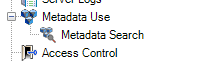
First you will need to activate the metadata search in the management client:
Navigate to “Metadata Use” tab and click on Metadata Search
 And then enable the metadata search for the type of metadata that your inference is generarting:
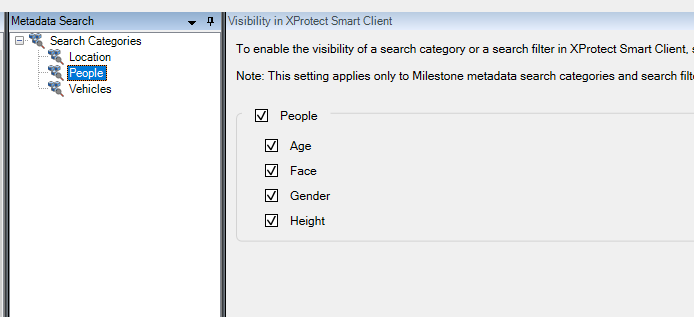
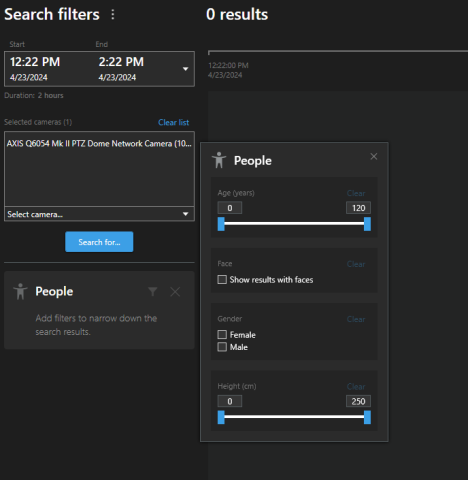
It would of a great help if you can send a sample of your metadata.
Have a nice day,
Daniel
Hi Daniel
Thank you yet again for the response,
Sorry for the misunderstanding in the first part, i was just complicating the issue, i totally get your point.
As for the metadata debugging i sadly didn’t find any useful logs that relate to the issue as well as not begin able to find anything using the metadata search method you proposed. I will give you 2 examples of metadata samples(ONVIF_ANALYTICS format) that get continuously sent to the VMS.
This first sample represents an empty doc in the case of no detections:
<tt:MetadataStream xmlns:tt="http://www.onvif.org/ver10/schema"><tt:VideoAnalytics><tt:Frame UtcTime="2024-04-23T12:59:50.907586+00:00" SourceStreamID="de64eda2-524d-4f49-a7dd-bc748cfaa914/28dc44c3-079e-4c94-8ec9-60363451eb41" /></tt:VideoAnalytics></tt:MetadataStream>
While this sample represents a doc where 1 detection occurred
<tt:MetadataStream xmlns:tt="http://www.onvif.org/ver10/schema"><tt:VideoAnalytics><tt:Frame UtcTime="2024-04-23T13:45:09.425244+00:00" SourceStreamID="de64eda2-524d-4f49-a7dd-bc748cfaa914/28dc44c3-079e-4c94-8ec9-60363451eb41"><tt:Object ObjectId="1"><tt:Appearance><tt:Class><tt:ClassCandidate><tt:Type>breach</tt:Type><tt:Likelihood>0.584375</tt:Likelihood></tt:ClassCandidate></tt:Class><tt:Shape><tt:BoundingBox bottom="0.1428415" right="0.25624965" top="0.019658500000000002" left="0.16041634999999999" /><tt:CenterOfGravity y="0.08125" x="0.208333" /></tt:Shape></tt:Appearance></tt:Object></tt:Frame></tt:VideoAnalytics></tt:MetadataStream>'
The process of generating these ONVIF documents is while inference is running it’s saving logs containing the bounding boxes information, my code then for every generated file extracts the contents of the file then creates the formatted metadata and sends it to the VMS.
Hi Youssef,
I was checking possible solutions, here are my findings
First if you are using StableFPS, please check the following:
Access to the management client and check the resolution 555x333 (please change it to 1920x1080)
StableFPS is hardcoded on purpose to 555x333 while the video resolution is 1920x1080. For AIBridge to function correctly with StableFPS you should change this camera setting to 1920x1080 otherwise your metadata will mapped to 555x333 instead of 1920x1080. The wrong mapping will prevent the smart client from drawing the bounding boxes in the right positions.
The settings are overwritable. You can change the value like this:

Another thing I noticed, if you are using StableFPS. Usually StableFPS cameras start with the id “140d7bbf-665e-4e20-a5aa-d252b9bfda4f/28dc44c3-079e-4c94-8ec9-60363451eb40”. Before subscribing mind selecting the correct stream.
For example, I have StableFPS installed and the stream I set for the camera is the “Video stream 1” with the id “140d7bbf-665e-4e20-a5aa-d252b9bfda4f/28dc44c3-079e-4c94-8ec9-60363451eb40”
In the image below, you can see my camera settings. Please, notice that I have selected the “Video stream 1” to play. This settings will allow me in the smart client to view the feed from the “Video stream 1”.
For that reason, in the management client, at the processing server tab, I choose the Video stream 1 before I subscribed to the metadata topic.
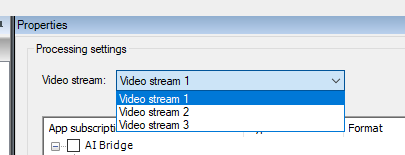
I noticed that you are using in your generated metadata, the stream id “de64eda2-524d-4f49-a7dd-bc748cfaa914/28dc44c3-079e-4c94-8ec9-60363451eb41” that means you are using the “Video stream 2”.
Please, check which stream you are using for viewing in the camera settings and which one you are using for subscribing to topics in the processing server tab.
Now, if you are not using StableFPS:
Would you mind share your findings, using the metadata search feature? (no need for screenshots, it would be enough, confirming if you found the metadata listed in the search or not).
Thank you,
Daniel
Hi Daniel,
Thanks yet again for the insights,
I’m currently not using StableFPS, it’s my first time hearing about the software.
As for the metadata search feature, the only results are the clips where there is movement, which of course has nothing to do with my sent metadata since it’s a built in milestone movement detection.
As for the chosen stream like you said I’m intentionally using video stream 2 which is the video stream displaying and the video stream I’m running inference on using it’s RTSP URL and i of course checked carefully to subscribe to the topics using video stream 2 as well.
At this point I’m guessing it’s a problem with my developed application running the inference so i will be debugging and checking if there are any problems in sending the metadata since sadly i can’t seem to find a way to check from the VMS’s side.
About the metadata samples i sent you are those valid? Or is there something missing or wrong about the structure? Please make sure to give me your insight/suggestions.
Thank you yet again for your interest.
Hi again,
Thank you for confirming these details with me. Yes, your metadata is good. And the camera stream and subscription to topic as you described are good as well. In this case Youssef, It is most probably related to your code, I believe it has to be the timestamp.
I wrote a small code in Golang to send the metadata to the REST API.
Check the following code:
package main

import (
	"bytes"
	"fmt"
	"net/http"
	"time"
)

// Please fill the missing values ( <SourceCameraId> <SourceStreamId> <AIBridgeHostMachineName> <Your appId> and <Topic_Name> )
var CameraStreamId = "<SourceCameraId>/<SourceStreamId>"
var RestEndpoint = "http://<AIBridgeHostMachineName>:8382/metadata/<Your appId>/<Topic_Name>/onvif_analytics"

func main() {
	// Send metadata every 2 seconds
	ticker := time.NewTicker(time.Duration(2.0 * float64(time.Second)))
	for {
		select {
		case t := <-ticker.C:
			onvifMetadata := `<tt:MetadataStream xmlns:tt="http://www.onvif.org/ver10/schema"><tt:VideoAnalytics><tt:Frame UtcTime="` + t.Format(time.RFC3339Nano) + `" SourceStreamID="` + CameraStreamId + `"><tt:Object ObjectId="1"><tt:Appearance><tt:Class><tt:ClassCandidate><tt:Type>breach</tt:Type><tt:Likelihood>0.584375</tt:Likelihood></tt:ClassCandidate></tt:Class><tt:Shape><tt:BoundingBox bottom="0.1428415" right="0.25624965" top="0.019658500000000002" left="0.16041634999999999" /><tt:CenterOfGravity y="0.08125" x="0.208333" /></tt:Shape></tt:Appearance></tt:Object></tt:Frame></tt:VideoAnalytics></tt:MetadataStream>`

			fmt.Println("sending onvif metadata")
			_, err := http.Post(
				RestEndpoint,
				"text/xml",
				bytes.NewBuffer([]byte(onvifMetadata)))
			if err != nil {
				fmt.Println(err.Error())
				return
			}
		}
	}
}
What I do here is just sending POST request to aibridge-broker container every 2 seconds.
Anyway, Running the code above, I could confirm that the metadata is being displayed in the smart client, in live view:
The yellow box represents the metadata sample you provided me the other day.
On the other hand, I did encounter the same issue as you. When trying the metadata search feature. Eventhough, I did send metadata for a Vehicle type object earlier, I wasn’t able to find any metadata using the search feature.
I hope this help you find out the cause of the issue,
Daniel
Hi Daniel,
I want to thank you so very much for your guidance so far as i managed to observer the metadata over the camera feed, the mistake i made is that i was waiting for the bounding boxes to appear on the preview over at the management client, the image you sent made me realize my mistake and check the smart client.
Thanks again and i will make sure to contact you again if needed.