Hello again,
This time I’m trying to edit existing alarm definitions from within my app, and I have gotten everything working perfectly up to the point that I save the changes…
ValidateItem().ValidatedOk comes back true and I run Save(), and it returns with no exceptions like it’s fine, but when I retrieve the AlarmDefinition from the server again, it shows no changes.
I’m using the 2020R2 SDK and the server is XProtect Corporate 2019R3.
Thank you!
Derek
This piece of code works for me and modifies an existing AlarmDefinition and saves it again.
private void ChangeAlarmDefinition(AlarmDefinition alarmDefinition)
{
	alarmDefinition.Description += "xyz";

	var result = alarmDefinition.ValidateItem();
	if (result.ValidatedOk)
		alarmDefinition.Save();
	else
		label1.Text += "not OK";
}
This is the simplest possible scenario but shows that there is not a general flaw on AlarmDefinition.ValidateItem or AlarmDefinition.Save
Perhaps as a start you could test whether my code here works for you in your test server. Does it work for you?
If it also works for you we will need to go deeper and see what you have of values in the AlarmDefinition object when it fails to save. Please give me a simple snippet of code containing values that trigger the issue?
Hi Bo,
I tired your code and it gave no console output or exception, but it also doesn’t seem to save the changes. Here is the code I am using currently (this is ripped right out of my model, _instance is a reference to the AlarmDefinition):
public void OnSubmitAlarm()
{
  foreach (var p in _instance.GetPropertyKeys())
  {
    Console.WriteLine($"{p}: {_instance.GetProperty(p)}");
  }
  try
  {
    if (_instance.ValidateItem().ValidatedOk)
    {
      _instance.Save();
      Console.WriteLine("Save successful!");
      return;
    }
  } catch (Exception ex)
  {
    Console.WriteLine(ex.ToString());
  }
}
And the result:
Name: abc
Description: xyz
EventTypeGroup: 1eacbcad-d566-4375-834b-cfbe3d937caa
EventType: 13932401-cf0a-47ce-aada-9252eee2cb5f
SourceList: Camera[955A6E96-C072-48C7-8360-F8622C3F69CC]
EnableRule: 0
TimeProfile: TimeProfile[00000000-0000-0000-0000-000000000000]
EnableEventList:
DisableEventList:
ManagementTimeoutTime: 00:01:00
ManagementTimeoutEventList:
RelatedCameraList:
RelatedMap:
Owner: multipass ([BASIC]\multipass)
Priority: 8188ff24-b5da-4c19-9ebf-c1d8fc2caa75
Category: 0991b8ea-22e3-4902-9df8-f11739277338
TriggerEventlist:
AutoClose: False
Save successful!
When I pull the AlarmDefinition from the server again (or check the Management Client) it doesn’t show these changes. Any ideas? 
I this an existing Alarm Definition that you change or a new one you create?
Perhaps you could show me doing the same when done in the Management Client by a series of screen captures? Or, perhaps eve better show me when doen using the Config API Client by a series of screen captures? (I realize it is not easy for me to understand all of the parameters that are just Guids.)
Usually you would modify the AlarmDefinition modifying all properties in one go and one save, if you try this instead of looping saves, do you see a better result?
Hey Bo, my apologies: I didn’t realize that I didn’t directly reply to your comment, and you may not have been notified of my response. Please see my comment further in the thread.
Thanks,
Derek
Bo,
This is an existing AlarmDefinition I am trying to modify. I have the component successfully creating and deleting AlarmDefinitions using the AddAlarmDefinitionServerTask and RemoveAlarmDefinitionServerTask classes, just this weirdness when calling Save() on a retrieved AlarmDefinition class.
I am not looping through and saving on each property, but only looping through the properties before validating to verify their values for debugging purposes. It is only attempting to save once.
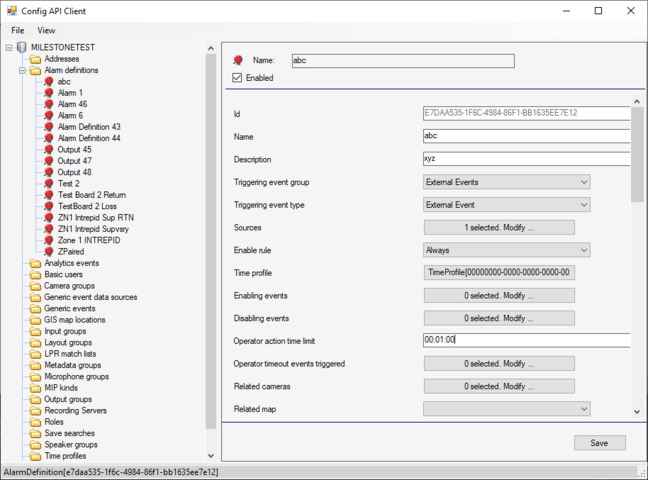
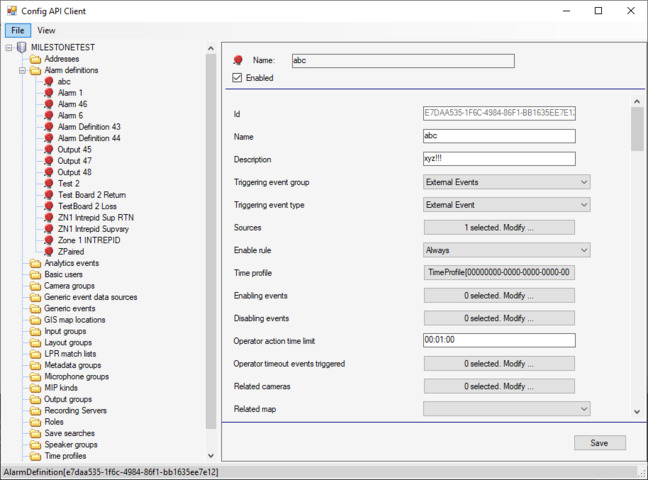
I tried using the CofigApiClient sample and it does work, here is a before-and-after of a simple test I just did:
[before]
[after]
It shows the changes after reloading just fine.
This is pretty mysterious if you ask me. The fact that both the Management Client and the ConfigAPIClient sample can modify the AlarmDefinitions without any trouble suggests there is something wrong with my code, but it’s really not qualitatively different from the minimum viable code you suggested, which also failed to save…
What do you think?
Thanks,
Derek
Could you expand on the snippet of code and show the code that modify the AlarmDefinition? Ideally upload for me a minimal implementation source code project that reads, modifies, saves the AlarmDefinition. In that way I will be sure to debug the same as you have, and I assume that this will enable me to reproduce the issue and debug the situation as you see it.
Hey Bo,
I can try to get a minimum code prototype of this setup but as it is embedded in a much larger application, that would be a very big task to separate out only the components needed to show this issue and to modify them to work standalone. I can, for the moment, show you the code most immediately relevent for this issue: The window View, Code-Behind, and ViewModel I am using to modify the values, and the model which acts as the proxy between the interface and the alarm definition which the code above is a part of. In the xaml file the relevant bindings are around lines 510-670. Hope this helps! I will see if I can find time to extract a minimum implementation for you.
Thank you,
Derek
Hello Bo,
Have you had a chance to look at the code I posted? I’ve been working on other issues the past couple weeks but we upgraded our server and SDK to 2020R3 and saw no improvement on this issue.
Hope all is well!
Cheers,
Derek
For whatever reason, I am able to do this:
private void SaveEdits()
{
  try
  {
    var alarm = _alarmConfigService.GetAlarmDefinitionFolder()
      .AlarmDefinitions.Where(a => a.Id == _instance.Id).FirstOrDefault();
    foreach(var k in alarm.GetPropertyKeys())
    {
      alarm.SetProperty(k, _instance.GetProperty(k));
    }
    alarm.Save();
  }
  catch (Exception)
  {
    throw;
  }
}
And it works. I don’t know why I have to essentially refetch the alarm, apply everything at once, and save it immediately, but I’m happy to have a working solution to my problem!