Is there a workaround for this? Will this feature be enabled in future releases? We are currently on 202 R3
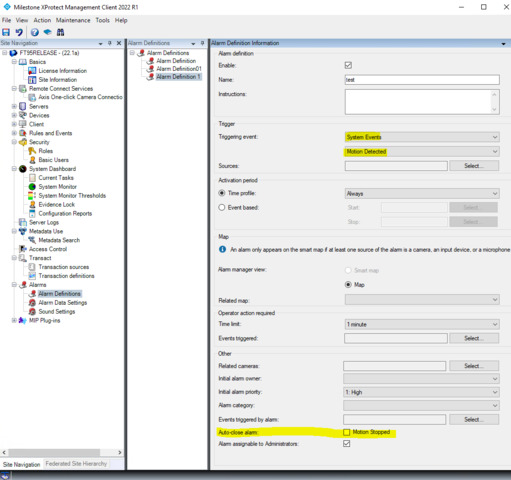
Please see following setting –
I select System Events and Motion Detected as Triggering event. As you can see, there is a list for the System Event and some of them can available for Auto-close alarm. So please explore the settings.
Thank you but there are no options for SupervisedInputCut and SupervisedInputShorted under ‘System Events’. Those options are only under ‘Device Events’. Input Open activated and input deactivated are under System events and I am able to choose auto close. But I need to be able to auto close Supervised cuts and shorts as well. Thank you.
Unfortunately, it is impossible to select “Device Events” and “SupervisedInputShorted” for enabling auto close. The auto-close capability is only implemented for Alarms involving “System Events” pairs, one example is “Motion Detected” / “Motion Stopped”.
Are you saying that this will never be an option for supervised inputs? So Input Rising and Input falling is a paired event?
Yes, currently there is no functionality for what you want.
We will ask Milestone Management to put it on the wish-list for future enhancement development work. A prioritization needs to be made by Milestone Product Management, so it is not possible to say when, or even if, this will be developed.