Hi! We are building an integration using WebRTC for streaming via a web browser. We would like to show multiple streams at the same time, like one large and some additional smaller ones.
Is it possible via the WebRTC interface to select different streams and do I need to do some configuration in the Recording Server. I can see that one of out cameras has 7 streams (Video Stream 1-7) but they seem to have the same settings.
Maybe someone could guide me to a section in the documentation where this is described, it could be that I have not understood the multiple stream context in Milestone.
Kind regards Hans
I am pointing you to the manuals, to the pages that explain how to use and how to set-up multi-streaming. its starts with an explanation of the Adaptive streaming feature and follows to explain how to set up multiple streams for live and playback.
https://doc.milestonesys.com/en-US/bundle/doc1040_2025r1/page/content/standard_features/sf_mc/sf_systemoverview/mc_adaptivestreamingexplained.htm
Please note that the WebRTC functionality supports multis-streaming, that you can specify a stream id and get that specific stream, it does not support adaptive stream, that you automatically get the stream best fitting a resolution.
Great, thanks. I got it to work after reading the section in the manual you pointed to, it was easier than I first thought 
Kind regards Hans
I have a follow up question
We are trying to make our client that consumes video streams to be able to select between different streams and when it shows like a (mini)preview of a camera stream it should select a stream with lower resolution/bitrate for the selected camera (if such stream is available). We would like to dynamically extract the stream “metadata” via a Milestone API and send it to our client.
When calling the SOAP method “XProtectCSServerCommand/IServerCommandService/GetConfiguration” we can on each camera get information of the available streams on a camera and see if it is set as Default or not.
I also saw that there is, in the Config API (REST), an Get - setting/{id} endpoint (where I suppose the id could be the camera Id) where you can get the resolution for the available streams.
I have not found any endpoint where you can get the max bit-rate value for a stream, is there a way to get that info?
Kind regards Hans
There is a risk that not every camera / camera driver includes a max bitrate, or it does include it but not with the same name, these setting are potentially different in another driver.
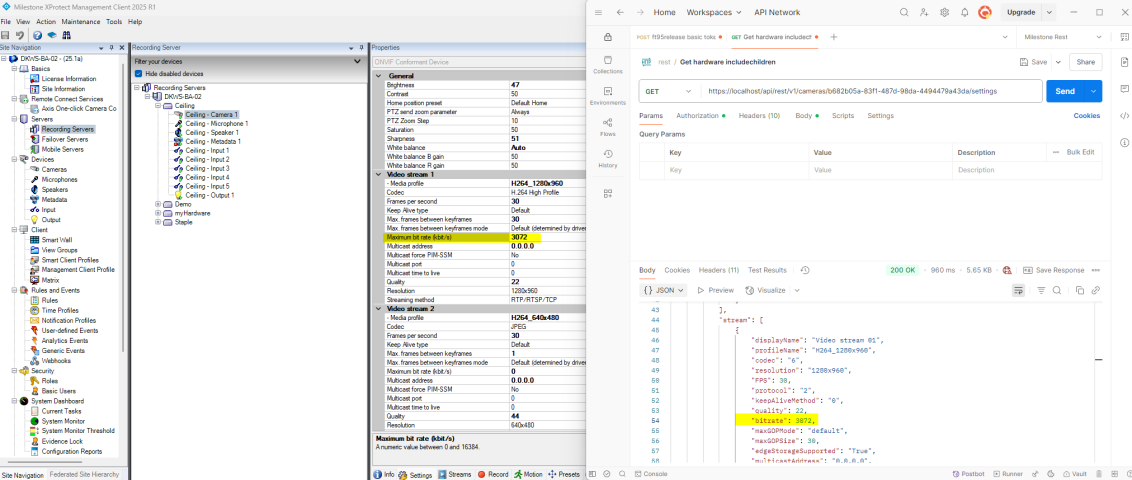
I did a quick test and in this case the camera is on a ONVIF driver…
I learned it is not called max.bitrate but just bitrate when I receive it from the REST call -
Ok I see. I think will will go for the solution where we make it possible to configure in our system what streamId for a camera that should be used for “low resolution streaming”. It is a little bit more administration but if feels like a more “robust” solution for our use case.
Thanks for the quick response and help.
/Hans