I am trying to run the Access Control Demo. Everything seems to work except that the events and the doors do not show up in Smart Client. Before I had an incomplete license but that has been taken care of.
This works
The Access Control System Simulator. I can edit doors, card holders, and users. And I can create the various AC events by dragging credential holders or hitting buttons.
Management Client: I have created a randomly named entry under Access Control. I can verify the communication with the simulator by pressing Refresh Configuration.
Smart Client displays the Access Control tab. The card holders from the simulator are listed. Changing the name of one in the simulator and the hitting refresh in Smart Client will display the new name.
The logs (available on request, this textbox is so tiny) look clean with no errors.
This does not work:
However I try, the events from the simulator are not displayed in Smart Client.
Likewise with the doors. They will not appear in Smart Client.
I have been banging my head against this for two days now so help would be sincerely appreciated.
Rie, did you see my response? I am afraid I posted it as an answer rather than a reply. It was:
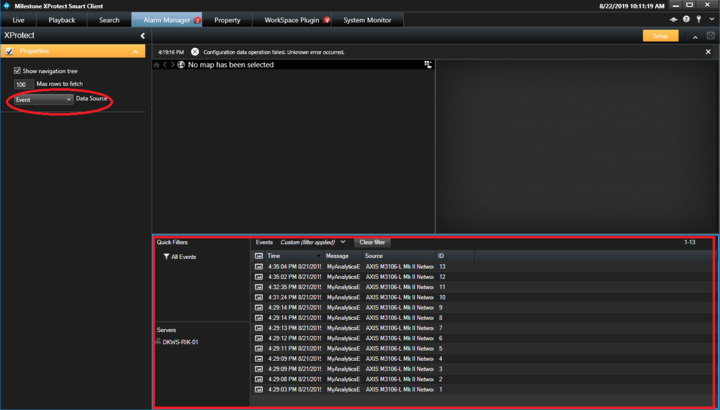
Ok, I clicked the bottom right pane to get the corresponding sidebar, but Alarm was chosen in the drop down. I tried changing it to event and 6 rows showed up in the pane concerning server connected and server disconnected. But there is no change under the access control tab no doors and no events.
Ok, I clicked the bottom right pane to get the corresponding sidebar, but Alarm was chosen in the drop down. I tried changing it to event and 6 rows showed up in the pane concerning server connected and server disconnected. But there is no change under the access control tab no doors and no events.
With your remark on licensing I expect that there is no warnings about expired or without license in the Management Client License Information page.
Please examine the Event Server logs, after a Event Server service restart you should find..
--
/timestamp/ Info Server Event Server is starting.
.
.
// Info AccessControlManager Access control license updated.
// Info AccessControlSystem Access control system registered with license manager: DemoAccess (57c4a440-eb9c-48b8-99c1-b576d79fcc99)
// Info ServerConfigManager Access Control system ‘DemoAccess’ created.
--
Please verify this.
The Event Server logs might also include error text that might tell what is wrong, let me know what you find.
Event Server logs are at [C:\ProgramData\Milestone\XProtect](file:C:/ProgramData/Milestone/XProtect) Event Server\logs and are named after the date - CYYYY-MM-DD.log
Eureka problem solved! I deleted my old entry under Access Control in Management Client and create a new one from scratch. The previous one was created before the license situation had been resolved.
Things seem to be working as intended now. Many thanks for your support.