We are currently implementing Protocol Integration when it comes to bringing us images. The next thing is to implement two-way audio, that is, to be able to send audio (microphone) and listen (speakers).
What is the best way to implement this?
Can I use the same Token that I use to bring me images?
If using protocols you should use the ImageServer protocol. See the documentation - ImageServer protocol --Requests and responses (cameras and microphones) --Requests and responses (speakers)
Yes, under the same login use the token universally and renew it universally.
PS. I have made the assumption that you want to use protocol integration, when you ask for the best way I actually think it is much easier to integrate using the MIP Library (.Net). (Milestone has samples for audio and more..)
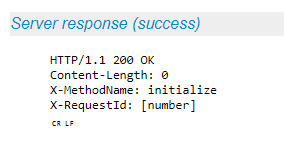
Content-Length is the standard Content-Length HTTP header basically specifying the number of bytes in the request body.
The X-RequestId is just a unique number given by the client, and written in the response, to make it easier for the client to map a response to a request. Possibly just start with 0 and then increment for each request.
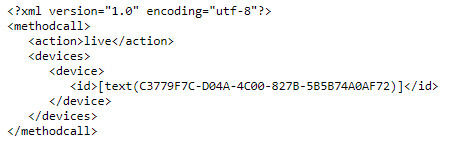
Unfortunately there seems to be an error in the documentation for the HTTP initialize client request.
It is not possible to specify live or browse as action for these requests.
According to the above statements we should not use the mentioned resquest, I am requesting audio with the following request, is that correct? (We change the camera ID for the Microphone).
<? xml version = "1.0" encoding = "UTF-8"?>
1
live
no
75
\r\n\r\n’
The response is the same as when I request image, that is the problem.
Also, in the documentation the response from the server is not complete:
The result of sending the live request is a series of responses of two different types, GoTo or LivePackage. Each response ends with a double CR-LF, which means four bytes with decimal values 13, 10, 13, 10. The GoTo response is described in the GoTo section.
The LivePackage responses arrive with regular intervals, so you should keep your socket receive active at all times.
If you do not get any responses at all for this request and you got responses from other requests, you have forgotten to append the double CR-LF to the live request.
Each LivePackage response contains status information for the currently connected camera. This includes information about camera-to-server connection problems, database errors, recording status and motion status. The package has the following format.
<?xml version="1.0" encoding="UTF-8"?>
_<statustime>\[milliseconds since UNIX epoch\]</statustime>_

_<statusitem id="\[Number\]" value="\[Text\]" description="\[Text\]"/>_

_..._
=====
The other response you posted as an image is on the HTTP interface (for the Speak functionality). Here you may get other than 200 OK - e.g if it wasn’t possible to reserve all requested devices for speak - then you get 409 CONFLICT and content xml specifying devices that could not be reserved (and the Content-Length header will tell how many bytes there are in the body).
Once I get the response from the microphone with the audio, I take out the headers and keep the body. I use a base64 byte encoder (just like the images) and pass it to .
Is the base64 conversion correct? Should I convert the same as an image?
The resulting string is not currently working when I send it to the player, can you think of what the problem might be?
I tried to pass it a string that I found as an example and it works, so the problem is in my string.
I used online Base64 converters and clearly when I make the request you mentioned (the same as to request images but with the microphone ID) it returns an image type format and not audio.
As stated earlier, there is an unfortunate error in the documentation, so you cannot use the HTTP API for these requests. This documentation error will be fixed in the next release.
The request that you need to use for microphones is described here:
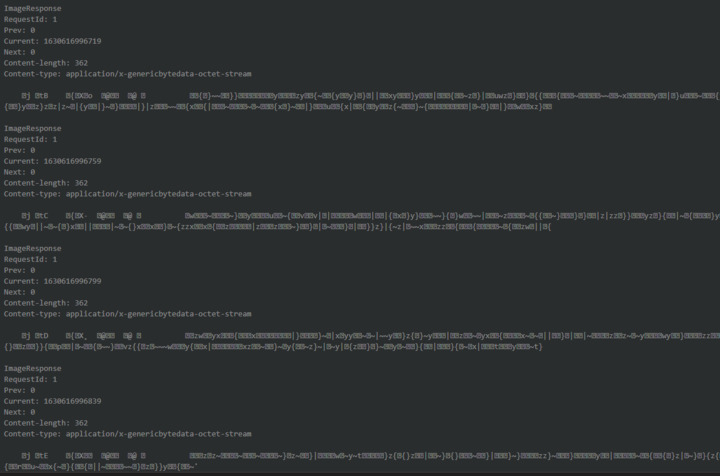
You are receiving a series of packets in a multipart mime style. That is a series of responses, each starting with ImageResponse and some headers + \r\n\r\n.
The Content-Length header specifies how many bytes you receive in the body.
The bytes received are GenericByteData bytes. Read more about it here:
Another problem that I found, is that the answer is in application/octet-stream, do I need it to be audio / (ogg-wav-mpeg), is it possible to convert it or should I always treat it as octet-stream?
Currently, I’m trying to reproduce in base64 the response received by the server in the application/octet-stream format, the problem is that this format is not accepted by browsers/players.
Hi Milestone Team. Have you been able to review these queries from my Partner Lautaro?
We really need to undertand this and be able to reproduce audio within our integration. As Lautaro has mentioned, we tried several things but for now it’s not working.
Raw data might not be ideal when you want to play back in browser. I wonder if it might be more practical to use Mobile Server and Mobile protocol. There is a sample in the Mobile protocol documentation.
Hi @Bo Ellegård Andersen (Milestone Systems). We’ve already investigated the possibility to use Mobile Server but is has problems about system scalation. Right now we are managing +2500 cameras and the business is growing (x3/x4) so it will be difficult to manage a mobile server providing video from all these cameras.
Nevertheless, we would really like to know how to play audio directly using Protocol Integration. As far as we saw it, documentation it’s not totally clear so we need a little bit more of help on this.
Besides, SMART Client doesn’t use Mobile Server by default, and two way audio works pretty well on this app, so we would like to acomplish something similar. Our App is a Desktop App (based on Electron) and has a Web layer (ReactJs) to manage frontend controls.
In Milestone Technical Support we have no experience how you can use raw audio data and get it played, this is because there is no sample. From a API perspective the focus has been how you can get the data out of XProtect, and it might fall short on how to practically use the data.
I hope that other partners active on this forum might have the experience and will answer.