What is the better way to create a Event through a plugin that send http requuest ?

Hello,

I want to create an interface on the Managment Client that can create an event with many arguments stored in a configuration file, the main objective of this plugin is to send an http request to an external IHM when the event occure.

So what is the better way to do that ? With Analitics event or user defined event ?

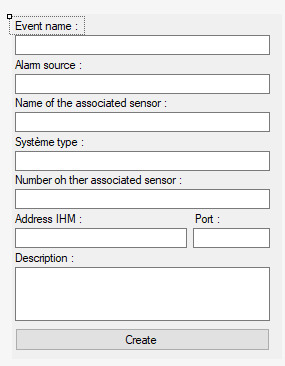
The interface look like this :

When the button create is pushed the event is create and all of the argument would be stored into a file and used when the event occured.

I have in idea to send all of the arguments on a configuration file that can be use when the event is triggered to you think that kind of plugin is realisable on Milestone and work well with our application ?

The event is for a drone with dock station and look like : Station open, drone take off or Motion detecton with a sensor.

If you want to store some information then AnalyticsEvent might fit, but please read following links first.

AnalyticsEvent -

https://doc.developer.milestonesys.com/html/index.html?base=miphelp/class_video_o_s_1_1_platform_1_1_data_1_1_analytics_event.html&tree=tree_search.html?search=analyticsevent

AnalyticsObject -

https://doc.developer.milestonesys.com/html/index.html?base=miphelp/class_video_o_s_1_1_platform_1_1_data_1_1_analytics_object.html&tree=tree_search.html?search=analyticsobject

If you can not find suitable place to store your own information, you can also use ExtensionData in AnalyticsEvent and AnalyticsObject.

Ok thank for this information it was usefull.

But now im on the last step : match the device and the analytic event, how to do it properly ?

For exemple i have an AXIS D2050-VE (Motion detection radar) and i want to match it with analitics event, can i do it with Milestone Management Client or programatically ? and what is the better way to do that ?

An Analytics Event must have a source of the event, this might be a camera, input, microphone, or something.

In what you describe the camera should be the source of the event.

Ok thanks for you help.

I want to know one other thing, how to use System.Threading.Thread.CurrentThread.CurrentUICulture ?

I want to set label in different languages its possible to do something like this in a Wpf application ?

if (System.Threading.Thread.CurrentThread.CurrentUICulture == French)

{

label1.Text = “En français”;

}

else

{

label1.Text = “In english”;

}

i try like this but it dosen’t work do you have any idea how to do it please ?

Your method should be correct.

https://developer.milestonesys.com/s/article/How-to-read-the-language-culture-that-the-XProtect-Smart-Client-is-running-from-within-an-XProtect-Smart-Client-plug-in

The possible return values might be formatted differently. You might want to see Microsoft .Net page -

https://docs.microsoft.com/en-us/dotnet/api/system.threading.thread.currentuiculture?view=netframework-4.8#System_Threading_Thread_CurrentUICulture

Another recommendation from me is that you should set a breakpoint and examine the return value you get. For guidance how to debug like this please see –
https://developer.milestonesys.com/s/article/debugging-techniques-for-Smart-Client-plugins