Hi Allen,
I don’t think there’s a supported method for this (yet). But it looks like a scan of the registry will pick up any installed patches. Here’s an example:
Get-ItemProperty HKLM:\SOFTWARE\WOW6432Node\Microsoft\Windows\CurrentVersion\Uninstall\*| Where-Object BundleTag -like "Milestone.Patch*" | Select DisplayName, DisplayVersion, ParentDisplayName
And here’s what it looks like with a patch installed…
PS C:\WINDOWS\system32> Get-ItemProperty HKLM:\SOFTWARE\WOW6432Node\Microsoft\Windows\CurrentVersion\Uninstall\*| ? BundleTag -like "Milestone.Patch*" | Select DisplayName, DisplayVersion, ParentDisplayName
DisplayName                                  DisplayVersion ParentDisplayName
-----------                                  -------------- -----------------
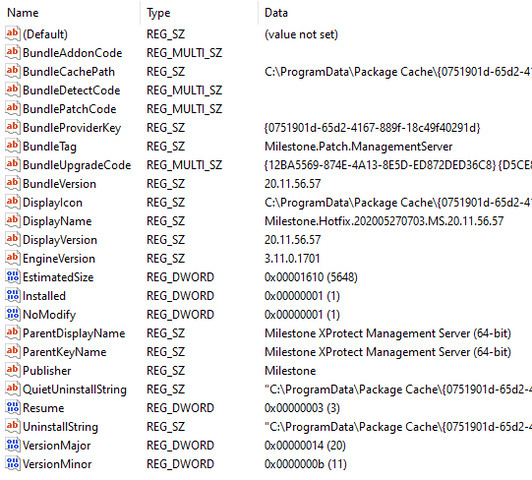
Milestone.Hotfix.202005270703.MS.20.11.56.57 20.11.56.57    Milestone XProtect Management Server (64-bit)
And here’s an example registry key