As shown in the picture below.
every seconds will trigger this method,What are the requirements for data format?Does it mean that I get the the frame data per second and assign it to the data array?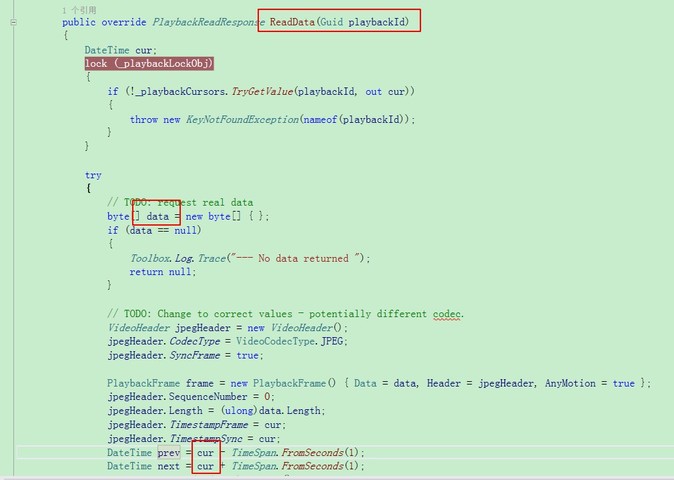
The reason this method is triggered every second is that we, in the method (by setting prev and next), tell the driver framework that the next frame is a second in the future and the previous one is a second in the past. You should set these in your driver to whatever point in time is the actual next frame and previous frame, whatever that might be. The data is a single frame, encoded as a byte array. So you would get a single frame from your device, encode it, and specify the header information in the same manner as done in the demo driver, then pass that as your result.
I hope this helps. If you have any further questions, please don’t hesitate to ask.
BR
Simon
Thanks,Every second enters the ReadData() function because of setting prev and nex?
From the perspective of debugging, each time you enter the navigation() first and then the readdata().
What is the relationship between the two function? Isn’t readdata() entered every time because of navigate()?
Sort of. Prev and next tell the recording server “these are the previous and next frame that I have”. You should of course be telling it the actual values instead of just the next second.
Navigate tries to move the “pointer” to the next frame (or previous, depending on parameter). Here, you should of course move to the next frame, rather than move forward by one second as the demo driver does.
The time of the next frame is assigned as the time of the actual value. Is the next time enter the read() function to get the time just assigned?
What I hope is that every frame can enter the read() function, so how can I make every frame of data enter? From the test, it comes in once a second.